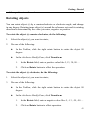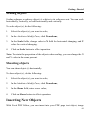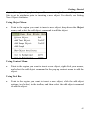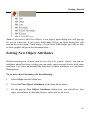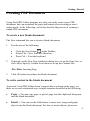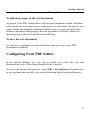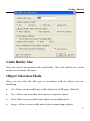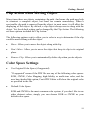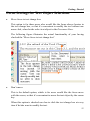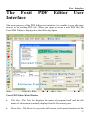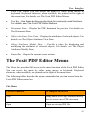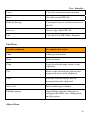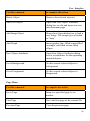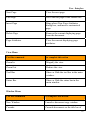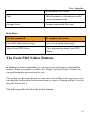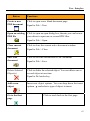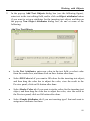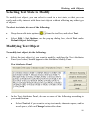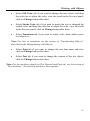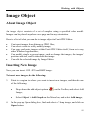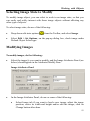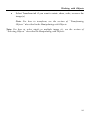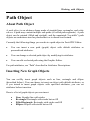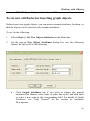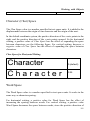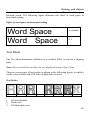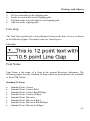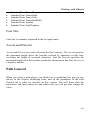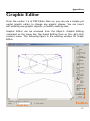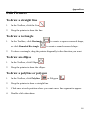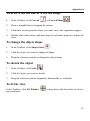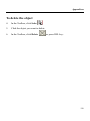
1
Foxit PDF Editor Version 1.4 User’s Manual 1 END USER LICENSE AGREEMENT IMPORTANT NOTICE Thank you for choosing Foxit PDF Editor Product (PDF Editor). This license is the legal agreement (Agreement) between you, the customer who has acquired PDF Editor (“You”) and Foxit Software Company (“Foxit”). Please read this agreement carefully. Foxit is only willing to provide PDF Editor to you on the condition that you accept all of the terms contain in this Agreement. You accept all of the terms by installing or using PDF Editor. If you did not acquire PDF Editor from Foxit, or an authorized Foxit distributor, then you may not enter into this Agreement or use PDF Editor. No other party has the right to transfer a copy of PDF Editor to you. If you are unwilling to accept this Agreement, do not use PDF Editor. If you have already paid for PDF Editor with having a prior opportunity to review this Agreement, and are now unwilling to agree to these terms, you may, within thirty (30) days after the date on which you acquired PDF Editor, return it to Foxit, or the authorized distributor from whom you acquired it, along with its original packaging and proof-of-purchase, for a full refund. Notwithstanding anything herein to the contrary, Foxit authorized distributors do not act as agents of Foxit, and such distributors may not enter into any contracts on behalf of Foxit Software Company. No authorized distributor has the authority to modify the terms of this Agreement. 1. OWNERSHIP PDF Editor (exclusive of its physical packaging) is licensed. It is not sold, even if for convenience we make reference to words such as “sale” or “purchase.” PDF Editor is protected by copyrights and other intellectual property rights. You agree that all worldwide copyright and other intellectual property rights in PDF 2 Editor and all copies of PDF Editor, however made, are the exclusive property of Foxit. All rights in PDF Editor not expressly granted to you in this Agreement are reserved by Foxit. There are no implied licenses under this Agreement. 2. GRANT of LICENSE This agreement grants you the following rights: Installation and Usages - You may install and use one copy of PDF Editor on a single computer at a time and only by one user at a time. Network Storage/Use - You may also store or install a copy of PDF Editor on a storage device, such as a network server, used only to install or run PDF Editor on your other computers over an internal network; however, you must acquire and dedicate a license for each separate computer on which PDF Editor is installed or run from the storage device. Concurrent Use - A license for PDF Editor may not be used concurrently on different computers, however, this agreement does allow a licensed user to install PDF Editor on both a work computer and a home computer, provided the PDF Editor is not in use on both machines at the same time. 3. OTHER RIGHTS AND LIMITATIONS Limitations on Reverse Engineering, Decompilation, and Disassembly - You may not reverse engineer, decompile, or disassemble PDF Editor, except and only to the extent that such activity is expressly permitted by applicable law not withstanding this limitation. Separation of Components – PDF Editor is licensed as a single product. Its component parts may not be separated for use on more than one computer. Rental - You may not rent or lease PDF Editor. Software Transfer - You may permanently transfer all of your rights under this Agreement, provided you retain no copies, you transfer all of PDF Editor (including all component parts, the media and printed materials, any upgrades 3 and this Agreement), and the recipient agrees to the terms of this Agreement. If your copy of PDF Editor is an upgrade, any transfer must include all prior versions of PDF Editor. Termination - Without prejudice to any other rights, Foxit Software Company may terminate this Agreement if you fail to comply with the terms and conditions of this Agreement. In such event, you must destroy all copies of PDF Editor and all of its component parts. Development License Restrictions - These restrictions apply to a licensee who develops Application Software that utilizes PDF Editor in a commercially distributed application. (i) Must purchase a license of PDF Editor for each copy of the Application Software sold; (ii) PDF Editor is not the sole or primary component of such Application Software; (iii) You must give proper acknowledgment of the copyright of Foxit Software Company; (iv) Must not be used to create a software application that competes with or is intended to compete, directly or indirectly, with PDF Editor; (v) The Application Software must add significant value to the PDF Editor. All other uses that fall outside the scope of this Agreement must receive the written permission of Foxit. 4. DOCUMENT COPYRIGHTS PDF Editor does not allow you to alter PDF documents protected by a password, or without password but encrypted, and with modification permission disabled by the copyrights owner. However, for otherwise unprotected PDF documents, you must also observe the copyrights of the documents. Foxit will not be liable to any loss caused directly or indirectly by copyrights infringing when you use PDF Editor to alter documents illegally.6 5. LIMITED WARRANTY 4 Foxit, warrants that PDF Editor contained herein will, for a period of thirty (30) days from the date of delivery, perform substantially in accordance with the accompanying documentation. NO OTHER WARRANTIES. Foxit disclaims all other warranties, either express or implied, including but not limited to implied warranties of merchantability and fitness for a particular purpose, with respect to the Software, the accompanying written materials. In the event of any breach of warranty or other duty owed by Foxit, Foxit's entire liability and your exclusive remedy shall be, at Foxit’s option, either (a) return of the price paid by you for the product (not to exceed the suggested U.S. retail price) if any, (b) repair or replacement of the defective product. This Limited Warranty is void if failure of the product has resulted from accident, abuse, or misapplication. Any replacement product will be warranted for the remainder of the original warranty period or ten (10) days, whichever is longer. 6. NO LIABILITY FOR CONSEQUENTIAL DAMAGES In no event shall Foxit be liable for any damages whatsoever (including but not limited to damages for loss of business profits, business interruption, loss of business information, or any other pecuniary loss) which results from the use or inability to use PDF Editor, even if Foxit has been advised of the possibility of such damages. Because some states/jurisdictions do not allow the exclusion or limitation of consequential or incidental damages, the above limitations may not apply to you. 7. UPDATES AND SUPPORTS When you purchase a Foxit Editor license from Foxit, you receive more than the usual right to use the current version of the software. Along with a perpetual license to the current official version of the product, you receive the following: z z Unlimited access to software updates for one year from the date of license purchase, with no limit on minor or major release. Unlimited free technical support by e-mail for one year. To receive the above services, you need to register your purchased copy of PDF Editor with Foxit. Upon registration, Foxit will collect your information 5 including name of you or your organization, email address as well as unique CD key of your purchased copy of PDF Editor. Foxit will retain those information for providing the above services. Foxit will not reveal your information to any third party unless required doing so by law. 8. GOVERNING LAWS If PDF Editor was purchased in the United States, this Agreement is governed by the laws of the state of California; otherwise, local laws may apply. 9. GENERAL PROVISIONS If any part of this Agreement is found void and unenforceable, it will not affect the validity of the balance of this Agreement, which shall remain valid and enforceable according to its terms. This Agreement shall not prejudice the statutory rights of any party dealing as a consumer. This Agreement may only be modified by a writing signed by an authorized officer of Foxit. Updates may be licensed to you by Foxit with additional or different terms. This is the entire agreement between Foxit and you relating to PDF Editor and it supersedes any prior representations, discussions, undertakings, communications or advertising relating to PDF Editor. Should you have any questions concerning this Agreement or if you desire to contact Foxit Software Company for any reason, please write to Foxit Software Company, PO Box 612588, San Jose, California 95161, USA, or send us email at [email protected]. 6 Table of Contents Table of Contents FOXIT PDF EDITOR ...............................................................................................1 END USER LICENSE AGREEMENT ...................................................................2 TABLE OF CONTENTS..........................................................................................7 INTRODUCTION ..................................................................................................12 PDF DOCUMENT CONCEPTS ..................................................................................13 WHY FOXIT PDF EDITOR ......................................................................................13 PDF DOCUMENT COPYRIGHTS ISSUE ....................................................................14 WHAT’S NEW ........................................................................................................14 WHAT FOXIT PDF EDITOR CAN AND CANNOT DO .................................................16 ABOUT THIS MANUAL ...........................................................................................17 INSTALLING FOXIT PDF EDITOR ...................................................................18 INSTALLING FOXIT PDF EDITOR ............................................................................18 Procedure One – Load CD or Downloaded Package.......................................18 Procedure Two – Installing the Software ..........................................................18 UNINSTALLING FOXIT PDF EDITOR .......................................................................22 INSTALLING LICENSE KEY .....................................................................................23 REGISTERING FOXIT PDF EDITOR .........................................................................28 USING FOXIT PDF EDITOR ...............................................................................30 GETTING STARTED WITH FOXIT PDF EDITOR..........................................32 LAUNCHING PDF EDITOR ......................................................................................33 LOADING PDF FILES .............................................................................................33 THE LAYOUT OF PDF EDITOR ................................................................................34 VIEWING PDF DOCUMENTS ..................................................................................34 OBJECTS ................................................................................................................35 Object Selection Mode......................................................................................35 Selecting Objects ..............................................................................................36 Moving Objects.................................................................................................37 Deleting Objects ...............................................................................................39 7 Table of Contents Copying/Cutting/Pasting ..................................................................................39 Foreground/Background Objects......................................................................40 Modifying Object Attributes .............................................................................41 Viewing Object Attributes .................................................................................42 Transforming Objects .......................................................................................42 Inserting New Objects ......................................................................................44 Setting New Object Attributes...........................................................................46 MODIFYING PAGES ................................................................................................48 UNDOING AND REDOING........................................................................................48 SAVING A PDF FILE ...............................................................................................49 ROLLBACK SAVING ................................................................................................50 CLOSING PDF DOCUMENT WINDOW .....................................................................50 CREATING PDF DOCUMENT ..................................................................................51 CONFIGURING FOXIT PDF EDITOR ........................................................................52 Undo Buffer Size...............................................................................................53 Object Selection Mode......................................................................................53 Clip Action when Moving Object......................................................................54 Color Space Settings.........................................................................................54 Focus Settings for Text Object Selections .........................................................55 Save As Default.................................................................................................56 THE FOXIT PDF EDITOR USER INTERFACE................................................57 THE FOXIT PDF EDITOR MENUS....................................................................58 THE FOXIT PDF EDITOR BUTTONS ........................................................................62 THE DOCUMENT PANE ...........................................................................................65 THE OBJECT ATTRIBUTES VIEW PANE ....................................................................65 THE OBJECT ATTRIBUTES MODIFY PANE ...............................................................66 Text Attribute Modify Box .................................................................................67 Image Object Modify Box .................................................................................71 Path Object Modify Box ...................................................................................72 THE POP-UP CONTEXT MENU ................................................................................73 WORKING WITH DOCUMENTS.......................................................................75 OPENING PDF FILES ..............................................................................................75 VIEWING MULTIPLE FILES ON SCREEN ..................................................................75 VIEWING A PDF DOCUMENT .................................................................................77 Viewing Tools....................................................................................................77 Paging through Documents ..............................................................................77 Adjusting the View ............................................................................................77 8 Table of Contents WORKING WITH PAGES....................................................................................79 VIEWING PAGE ......................................................................................................79 INSERTING PAGE ....................................................................................................80 COPYING PAGE ......................................................................................................82 EXPORTING AND IMPORTING PAGES .......................................................................82 SETTING PAGE LAYOUT .........................................................................................84 To resize a page ................................................................................................85 To clip a page content.......................................................................................85 To rotate a page ................................................................................................86 WORKING WITH OBJECTS...............................................................................87 TEXT OBJECT.........................................................................................................88 About Text Object .............................................................................................88 Inserting Text Object.........................................................................................88 Selecting Text State to Modify...........................................................................90 Modifying Text Object.......................................................................................90 IMAGE OBJECT ......................................................................................................92 About Image Object ..........................................................................................92 Inserting New Image.........................................................................................92 Selecting Image State to Modify .......................................................................93 Modifying Images .............................................................................................93 PATH OBJECT .........................................................................................................95 About Path Object ............................................................................................95 Inserting New Graph Objects ...........................................................................95 Selecting Path State to Modify..........................................................................97 Modifying Path Object......................................................................................98 OBJECT ATTRIBUTES DESCRIPTIONS ....................................................................100 Color Attributes ..............................................................................................100 Text Attributes.................................................................................................100 Path General ..................................................................................................104 APPENDIXES.......................................................................................................110 KEYBOARD SHORTCUTS ......................................................................................110 ABOUT THE EVALUATION VERSION OF FOXIT PDF EDITOR .................................111 OTHER FOXIT PDF PRODUCTS.............................................................................112 SUPPORT ..............................................................................................................113 CONTACT US ........................................................................................................113 NOTICES ..............................................................................................................114 FAQ ....................................................................................................................114 T 9 Table of Contents GRAPHIC EDITOR .............................................................................................117 EDIT PICTURES ....................................................................................................118 To draw a straight line....................................................................................118 To draw a rectangle ........................................................................................118 To draw an ellipse...........................................................................................118 To draw a polyline or polygon........................................................................118 To draw a curved line or a curved shape........................................................119 To change the object shape.............................................................................119 To sketch the object.........................................................................................119 To fit the view..................................................................................................119 To delete the object .........................................................................................120 IMAGE EDITOR..................................................................................................121 EDIT IMAGES .......................................................................................................121 To paint with a pen .........................................................................................121 To copy color with color picker ......................................................................122 To draw a rectangle or lasso ..........................................................................122 To flip a image or object.................................................................................122 To create custom colors ..................................................................................122 To brighten or darken a small area ................................................................123 To fill an area or object ..................................................................................123 To erase an area .............................................................................................123 To use the filters..............................................................................................123 To open and save an image.............................................................................124 10 ONLINE RESOURCES This manual is available for download on Foxit Software Company’s website. Please visit http://www.foxitsoftware.com and click on “Support” section. Users of Foxit PDF Editor are entitled free upgrade for one year, please visit http://www.foxitsoftware.com and click on “Download” section for latest version of Foxit PDF Editor. 11 Introduction Introduction Welcome to use Foxit PDF Editor from Foxit Software Company. The Foxit PDF Editor extends the usability of PDF documents by enabling user to edit PDF files in a WYSIWYG (What You See Is What You Get) way. Foxit PDF Editor is proud to be the first, and up to time when this manual is printed, the only PDF Editor that allows you to modify existing PDF documents in easy and efficient way, yet to retain all rich features for viewing and printing provided by PDF document format. The Foxit PDF Editor is a revolutionary program in editing PDF file. Its goal is to give user a friendly editing interface and make user feel they are editing a common document, like with a common editor, and to offer user flexibility to modify or customize anything in the page contents of a PDF file. This chapter covers the following sections: z PDF Document Concepts: Introduces the basic concepts of PDF document and editing of PDF page contents. z Why Foxit PDF Editor: Explains why you need to use Foxit PDF Editor. z PDF Document Copyrights Issue:Tells user PDF Editor by no means to break the copyrights preserved by authors. z What’s New: Introduces new feature in each major Foxit PDF Editor version. z What Foxit PDF Editor Can does and cannot do: Lists capabilities of Foxit PDF Editor and features that are not 12 Introduction designed to be in Foxit PDF Editor. z About this Manual: Describes how this manual is structured. PDF Document Concepts PDF stands for Portable Document Format, which can be used to exchange and distribute documents in a manner independent of the application software, hardware, and operating system used to create it. A PDF document contains one or more pages. Each page in the document may comprise a sequence of objects. An object can be a text object which consists of a number of text characters, a graph object which contains straight lines, rectangles, and cubic curves, or an image object which is made of a set of colored pixels. And each object contains a series of attributes that determine how the object looks like. Text Objects use fonts to specify how the characters look like, and font sizes to specify how large those characters are. Graph objects have attributes like line width and fill type. All objects have common attributes like position, size, and orientation. There are many more attributes defined for PDF page objects, please refer to Chapter “Working with Objects” for detailed explanation of all object attributes. Why Foxit PDF Editor Directly edit PDF document! As the PDF becomes more important in the field of document publishing, people have an increasing need in the use of PDF, and the more special need to edit PDF document. This demand had led to the conversion of PDF to other type of file,such as Microsoft Word file, so to realize editing PDF. This however usually causes data or format lost during the conversion of PDF file. When PDF files converted into other type of files and then converted back to PDF, very often too many things has been changed during double conversion hence user has to almost rebuild the whole document structure. 13 Introduction What if there is a way to edit PDF document directly that is reliable and easy to use? The answer is Foxit PDF Editor, the first and only REAL editor for PDF files. PDF Document Copyrights Issue Many PDF documents come with copyrights reserved by the author, or owner of the intellectual property. And in many cases the owner of copyrights may prohibit anyone else to alter the document in any way. Foxit PDF Editor by no means is designed to breach those copyrights. However, it’s up to you, the user of Foxit PDF Editor to observe the copyright, if the document is not protected in any technical way. With Foxit PDF Editor, you are unable to edit any password protected documents. If a document is not protected by password, but encrypted and with modification permission prohibited, you can not edit it with Foxit PDF Editor either. What’s New Foxit PDF Editor 1.0 In March 2004, after one year of extensive development, Foxit Software Company introduced the first version of Foxit PDF Editor. It provided user ability to change PDF files no other tools has provided before. All basic editing features have been built in this initial version, making it the first and only real editor for PDF files. Foxit PDF Editor 1.1 Released in June 2004, Foxit PDF Editor 1.1 added even more convenience and capabilities for working with complicated PDF files: z Enhanced document manipulation like copy and paste, redo and undo, save 14 Introduction and rollback saving etc. z Page manipulation - user can now insert and delete pages, and configure page size. z Import Windows font – user can import Windows fonts to be used in any text object. z Graphic Keyboard for Embedded Font – user can use a Graphic Keyboard to edit the text objects with embedded fonts. Foxit PDF Editor 1.2 The new features of the Foxit PDF Editor 1.2 include: z New Color Spacing Settings in PDF Editing Options for changing the displaying color mode. z New Split Text Option for splitting one integrate text object into two or several part so that you can easily move the text part you want. z New image formats are supported like GIF and JPG. z New Clockwise and Anti-clockwise Rotate option for changing the object orientation. z New Object Attribute Modify Mode. All selected object(s) attributes are displayed in the Attribute Modify Pane which in before version only the common attributes of the selections are shown. Foxit PDF Editor 1.3 z In-place editing allows you to quickly make changes to your documents. z New user-friendly interface for “Import Windows Font”. Foxit PDF Editor 1.4 15 z Introduction Page level operations: you can import/export PDF pages, or change page layout. These new features are accessible from "Page" menu. z Graphic Editor: you can use a simple but useful graphic editor to change any graphic shapes (lines, polygons, curves, stroked, filled, etc.). You can insert whole new graphic objects (select "Object: Add Graph: Add New Graphic" menu item) or modify existing ones (select "Graphic Editing" from popup menu when you right-click on a graphic object). z Clipping Editor: you can add/modify/remove clipping layers of any visual object so the visible part of the object can be anything you want (find all the new clipping features in the "Clipping" pane); z Image Editor: you can make some simple but useful changes to any existing image (select "Image Editing" from popup menu when you right-click on an image object). What Foxit PDF Editor Can and Cannot Do Here is a list of what Foxit PDF Editor can do: z z z z z z z z z z Can edit and insert text, image and graph object; Can transform any type of objects; Can copy/cut/paste any type of objects; Can drag and drop any object within a page’ Can delete any selected objects; Can configure text font, color and stroke color; Can undo any previous editing actions; Can save and rollback saving; Can insert and delete, split and merge page; Can create a new PDF document. Here is a list of what Foxit PDF Editor can not do: z z z Can not insert or modify PDF page comments; Can not edit PDF interactive forms; Can not convert PDF files to other type of documents; 16 z z z Introduction Can not print document directly. You need to use Acrobat® Reader from Adobe® to print edited PDF documents; Can not encrypt and decrypt PDF files; Can not do preflight routines. About This Manual This manual is intended as guide to the use of the Foxit PDF Editor. z Chapter 2: Installing Foxit PDF Editor – provides information on how to install Foxit PDF Editor onto your system. z Chapter 3: Getting Started with Foxit PDF Editor– covers how to start the program and work in this program. z Chapter 4: The Foxit PDF Editor User Interface – provides introductions to program screen and its components z Chapter 5: Working with Documents – introduces how manipulate PDF document files in Foxit PDF Editor. z Chapter 6: Working with Pages – introduces process of how to insert, delete, copy, split and merge PDF pages. z Chapter 7: Working with Objects – provides detailed information on how to operate on three types of object: text, image and graph, and their attributes. z Appendixes -- contains the following auxiliary information: Keyboard Shortcuts References, Evaluation Version, Other Foxit PDF Products, Support, Contact and Notices. 17 Installation Installing Foxit PDF Editor Installing Foxit PDF Editor Procedure One – Load CD or Downloaded Package Foxit PDF Editor is distributed via CD pack or web download. If you have Foxit PDF Editor CD pack on hand, follow the three steps below then go to Procedure Two. 1. Load Foxit PDF Editor CD into your computer's CD – ROM or DVD-ROM. 2. The Foxit PDF Editor setup program should automatically start. If it doesn't start automatically, choose Start > Run. Click “Browse” and choose the “Setup.exe” file on the Foxit PDF Editor CD, then click OK. If you have downloaded full retail package, you just need to UNZIP the package into a temporary folder, and then start the “setup.exe” application. Procedure Two – Installing the Software After run the Foxit PDF Editor setup program, you will need to execute the following steps to finish setup: 1. License Agreement -- What you are seeing is Foxit PDF Editor License Agreement (see the following figure). This is common for nearly all software. Only after you click "I agree" button to grant your acceptance can you continue to install. 18 Installation 2. Choose Installation Type: 19 Installation In this screen you can click Default button to expressly finish Foxit PDF Editor setup, or click Custom button to complete the setup step by step. If you select Default, you agree to use the default setup configuration that Foxit has preset for the installation. The setup progress proceeds in the background, and very soon Foxit PDF Editor will be launched for you to use. Here is a list of the default setup configurations: z z z z z The destination folder is set to “C:\Program Files\Foxit Software\PDF Editor”. A desktop shortcut Foxit PDF Editor.exe is created. A "Program Group" called "Foxit PDF Editor" is created, it includes two shortcuts, the first is Uninstall, and the second is PDF Editor. The program is added to the Control Panel > Add or Delete Program. A registry key is created as" HKEY_LOCAL_MACHINE\Software\ Foxit Software\PDF Editor ". 20 z z Installation The Foxit PDF Editor installation directory is added to the system path. Foxit PDF Editor program is auto run after finish setup. If you select Custom, you can change the default settings, but have to configure the setup one by one. Here are steps you will experience in the custom installation: Firstly, after you click Custom button, you will see the following screen: z Destination folder: You can directly input a destination path in this box, or click on Browse button to select a destination folder for Foxit PDF Editor. z Create a desktop shortcut: Check the box will create a shortcut of Foxit PDF Editor.exe on desktop. If you don’t want a desktop shortcut uncheck it. 21 z Installation Create a shortcut in the start menu: Check the box will create a program group called “Foxit PDF Editor” in the Start Menu > All Program screen. If you don’t want the program group, uncheck it. Now, click Next button to continue the setup, and you should see the following screen: The Run Foxit PDF Editor.exe is checked by default. And when you click Finish button the Foxit PDF Editor program will automatically be launched. If you don’t want auto run Foxit PDF Editor after installation, uncheck the box. Uninstalling Foxit PDF Editor To uninstall Foxit PDF Editor, do one of the following: 22 z z z Installation Click Start > All Program Files, and find Foxit PDF Editor, and last click Uninstall. Select Control Panel > Delete or Add Program, and then select Foxit PDF Editor to uninstall. Find the PDF Editor installation directory named “Foxit Software”, and then select Uninstall. Installing License Key 1. If you purchased PDF Editor from a retailer, then a license key file is already stored in the CD, you don’t need to install it. However, please register your copy of PDF Editor with Foxit Software to receive technical support and upgrade notification. Please skip to next section: “Registering Foxit PDF Editor”. 2. If you purchase online, you will be able to download a Temporary Working Copy with a temporary license key inside, or more immediately download a small temporary key. Downloading a Temporary Working Copy z When your online order is accepted, you will be allowed to download a working copy of PDF Editor so as to verify the order. Within this copy a temporary key is included, so you can immediately start editing your PDF documents without evaluation marks inserted on modified pages. You can download temporary working copy from the following website: Within that website, do the following: 1) Click the download link “Click here to download temporary working copy” shown as below: 23 Installation 2) In the pop-up download prompt box shown as below, click Save button to store the temporary working copy into a folder you want (for example, "C:\Program Files\PDF Editor"). The package file name is “pdfedit_with_temp_key.zip”. 3) To use the temporary working copy, just double click on the downloaded zip package to unzip it to some folder, and then double click on the file "pdfedit.exe". See below illustration. Double click to unzip temp key file. Double click PDFEdit.exe to run. 24 Installation Note: If you have already installed PDF Editor on your computer, and you don't want to download the whole package again, you can also choose to download a small temporary key for immediately starting to use Foxit PDF Editor. Please follow the instructions below. z Downloading a Temporary License Key 1) Make sure you know the folder where you have put PDF Editor. If you don't know, please do a search on your computer for "pdfedit.exe". 2) Follow the link as shown in the figure below: 3) In the Open site, press the "Download Temporary License Key" button as shown below: 25 Installation 4) In the file download prompt box, click Save button to store the key file into where the PDF Editor is saved. The temp key file name is “pedkey.txt”. Notes: z z The key file must keep its original name (pedkey.txt). The key file must store into the same folder with PDFEditor. See ass the below figure show: These two file must be put in the same folder 26 Installation 5) Finally, double click on PDF Editor or pdfedit.exe to run the application without any limitation. 3. After your online purchase order verified, Foxit will send you a formal license key within an email. The license key is sent as a attachment with its name as “pedket.txt” Here are two examples on how you can save the license key in the Outlook Express and Open Web Mail. Using Outlook Express 1) Close Foxit PDFEditor window, and in the Foxit mail with formal license key in your Outlook mail list. 2) Click the attachment file, and click Save Attachment menu as shown in the following figure. 3) In the pop-up Save As dialog box, click Browse button to search the folder where PDFEditor.exe is saved, and then Save the PEDKey.txt into that folder. Note: PEDKey.txt must be stored into the right place where PDFEditor.exe exists; otherwise the product will not be licensed. 27 Installation 4) Restart the PDFEditor.exe and it is licensed. Using Open Web Mail 1) Double click the Foxit mail with formal license key in the Inbox of your Open Web Mail. 2) Scroll down the Message Display window to the message bottom, and you can find a small attachment prompt box shown as below: 3) Right click the Download link and Choose Save Target As menu. 4) In the pop-up Save As dialog box, click Browse button to search the folder where PDFEditor.exe is saved, and then Save the PEDKey.txt into that folder. Note: PEDKey.txt must be stored into the right place where PDFEditor.exe exists; otherwise the product will not be licensed. 5) Finally, when the PDFEditor.exe is restart, it should be licensed. Registering Foxit PDF Editor If you purchased Foxit PDF Editor, in a packaged box, through our authorized distributor or retailer, please register your copy of Foxit PDF Editor through our website at http://www.foxitsoftware.com/register/. After registration you can receive our free technical support for one year. You need to use the key number 28 Installation on the CD case to register. 29 Installation Using Foxit PDF Editor It's very easy to use Foxit PDF Editor. First, you open an existing PDF document. The first page of the document will be shown when the document is opened, and you can locate any other page using toolbar buttons or menu items. You can insert new objects by selecting item from the Object menu or Add Object toolbar dropdown menu. You can then freely change any attribute of the newly created object. Before you can delete or change any existing object, you must select the object. You can select an object by simply clicking on the object itself. There might be more than one object overlapping each other. In this case, you might need to click on the same place several times to pick up the correct object. Attributes of the selected object are displayed in the Attributes View pane. You can select multiple objects by holding down CTRL key when you select objects with the mouse. You can also select many objects at one time if you click on an unselected area and drag your mouse pointer while holding the mouse button down. In this case, all objects completely within the rectangle created by the drag of the mouse will be selected. You can change any attribute of the selected object (or object group). In the Attributes Modification pane, attributes are organized in several pages. You can use the mouse to choose any of those pages. In many pages, you need to click on the Save button if you want to make the changed attributes effective for selected objects. 30 Installation If you want to delete a selected object or object group, just press the Del key. You can press CTRL+C to copy selected objects onto the Windows clipboard, or press CTRL+V to paste objects, text, or image from the Windows clipboard to your PDF. To undo your last editing (insertion, deletion, or modification), just press ALT + Backspace. You can undo as many editing steps as you want by repeating ALT + Backspace. If you want to redo the change after undoing it, should press CTRL + Y. This step (redo) can also be repeated as desired. After you have finished your work, you can press the Save button to save your work, or select Save As from the "file" menu to save into another PDF file. 31 Getting Started with Foxit PDF Editor This section gives a short overview on how to get started using PDF Editor. Use this section to learn how to launch Foxit PDF Editor, to open documents, and to perform common editing operations. This chapter contains the following sections: z z z z z z z z z z z z Launch PDF Editor Loading PDF Files The Layout of PDF Editor Viewing PDF files Objects Modifying Pages Undoing and Redoing Saving a PDF File Rollback Saving Closing a PDF Document Window Creating PDF Document Configuring Foxit PDF Editor Getting Started Launching PDF Editor From the Programs Group z Click on Windows “Start” button, select “All Programs”, click on “Foxit PDF Editor” group, then click on “Foxit PDF Editor” icon; From the Desktop z Go to your desktop, find the “Foxit PDF Editor” icon, double click on it; From the Installation Directory z Go to the directory where you installed Foxit PDF Editor, double click on the PDFEDIT.EXE icon. From the Run_line z Click Start, click Run, in the Open field, input the full path where Foxit PDF Editor locates, and then click Ok button. Loading PDF Files There are several ways to load PDF files. Using File Menu z Select File menu from the Menu bar, and select Open command, and then in the Open dialog box, select one or several PDF files to open. Using Open Toolbar z In the Toolbar, click Open button, and then in the Open dialog box, select one or several PDF files to open. 33 Getting Started Using Shortcut Key z Directly press Ctrl + O to pop up the Open dialog box, and then select one or several PDF files to open in this dialog box. The loaded PDF files are displayed in the Document Pane; you can view and edit it. The Layout of PDF Editor When you launch PDF Editor and open a PDF file, you can see seven main sections in the Foxit PDF Editor program: the Title Bar and Menu bar at the top of the screen, the Status Bar at the bottom, the Tool Bar at the left side, the Document Pane at the upper region, the Object Attributes Pane at the lower-left region, and the Object Modify Pane at the lower-right. You can use Title Bar to see the file name, use Menu Bar together with Tool Bar to work with the whole PDF file, use the Object Attribute Pane to view the properties of selected object(s), use the Object Modify Pane to edit the selections. See also: The Foxit PDF Editor User Interface Viewing PDF Documents You have a number of options for viewing documents. For example, you can increase or decrease the magnification level or display a specific page within the viewing window. Zooming in or out z You can use the Zoom Options in the View menu or the Zoom button in the Tool bar to magnify or reduce the view. You can also zoom in or out using keystrokes, as described in Keyboard Shortcuts. Navigating Pages 34 z Getting Started You can use the navigating options in the Page menu or the navigation buttons in the Toolbar to move around in multiple-page documents. You can also navigate using keystrokes, as described in Keyboard Shortcuts. Scrolling z You can use the scroll bars to scroll around a view in case parts of the page are not visible. Jumping to a specified page You can view a specified by using Goto Page, which can be accessed in the Page menu (see below), or in the pop-up Context menu (see below). Objects In Foxit PDF Editor, there are four types of page objects can be edited: Text, Image, Graphs as well as Clip. For a quick start of editing, this section gives a brief instruction on the following topics: z z z z z z z Object Selection Mode Selecting Objects Moving Objects Deleting Objects Copying/Cutting/Pasting Showing/Hiding the Selected Objects Modifying Object Attributes Object Selection Mode A page may contain several different editable objects. In Foxit PDF Editor, user can select one object mode to edit, not need to worry about changing other type of object in unconscious operations. If you are aiming at text object, for example, you can choose text selection mode, thus except text objects, any other objects keep intact no matter what editing way you take. 35 Getting Started Here is a list of selection mode in Foxit PDF Editor: z z z z All modes: The default mode, all types of page objects (text, path, and image) can be selected for editing. Text mode: Only text object can be selected. Path mode: Only path object can be selected. Image mode: Only image object can be selected. The selection mode can be accessed by one of the following ways: Using Tool Bar z Drop down the selection mode icon selection mode. from the Toolbar, and select a Using File Menu z Select Edit > Editing Options, in the pop up dialog box, select a selection mode. Selecting Objects You can select one single object, or a group of objects in a page. When an object is selected, a constantly moving dotted line will appear around it, so you can clearly identify which object(s) is/are selected. And the Object Selected in the Object Attributes View Pane will show the number of currently selected objects, as well as other information about selected object(s). To select single object z Just simply click on an object in the Document Pane to select it. To select multiple objects z Select an object, and then hold down Ctrl key when select additional objects. 36 Getting Started To select all objects within a page Using Edit Menu z Select Edit > Select All to select all objects in page. Using Shortcut Key z Press Ctrl + A to select all objects in a page. To select overlapped objects z Sometimes, there are more than one object overlapping with one object (for example, background or foreground graph objects), you might need to repeat clicking to make sure the object is selected (you can look at lower-left side of the screen to see what type of object currently selected). To unselect objects z To unselect a selected object from multiple selections, hold CTRL key and click on the object. z To unselect all selected objects, click on a point outside of any object, or press ESC key. Note: You can look at the lower-left pane to view what type of object you select. If you are selecting different types of objects, the value for object type will be read as “mixed”. Moving Objects There are several ways for moving objects. When an object contains clip elements is moved, you can set option to determine whether the clip should be moved along with the object. See Also: Clip Action in the section of Configuring Foxit PDF Editor 37 Getting Started Using Dragging Action z Select the object(s) you wish to move, and hold down left mouse to drag it over to the place you desire. Note: When an object is being dragged, an equivocal blank rectangle is used to represent the object and the cursor visions as a hand. Example: The following is an example of dragging an object. The dotted object is the object that will be moved, and the blank rectangle represents where the object is moved. Once you loosen the mouse, the object is moved to that place. Using Cursor key z Select the object(s) you wish to move, and press the cursor key to move it toward up, down, right or left direction. In this method, you can also hold down the cursor key until the object reaches the place you desire. Using the Transform Tab z Select the object (s) you wish to move, and in the Object Attributes Modify Pane, click Transform tab (see the following figure.), then enter values in the Move To field, and finally click on Move button to finish. 38 Getting Started Deleting Objects There are several ways to delete objects in Foxit PDF Editor: Using Object Menu z Select the object(s) you want to delete in the Document Pane, and then click Object > Delete Object. Using Context Menu z Select the object(s) you want to delete in the Document Pane, and then right click the object(s), in the pop up Context Menu, select Delete Object. Using Del key z Select the object(s) you want to delete in the Document Pane, and then simply press Delete key. Copying/Cutting/Pasting Foxit PDF Editor allows you to do copy and pasting in a PDF document. You can copy and paste any type of objects. For text and image objects, you can copy from or paste to other Windows applications, like text editor, word processor, or image editor. 39 Getting Started To copy or cut, select the objects you want to copy or cut, then press CTRL + C to copy, or CTRL + X to cut. You can then go to other place of the PDF document, or another Windows application, to perform paste operation. To paste into Foxit PDF Editor, simply press CTRL + V. The pasted objects will appear at the upper left corner of the page view. You can also use right click on a place in your PDF page, then select Paste to paste objects at the clicked position. Foreground/Background Objects An object maybe overlapped with one or several objects at the same position. For example you might have a text object as foreground, and then at the same location, there is a background graph object with filled color. You can control whether the current selected object(s) to appear as foreground, or background. Using Object Menu z Select the object in the Document Pane, and drop down the Object Menu, and then select Set to Background, or Set to Foreground. Using Context Menu z Select the object in the Document Pane, and right click it, and then choose Set to Background or Set to Foreground in the pop- up Context Menu. Using Shortcut Key z Select the object in the Document, and then use the keyboard shortcut Alt + 1 to Set to Background, and Alt+2 to Set to Foreground. Here is an example for how to show/hide object: The example given below has two types of object overlapped, see figure <A>, one object is text, the other is path, (you can see what type object you select by looking at the lower-left pane). By selecting the text object see figure <B>, and right click it, and then select Set to Background, you will see the texts is hidden, 40 Getting Started see figure <C>. Or similarly you can select the path object and right click it, and then select Set to Foreground. <A> <B> <C> Modifying Object Attributes Modification works are mainly completed in the Object Modify Pane. When you select any type of object in the Document Pane, you will see a window box appears in the lower-right pane called Object Modify Pane. This window box is called Object Attributes Modify Box. At present, there have totally the following modify boxes: z Text Attributes Modify Box: For editing text attributes only. When text is selected, it appears. z Image Attributes Modify Box: For editing image attributes only. When 41 Getting Started image is selected, it appears. z Path Attributes Modify Box: For editing path attributes only. When graph is selected, it appears. Using the above modifying boxes, you can easily and effectively realize modifications of the selected objects. Modifying object becomes a simple thing. Only need to select the object in the Document Pane, and then modify in the corresponding object attributes box. Lastly, click Save button to effect the change. Note: When do modifications, you can view the attribute value in the Object Attributes View Pane. After you click Save to do the changing, the value in the Attributes View Pane will change accordingly. Viewing Object Attributes Before change an object, you may like to know what attributes are included in the object, like object position, font information and fill or stroke color etc. In Foxit PDF Editor, you can use the Object Attributes View Pane to view the selected object attributes and its values. Transforming Objects There are several ways to transform objects: z z z Rotate: move the object clockwise or counter-clockwise around the reference axis. Scale: make an object bigger or smaller. You can scale horizontally, vertically, or both horizontally and vertically. Shear: lets you slant an item horizontally. Transforming can be done by using the rotation button use the Transform tab in the Attributes Modify Pane. in the Toolbar, or If you like to transform group objects, you can multi-select the desired objects, 42 Getting Started and then perform transformations. Rotating objects You can rotate object (s) by a counterclockwise or clockwise angle, and change in any degree. Rotating turns object (s) around the reference axis and its rotating direction is determined by the value you enter, negative or positive. To rotate the object (s) counter-clockwise, do the following: 1. Select the object (s) you want to rotate; 2. Do one of the following: z In the Toolbar, click the right rotate button to rotate the object 90 degree. z In the Attributes Modify Pane, click Transform 1. In the Rotate field, enter a positive value like 5, 13, 30, 90 … 2. Click on Rotate button to effect the operation. To rotate the object (s) clockwise, do the following: 1. Select the object (s) you want to rotate; 3. Do one of the following: z In the Toolbar, click the right rotate button to rotate the object 90 degree. z In the Attributes Modify Pane, click Transform 1. In the Rotate field, enter a negative value like -5, -13, -30, -90 … 2. Click on Rotate button to effect operation. 43 Getting Started Scaling objects Scaling enlarges or reduces object (s) relative to its reference axis. You can scale horizontally, vertically, or both horizontally and vertically. To scale object (s), do the following: 1. Select the object (s) you want to scale; 2. In the Attributes Modify Pane, click Transform; 3. In the Scale fields, change value in X field for horizontal changing, and Y value for vertical changing. 4. Click on Scale button to effect operation. Note: To retain the proportion of the objects when scaling, you can change the X and Y value in the same percent. Shearing objects You can shear object (s) horizontally. To shear object (s), do the following: 1. Select the object (s) you want to scale; 2. In the Attributes Modify Pane, click Transform; 3. In the Shear field, enter a new value; 4. Click on Shear button to effect operation. Inserting New Objects With Foxit PDF Editor, you can insert into your PDF page text object, image 44 Getting Started object (bitmap), and graphic shapes like curve, straight line etc. Yet you may like to set its attributes prior to inserting a new object. For details, see Setting New Object Attributes. Using Object Menu z Point to the region you want to insert a new object, drop down the Object menu, and select the add object command to add the object. Using Context Menu z Point to the region you want to insert a new object, right click your mouse, and select the add object command in the pop-up context menu to add the object. Using Tool Bar z Point to the region you want to insert a new object, click the add object options (see below) in the toolbar, and then select the add object command to add the object. 45 Getting Started Note: if you select Add Text Object, a text object input dialog box will pop up for you to write text; if you select Add Image Object, an Open dialog box will pop up for you to load *.bmp image; if you select Add Graph, you will be able to draw graphic object in the document area. Setting New Object Attributes Before inserting new objects such as text objects or graphic shapes, you can set attributes ahead for them, so that you can easily insert several objects with same attributes. For better understand the functions of those attributes, see Attributes Descriptions. To set new object attributes, do the following: 1. Select Object on the Menu bar; 2. Select Set New Object Attributes in the drop down menu; 3. On the pop-up New Object Attributes dialog box, you should see four types of attributes as described below, select one or all to set. 46 Getting Started z Text Attributes: The text attributes tab is composed of those parameters that affect only text. There are six parameters in the text attributes tab: z z z z z z Name: -- displays the font information included in a document. You can click Import Font button to import a type of customized font. Size: -- provides a place to modify the font size. Line Gap – specifies the desired spacing between lines of text. Text Mode – provides a place to determine whether text is stroked, filled or used as clipping path. There are seven types of text mode, you can drop down the text mode, and select one type. Char Space -- specifies the displacement between the origin of one character and the origin of the next. Word Space – specifies the displacement between two words. z Graph Attributes: This attributes tab is used for type3 text object and graphic shapes. z Fill Color: The fill color is used to paint the interior of objects and text characters that are filled. To configure the fill color, simply drag the color adjusting bar till the color in the Preview is what you want. z Stroke Color: The stroke color is used to paint the border of paths and 47 Getting Started text that are stroked. To configure the stroke color, simply drag the color adjusting bar till the color in the Preview is what you want. Modifying Pages There are several ways you can do modifications on pages: z Insert new page When you inert a new page, you can customize the page attributes like the page dimension and or content measurement. To insert page, you can select Page > Insert Page on the menu bar. z Copy Pages You can copy a whole page into another page, just like clone. To copy page, simply perform copy and paste command. z Merge and Split Page You can combine different pages into a page and split a page into different pages by copying and pasting. z Delete Page: You can delete unwanted page. To delete the page, you can select Page > Delete Page on the menu bar. See Also: Working with Page. Undoing and Redoing Foxit PDF Editor provides chances for you to undo and redo previous actions. You can undo and redo any type of editing (insert, delete, or change) you have done. You can also set option to decide the size of undo buffer. For details, 48 Getting Started please refer to Setting Options. To undo previous actions, do one of the following: z Select Edit > Undo from the Menu bar. z Use keyboard shortcut Ctrl + Z. To redo previous actions, do one of the following z Select Edit > Redo from the Menu bar. z Use keyboard shortcut Ctrl + Y. Saving a PDF File In Foxit PDF Editor, you can choose to save a modified PDF file with the same name or using another name. When you directly save the changed file, Foxit PDF Editor will pop up a warming prompt asking you if you want to continue save operation. To save a PDF file, use one of the following ways: z z z Select File > Save from the Menu bar. Click the Save button on the toolbar. Use the keyboard shortcut Ctrl + S. To save a PDF file with another file name, do one of the following: z z Select File > Save As from the Menu bar, enter a new name for the file and click Save. Use the keyboard shortcut Ctrl + Shift + S, enter a new name for the file and click Save. 49 Getting Started Rollback Saving With Foxit PDF Editor, you can not only undo the modification actions, also can undo the saving actions by rollback saving. To use Rollback Saving is something to make the document in your hard driver restore to its original modified date where it is open, while keeping modifications in the current document untouched. To undo saving actions, do the following: z Select File from the Menu bar, and select Rollback Saving in drop-down list. Closing PDF Document Window To close a document but keep program window open, do one of the following: z Select File > Close from the Menu bar. z Simply click the Close button on the Menu bar Note: The close button on the Title bar will close the application. To close all open documents but keep program window open • Select File > Close All from the Menu bar. 50 Getting Started Creating PDF Document Using Foxit PDF Editor program, not only you easily create a new PDF document, but can customize the page and content size according to user’s output needs. In the following, we briefly describe the process of creating a simple PDF document. To create a new blank document: The New command lets you to create a blank document. 1. First do one of the following: z z z 2. Click the New button on the Toolbar; Select File > New from the Menu bar; Press Ctrl + N on the keyboard If desired, on the New Page Attributes dialog box, set up the Page Size, or click Allow Specify Content Size button to set up the Content Size. See Also: Inserting Page. 3. Click Ok button to produce the blank document. To write content in the blank document At present, Foxit PDF Editor doesn’t support direct writing on the page, yet there are several substituted ways to input contents described in the following. z Copy -- You can copy page or part of page into the clipboard, then paste into the blank document. z Insert -- You can use the Add feature to insert text, image and graph objects into the blank document. For how to insert objects, please see 51 Getting Started Inserting New Objects in the section of Editing Objects. To add more pages to the new document At present, Foxit PDF Editor allows only one page document created. And there is not option for you to specify how many pages you can create. Therefore if you want to make the document with more than one page, you can use Insert Page feature to add more blank pages to the new document. For details, please see Inserting Page in the section of Working with Page. To save the new document Use the Save command to save the document. And up to now a new PDF document is produced. Configuring Foxit PDF Editor In the options dialogue box, you can set buffer size; select edit type and determine the way of clip action when an object is moved. To access the options dialogue box, select Edit > Set Options on the menu bar, or use keyboard shortcut Alt + O, and the following dialog box should appear: 52 Getting Started Undo Buffer Size Here you can set the amount of the undo buffer. 300 is the default size, which means you can undo 300 times. Object Selection Mode Here you can select the edit type in accordance with the objects you are modifying. z All: Allows you to modify any visible objects in a PDF page. (Default) z Text: Allows you to modify none objects except text objects. z Path: Allows you to modify none objects except path objects z Image: Allows you to modify none objects except image objects. 53 Getting Started Clip Action when Moving Object Many times there are objects containing clip path. And some clip path may help to construct a complete object, but some are remain unnecessary. When a serviceable clip path is removed from the object, in most cases, it will affect the displaying of the object. By default, a clip object always moves along with the object. Yet, the default setting can be changed by the Clip Action. The following are three options included the Clip Action: The following options exist to allow you to select a way to determine if the clip could be moved along with the object. z Move: Allow you to move the object along with clip. z Don’t Move: Allow you to move the object but keep its clip in its original place. z Remove Clip: Allow you to automatically delete clip when you its objects. Color Space Settings z Use Original Color Space (if supported) “If supported” means if the PDF file use any of the following color spaces: RGB, CMYK, Color Mapping, high-fidelity or multi-tone color, and the user has checked this option, Foxit PDF Editor will show the original color as specified in the file. z Default Color Space RGB and CMYK is the most common color system, if you don’t like to use other abstract colors, simply you can choose RGB or CMYK as your default color space. 54 Getting Started Focus Settings for Text Object Selections z Move focus to text change box: This option is for those users who would like the focus always locates in the text change box, so that it’s convenient to modify the text without one more click, when he/she select text object in the Document Pane. The following figure illustrates the actual functionality of your having checked the “Move focus to text change box” z Don’t move: This is the default option, which is for users would like the focus move with the cursor, so that it’s convenient to move the text object by the cursor key. When this option is checked user has to click the text change box at every time if he/she want to modify the text. 55 Getting Started Save As Default Save all the changing as default. When a PDF file opens, it takes these settings as default. 56 User Interface The Foxit Interface PDF Editor User The main purpose of the PDF Editor user interface is to enable you to edit page objects in an existing PDF file. When you open or create a new PDF file, the Foxit PDF Editor is displayed as the following figure: Foxit PDF Editor Main Window z Title Bar –The Title bar displays the name of program itself and the file name of a document currently displayed in the Document pane. z Menu Bar –The Menu bar provides full access to the most functions of the 57 User Interface Foxit PDF Editor You can access the menu by either using mouse or keyboard. Keyboard shortcuts, when available, are printed on the right of the menu item. For details, see The Foxit PDF Editor Menus. z Tool Bar –Use these buttons as shortcuts for commonly used functions. For details, see The Foxit PDF Editor Buttons. z Document Pane – Display the PDF document for preview. For details see The Document Pane. z Object Attributes View Pane – Display the attributes of selected objects. For details, see The Object Attributes View Pane. z Object Attributes Modify Pane — Provide a place for displaying and modifying the attributes of selected objects. For details, see The Object Attributes Modify Pane. z Status Bar – Report the current cursor actions. The Foxit PDF Editor Menus The Menu bar provides full access to the most functions of the Foxit PDF Editor You can access the menu by either using mouse or keyboard. Keyboard shortcuts, when available, are printed on the right of the menu item. The following tables describe the menu commands that you can access from the Foxit PDF Editor menu bar. File Menu Use this command to complete this action New Bring about New Page Attributes dialog box to create a new PDF document. Open Open an existing PDF file. 58 User Interface Close Close the current document window. Save Save the current PDF file. Rollback Saving Cancel previous save action and recover the file. Save As Save a copy of the PDF file. Exit Close the Foxit PDF Editor Program. Edit Menu Use this command to complete this action Undo Undo previous action. Redo Redo an action. Copy Copy the selected page objects to the clipboard Cut Remove the selected page objects and temporarily store to the clipboard. Paste Paste the selected objects into the document from the clipboard. Select All Select whole page contents. Editing Options Open Editing Options dialog box to configure the buffer size, editing mode, and clip action. Object Menu 59 User Interface Use this command to complete this action Delete Object Remove the selected object(s). Add Text Object Open Add Text Object Attributes dialog box to edit and insert new text into document page. Add Image Object Bring about Open dialog box to load a new image. The image type is limited to “bmp”. Add Graph Insert graphic line, filled or non-filled rectangle, and filled or non-filled ellipse. New Object Attributes Open New Object Attributes dialog box to set attributes for the upcoming inserted objects. Set to Background Set the current selected object to background Set to Foreground Set the current selected object to foreground. Page Menu Use this command to complete this action Go to Page Jump to a specified page by its number. First Page Go to the first page of the current file. Previous Page View the previous page 60 User Interface Next Page View the next page. Last Page Go to the last page of the current file. Insert Page Bring about New Page Attributes dialog box, and insert a customized page. Delete Page Remove the current displaying page from the document. Page Attributes View the current displaying page attributes. View Menu Use this command to complete this action Zoom In Magnify the view. Zoom Out Reduce the view. Tool Bar Show or Hide the tool bar in the main window. Status Bar Show or Hide the status bar in the main window Window Menu Use this command to complete this action New Window Launch a document copy window Cascade Cascade documents so the title bar of 61 User Interface all documents are visible. Title Title documents so documents can be viewed simultaneously. Arrange Icons Arrange minimized file icons. Help Menu Use this command to complete this action Foxit PDF Editor Home Page Go to Foxit online home page. About Foxit PDF Editor View information about Foxit PDF Editor. The Foxit PDF Editor Buttons In addition to menu commands, you can access several features using toolbar buttons. When you point to a button, the "Ready" on the left side of Status bar can synchronously report action for you. The toolbar can be repositioned, you can move the toolbar to the top area, or you can drag the toolbar into the document pane to create a floating toolbar. You can drag the bar back to it The following table describes the toolbar buttons: 62 User Interface Button Functions Create a new PDF document Click to open a new blank document page. Open an existing PDF file Click to open an open dialog box; therein you can browse your driver to open one or several PDF files. Equal to File > New. Equal to File > Open. Close current document Click to close the current active document window. Save PDF document Click to save the current active PDF document. Delete Selected Object(s) Click to delete the selected object. You can delete one or several object at one time. Equal to File > Close. Equal to File > Save. Equal to Del stroke key. Add a new object Go to the first page Insert new object options. You can drop down the insert and select a type of object to insert. options Click to track back to the first page. 63 User Interface Click to view previous page. Go to previous page Go to next page Navigation Tools Click to view next page. Go to last page Click to view last page. Zoom In Click to magnify the view. Zoom tools Zoom Out Click to reduce the View. Rotate Left Click to transform the selected object toward left by 90 degree. Orientation Tools Rotate Right Click to transform the selected object(s) toward right degree. Home Page Click to link to \ the Foxit Software online home page. Object Selection Mode Choose a selection mode. You can drop down the mark to choose a type of page object for selecting. Display Version Click to display the “About” dialog box, wherein contains 64 User Interface Number program information and version number. The Document Pane The Document pane locates at the upper region of the main window, and displays the document. You can use the navigation tool to page through a document, use zoom tool to magnify or reduce a view, and use scroll bar to scroll up or down a page. Within a page, you can also drag selected object(s) to any location you want. When you drag an object the cursor will change to a hand. In addition, you can also use the Context Menu to work in the document pane. Simply right click anywhere in a page, the Context Menu will at once pop up. See also: The Pop-up Context Menu The Object Attributes View Pane The Attributes View pane locates at the lower-left region of the main window. It displays the type and attributes of the object which you select in the Document pane. Its main function is to display the object number, type and attributes you select in the Document pane. The following figure is an example of what you can see when you select a text object in the Documents Pane. 65 User Interface The following table shows what kind of attributes will be displayed when different objects are selected: z z z z z z Selected Object Text Image Graph Attributes Objects Selected Object Type Fill Color Stroke Color Position Font Name Font Size Text Objects Selected Object Type Position Objects Selected Object Type Fill Color Stroke Color Position Objects Selected -- Shows the number of objects you currently selected. Objects Type -- Shows what type of object you currently selected. But when different types of objects are selected, its type presents as “mixed”. Fill Color/Stroke Color -- Shows the color value of the object you currently selected. But if you select more than one object with different colors, the default value for it is black. Position -- Shows the location of the objects in a page, representing as x and y coordinates. Font Name -- Shows the name of text font. Text-- Shows the contents of the text. Clicking any item of the attributes can enable you to modify its state in the Object Attributes Modify pane. The Object Attributes Modify Pane The Attributes Modify pane, which locates at the lower-right region of the main window, is the central edit area. It displays the exact values of each attribute when it was selected in the Object Attributes View pane, and enables you to change the values. These values are part of the object attributes and determine the exact effect of object appearance. 66 User Interface The following examples show what modifying box will pop up when different objects are selected: Text Attribute Modify Box When Text Object is selected, this modifying box will pop up: Text In this box, you can directly input text, or delete the current text and input a new text line. z Remove Spacing When there are offset for specifying the horizontal text position between characters, this button will be enabled. You can simply click this button to remove the position, and make the text looks neat. In the above figure, if you click Remove Spacing button, you will get the following result: z Graphic Keyboard When there are any imbedded fonts selected or dotted, the Graphic Keyboard button is activated otherwise disabled. By clicking this button, you can bring about a dialog box for modifying the embedded font (see the 67 User Interface following figure). The above Text Object field is for displaying the current selected text, and the lower pane displays all characters contained in the dotted embedded fonts. You can use the Back Space key to delete the existing characters, and use mouse to select the character you want to write new embedded word in the Text Object field. After done, click Ok to insert the rewritten embedded fonts. z Split Text This option helps to split a whole text object into several parts as needed. z Change: After done, you must click this button the effect your action. Otherwise all are kept undone. 68 User Interface Text Attr In this box, you can choose a text mode and modify the character space and word space as shown below. After done you must click Change to effect the change. Fill / Stroke Color In this box, you can change the fill/stroke color for the selected text object by dragging the color bar as shown below. After done, click Change button to effect the change action. Fill Color Stroke Color 69 User Interface Transform In this box, you can rotate, shear, scale and move selected text objects as shown in the figure below. For how to transform, see “Transforming Objects” in the section of Getting Started with Foxit PDF Editor. z Font: In this box, you can change the text font name, font size and horizontal scale. And you can also import Windows font. See the figure below. 70 User Interface Image Object Modify Box When Image Object is selected, this modifying box will pop up: Image In this box, you can change the image position in x-axis and y-axis, and change its width and height. You can also load a new .bmp image to replace the current selected one. After done, click Change button to effect the modification. Transform In this box, you can rotate, shear, scale and move selected IMAGE objects as 71 User Interface shown in the figure below. For how to transform, see “Transforming Objects” in the section of Getting Started with Foxit PDF Editor. Clipping When the selected image object contains any clip inside, you will see this clip tab. In this clip box, you can hit Clear Clipping button to remove the clip, or hit Add Layer button to add layer for the selected object. Path Object Modify Box When Path Object is selected, this modifying box will pop up: 72 User Interface Path For details in this box, please see Path General of Object Attributes Descriptions in the section of Working with Objects. Fill / Stroke Color In this box, you can change the fill/stroke color for the selected path object by dragging the color bar as shown below. After done, click Change button to effect the change action. Transform In this box, you can rotate, shear, scale and move selected IMAGE objects as shown in the figure below. For how to transform, see “Transforming Objects” in the section of Getting Started with Foxit PDF Editor. Clipping When the selected path object contains any clip inside, you will see this clip tab. In this clip box, you can hit the Clear Clipping button to remove clip, or DIY a layer for the clip by hitting the Add Layer and Edit Layer button. The Pop-up Context Menu The pop-up menu appears when you right-click the mouse over the viewing pane. 73 User Interface z Set to Background: Set the current selections to background. z Set to Foreground: Set the current selections to background. Set Image: Modify the current selected image. Cut/Copy/Paste: Remove or copy the current selections to clipboard, and then paste into the same or another document. Delete Object: Delete the current selections. Add Text Object: Bring up an Add Text Object dialog box to insert new text into page. Add Image Object: Bring up Open dialog box, to insert a new image into page. Graphic Editing: Bring up Graphic Editor window to modify the graphics. Image Editing: Bring up Image Editor window to modify the images. Goto Page..: Jump to a specified page by its number. z z z z z z z z 74 Working with Documents Working with Documents This section introduces how to work with PDF documents. Opening PDF Files Foxit PDF Editor, with its powerful build-in displaying engine, enables you to open any tricky format of PDF files that can work on Adobe Acrobat. To open PDF files, do one of the following: z Select File > Open from the Menu bar, in the pop-up Open dialog box, browse the PDF file you want, and click Open. z Click on Open button from the Tool bar, in the pop-up Open dialog box, browse the PDF file you want, and click Open. z Use the keyboard shortcut Ctrl + O to bring about the Open dialog box, and select the PDF file to be wanted, and click Open. To open recently accessed files z Select File from the Menu bar, in the drop-down list, and click the file that you recently accessed. Note: Foxit PDF Editor can remember the last four documents you open. Viewing Multiple Files on Screen You can launch multiple files in Foxit PDF Editor window. When more than one document is open, you can open multiple views of the same document, switch between open documents via the open document list in the Window menu, or documents can be titled or cascaded on screen. When titled, documents are viewed simultaneously. When cascaded, the title bar of all documents is visible 75 Working with Documents but only the context of the top document is displayed. To open multiple views of the same document z Select Window from the Menu bar, and choose New Window. The original document will be titled with “filename: 1”, and the new window titled with “filename: 2”, “filename3”… To switch between open documents: 1. Select Window from the Menu bar. The open document list is at the bottom of the menu and displays all currently open documents. The active document is checked with a mark. 2. Select the document you want to view from the open document list. The selected document becomes the active document and has the check mark. To title open documents: z Select Windows from the Menu bar; select Title from the drop-down list to display windows edge to edge. To cascade open documents: z Select Window from the Menu bar, select Cascade from the drop-down list to display windows stacked and cascading from the upper left to the lower right of the screen. 76 Working with Documents To close windows: z Choose File > Close to close the active window. Viewing a PDF Document Foxit PDF Editor provides tools that can help you navigate a PDF file and find your way around a large document. Pages can be resized and scrolled to make them easier to see, you can jump directly to a page number, and step through a document page by page. Viewing Tools There are two groups of tools you can used to view a document: Navigation Controls which help to page through the documents, and Zoom Menu which help to adjust the document’s magnification. The Navigation Controls can be found in the Status bar, Tool bar, and View Menu which can be accessed over the keyboard shortcuts The Zoom Menu can be found in the Tool bar, View Menu that can be accessed over the keyboard shortcuts. Paging through Documents For how to page through documents, you can refer to the section of “Working with Pages”. Adjusting the View To Magnify or reduce a View, do one of the following: z Click the Zoom In button or Zoom Out button in the Tool bar. 77 z z Working with Documents Select Zoom In or Zoom Out command from the View menu. Use the keyboard shortcut Alt + + or Alt + - to increase or decrease the magnification. To scroll around a page Page scrolling is used when the document has been magnified to a level where parts of the page are not visible in the document window. To view the parts not visible you can scroll around the page moving those parts into the Document pane for viewing. To scroll, do the following: z Use the scroll bars along the bottom and right of the document window. 78 Working with Objects Working with Pages Viewing Page You can use Navigation Controls to page through documents, or use Goto page to jump to a specified page. Navigation Controls can be found on the Toolbar Status Bar , and in the Page menu as below: , on the To preview another Page, do one of the following: • • • • To go to next page, click the Next button on the Status bar or Tool bar, or use keyboard shortcut Alt + N. To go to the previous page, click the Previous button on the Status bar or Tool bar, or use keyboard shortcut Alt + P. To go to the first page, click the First button on the Status bar or Tool bar, or use keyboard shortcut Alt + T. To go to the last page, click the Last button on the Status bar or Tool bar, or use keyboard shortcut Alt + L. To jump to another Page by its Number 79 Working with Objects • Choose View > Go to Page on the Menu bar, or press keyboard shortcut Ctrl + G, on the pop-up box type the page number, and click Ok. Inserting Page To insert page, do the following: 1. Jump to the page where you want to insert a new page before or after; 2. Do one of the following: • Select Page > Insert Page on the Menu bar; • User keyboard shortcut Alt + I; 3. On the pop-up New Page Attributes dialog box (see below), assign new attributes you want; 80 Working with Objects • Before Current Page -- check this option, the new page will be always created prior to current displaying page. By default, this option is checked. • After Current Page -- check this option, the new page will be always created posterior to current displaying page. • Page Size – provides a place for setting up page dimension. • Allow Specify Content Size – provides a place for setting up customized content size. When you click this button, its value will be activated for edit. 81 Working with Objects Copying Page Foxit PDF Editor allows you to copy a whole page to clipboard, and then paste into another location within the same document, or another document open in Foxit PDF Editor, or another Windows application. To copy page do the following: 1. 2. 3. 4. Display the page you want to copy in the Document Pane; Press Ctrl + A to select all; Press Ctrl + C to copy the page. Finally find the place you want to paste the page from clipboard. Tip: Copying page features is useful if you want to merge or split a PDF file, or create a new page. Exporting and Importing Pages Using Foxit PDF Editor, you can export current document pages into several files, and import different pages from different documents into current document. To export current document pages, do the following: 1. Select Page > Export Page(s) item from the menu bar in the current open document window; 2. In the following pop-up dialogue box, you can select Current Page or multiple pages to export, and in the Destination line, you can input a full path or browse your computer to export the pages. Note: If you export page(s) to an existing PDF file, noted that the exported pages will cover the existing file pages. 82 Working with Objects To import different pages into current document, do the following: 1. Select Page > Import Page(s) item from the menu bar in the current open document window; 2. In the following pop-up dialogue box, you can browse your computer to look for the PDF file you hope to export page(s) from in the File line; and then select the page check box to import page(s). Note: the exported page(s) will be located before the current active page. 83 Working with Objects Setting Page Layout Now using the version 1.4, you can freely change the page layout of the current PDF document by using the Layout Pane. The Layout pane is populated to reset page layout (see the following figures). It's especially useful when you want to specify page layout for user preview or print. It consists of an undone button - Restore Original on the top, Resize, Clip Content and Rotate buttons beneath. You can simply click on one button to enable its fields, and type a new value in the field or drag the red rectangle on the preview pane, and then click Apply to make it effect, or Back to retract your behavior. 84 Working with Objects Preview pane To resize a page 1. Click on Resize Page button on the Layout pane. 2. Enter value in the H (height) and/or W (Width) field, or drag the reference point in the Preview pane to a position you want. To clip a page content 1. Click on Clip Content button on the Layout pane. 2. Enter a new value into Left, Right, Top, and Bottom field, or drag the reference point in the Preview pane to a position you want. 85 Working with Objects To rotate a page 1. Click on Rotate Page button on the Layout pane. 2. Drop down the Deasil combo box to select an orientation in 90-degree increments - 90,180,270. 3. Click on Apply button to take your change effect, or Back to cancel the change. 86 Working with Objects Working with Objects Foxit PDF Editor allows you to work with visible text, image, and graph as well as clip objects. This section includes the following four parts: • Text Object: introduces how to work with text object. • Image Object: introduces how to work with image object. • Path Object: introduces how to work path object. • Object Attributes Descriptions: introduces the attributes of the above objects with detail illustrations. 87 Working with Objects Text Object About Text Object A text object consists of one or more characters that can be placed anywhere on the page and in any orientation. Text Object can be stroked, filled, and uses fonts to specify how the characters look like, and font sizes to specify how large those characters are. Here is a list of what you can do to text object in Foxit PDF Editor: z Can insert new text object, using embedded or non-embedded fonts, or Windows font; z Can select a state to solely modify text object; z Can copy and paste pure text within Foxit PDF Editor itself, from or to any other Windows applications; z Can change the text content, the text font size and font style. Inserting Text Object With Foxit PDF Editor, you can insert new text object, using the standard 14 fonts, embedded, on-embedded fonts, or Window font. To insert new text object, do the following: 1. Point to a region to where you want to insert new text, and then do one of the following: z Drop down the add object options Text; on the Toolbar, and select Add z Select Object > Add Graph on the Menu bar, and select Add Text; 88 Working with Objects 2. In the pop-up Add Text Objects dialog box (see the following figure), enter text in the text editing field, and/or click on Object attributes button if you want to set new attributes for the inserting text object; and then on the pop-up New Object Attributes dialog box, do one or some of the following: Add New Text Objects z In the Text Attributes, enter new value in the text field, or select value from the combo box, and them click on Save button after done. z Select Fill Color tab if you want to fill colors for the inserting text object; and then drag the color bar to adjust the color, view the result in the Preview panel; click on Ok button after done. z Select Stroke Color tab if you want to stroke colors for the inserting text object; and then drag the color bar to adjust the color, view the result in the Preview panel; click on Ok button after done. z Select Graph Attributes tab if you are inserting type3 font and want to assign new attributes for them. 89 Working with Objects Selecting Text State to Modify To modify text object, you can select to work in a text state, so that you can easily and solely interact with those text objects without affecting any other type of objects. To select text state, do one of the following: z Drop down edit state options from the tool bar, and select Text. z Select Edit > Set Options, on the pop-up dialog box, check Text under Default Object Select type. Modifying Text Object To modify text object, do the following: z Select the text object (s) you want to modify; and then the Text Attributes Panel (see below) should appear in the Attributes Modify Pane. Text Attributes Panel z In the Text Attributes Panel, do one or some of the following according to your modification: z Select Text tab if you want to set up text mode, character space, and/or word space; click on Change button after done. 90 Working with Objects z Select Fill Color tab if you want to change the text colors; and drag the color bar to adjust the color; view the result in the Preview panel; click on Change button after done. z Select Stroke Color tab if you want to stroke the text or changed the stoked color; and drag the color bar to adjust the color, view the result in the Preview panel; click on Change button after done. z Select Transform tab if you want to rotate, scale, shear and/or move text object (s); Note: For how to transform, see the section of “Transforming Objects” described in the Manipulating with Objects. z Select Font tab if you want to change the text font name and size; click on Change button after done. z Select Text tab if you want to change the content of the text object; click on Change button after done. Note: For the attributes details on Text General and Font tab, see the section of “Text Attributes” described in Attributes Descriptions. 91 Working with Objects Image Object About Image Object An image object consists of a set of samples using a specified color model. Images can be placed anywhere on a page and in any orientation. Here is a list of what you can do to image object in Foxit PDF Editor: z z z z z Can insert images from bitmap or JPEG files; Can select a state to solely modify image; Can copy and paste images within Foxit PDF Editor itself, from or to any other Windows applications; Can modify single or group image, such as change the images, the images’ position and size, and/or transform the image. Can edit the selected image by Image Editor. Inserting New Image Now you can insert .GIF. .JPG and BMP image.. To insert new images, do the following: 3. 4. Point to a region to where you want to insert new images, and then do one of the following: z Drop down the add object options Image; on the Toolbar, and select Add z Select Object > Add Graph on the Menu bar, and select Add image; In the pop-up Open dialog box, find and select a *.bmp image, and click on Open button. 92 Working with Objects Selecting Image State to Modify To modify image object, you can select to work in an image state, so that you can easily and solely interact with those image objects without affecting any other type of objects. To select image state, do one of the following: z Drop down edit state options from the Toolbar, and select Image. z Select Edit > Set Options, on the pop-up dialog box, check image under Default Object Select type. Modifying Images To modify images, do the following: z Select the image(s) you want to modify, and the Image Attributes Panel (see below) should appear in the Attributes Modify Pane. Image Attributes Panel z In the Image Attributes Panel, do one or some of the following: z Select Image tab if you want to load a new image, adjust the image position, resize its width and height and/or edit the image; click on Change button after done. 93 Working with Objects z Select Transform tab if you want to rotate, shear, scale, or move the image (s) Note: For how to transform, see the section of “Transforming Objects” described in the Manipulating with Objects. Note: For how to select single or multiple image (s), see the section of “Selecting Objects” described in Manipulating with Objects. 94 Working with Objects Path Object About Path Object A path object is an arbitrary shape made of straight lines, rectangles, and cubic curves. A path may contain multiple sub-paths (or called path segments). A path object can be painted (filled and stroked), and the unpainted (“invisible”) path objects are sometimes used as placeholders or to denote text bounds. Currently the following things you can do to a path object in Foxit PDF Editor: z You can insert a new path (graph) object with default attributes or personalized attributes. z You can change a selected path object by modifying its attributes. z You can edit a selected path using the Graphic Editor. For path attributes, see “Path” described in Attributes Descriptions. Inserting New Graph Objects You can swiftly insert graph objects such as line, rectangle and ellipse (described below). You can choose to insert an object with default attributes, or if you intend to insert graph objects with specified attributes, you can set attributes before insertion. Here is a list of graph objects you can insert: z z z z Line: Straight line with stroke Rectangle: Rectangle with stroke but no fill Filled Rectangle: Rectangle with stroke and fill Ellipse: Ellipse with stroke but no fill 95 Working with Objects z Filled Eclipse: Eclipse with stroke and fill. To set new attributes for inserting graph objects Before insert new graph objects, you can preset common attributes for them, so that the objects can be inserted with common attributes. To set, do the following: 1. Select Object > Set New Object Attributes on the Menu bar; 2. On the pop-up New Object Attributes dialog box (see the following figure), do one or all of the following: z Click Graph Attributes tab if you wish to change the general attributes like flatness, miter limit, or other line styles, and then enter or select a new value in the corresponding field. For details of Graph Attributes, see “Path General” in the section of Attributes Descriptions. 96 z Working with Objects Click Fill Color tab if you want to change the fill color, and then drag the color bar to adjust the color. You can view the result in the Preview panel. Note: By default, fill is disabled in Foxit PDF Editor. Therefore when you insert a not filled graph object, you can not see the effect until you change the default fill type in the Modify Pane. z Click Stroke Color tab if you want to change the stroke color, and then drag the color bar to adjust the color. You can view the result in the Preview panel. Note: By default, stroke is enabled in Foxit PDF Editor. So all inserted objects are stroked. If you want to remove the stroke color, see To insert graph objects Do the following: 1. 2. Select one graph object to insert, and this action can be done by the following ways: z Drop down the add object options type graph. on the Toolbar, and select one z Select Object > Add Graph on the Menu bar, and select one type graph Point to a place you want to insert the graph object, and drag your pointer to draw the object. Selecting Path State to Modify To modify path object, you can select to work in a path state, so that you can easily and solely interact with those path objects without affecting any other 97 Working with Objects type of objects. To select path state, do one of the following: z Drop down edit state options from the tool bar, and select Path. z Select Edit > Set Options, on the pop-up dialog box, check path under Default Object Select type. Modifying Path Object Here is a list of what you can modify path objects z z z You can change Path Attributes including flatness, miter limit, line styles, fill type and strokes. You can edit the fill and stroke color of the selected path objects. You can transform path objects that are selected. To modify a path object, do the following: 1. Select one or several path objects you want to modify, and the Path Attributes Panel should appear in the Attributes Modify Pane. Path Attributes Panel 2. In the Path Attributes Panel, do one or some of the following according to 98 Working with Objects your modification: z Select Path tab if you want to change the general attributes, enter a new value in the text field, or select from the combo box, or select a check box, and click on Change button after done. Note: For details of the attributes, see the section of “Path General” described in the Attributes Descriptions. z Select Fill Color tab if you want to fill colors or change filled colors for the selected graph object (s), and drag the color bar to adjust the color. You can view the result in the Preview panel. Click on Change button after done. Note: If you can’t fill the filled colors, be sure the Fill Type is not set to “No Fill” in the Path General tab. z Select Stroke Color tab if you want to stroke colors or change stroked colors for the selected graph object (s), and drag the color bar to adjust the color. You can view the result in the Preview panel. Click on Change button after done. Note: If you can’t fill the stroked colors, be sure the Stroke option is not set to “No” in the Path General tab. z Select Transform tab if you want to rotate, shear, scale, and/or move the selected path objects. Note: For how to transform, see the section of “Transforming Objects” described in the Manipulating with Objects. z Select Clip tab, if you want to remove the clip object. 99 Working with Objects Object Attributes Descriptions Color Attributes Fill Color The fill color is used to paint the interior of paths and text characters that are filled. Stroke Color The stroke color is used to paint the border of paths and text that are stroked. Text Attributes Horizontal Scaling The Horizontal Scaling adjusts the width of characters by stretching or shrinking them in the horizontal direction. The scaling is specified as a percent of the normal width of the characters, with 100 being the normal width. The following figure shows the effect of horizontal scaling. The scaling always applies to the x coordinate, independent of the writing mode. Horizontal Scaling 100 (default) 50 100 Working with Objects Character (Char) Space The Char Space value is a number specified in text space units. It is added to the displacement between the origin of one character and the origin of the next. In the default coordinate system, the positive direction of the x-axis points to the right, and the positive direction of the y-axis points upward. So for horizontal writing, a positive value of Char Space has the effect of expanding the space between characters; see the following figure. For vertical writing, however, a negative value of Char Space has the effect of expanding the space between characters. Char Space for Horizontal Writing Character Character 0 (default) 0.25 Word Space The Word Space value is a number specified in text space units. It works in the same way as character spacing. For horizontal writing, a positive value for Word Space has the effect of increasing the spacing between words. For vertical writing, a positive value Word Space decreases the space between words, since the positive direction of 101 Working with Objects the y-axis points upward; therefore a negative value will increase the space between words. The following figure illustrates the effect of word space in horizontal writing. Effect of word space in horizontal writing Word Space Word Space 0 (default) 2.5 Text Mode The Text Mode determines whether text is stroked, filled, or used as a clipping path. Note: The text mode has no effect on text displayed using a Type 3 font. There are seven types of text modes as shown in the following figure, in which a stroke color of black and a fill color of light gray are used. Text Modes 1 1. 2. 3. 2 3 4 5 6 7 8 Fill text (default) Stroke text Fill then stroke text 102 Working with Objects 4. 5. 6. 7. 8. Text with no fill and no stroke (invisible) Fill text and add it to the clipping path Stroke text and add it to the clipping path Fill then stroke text and add it to the clipping path Add text to the clipping path Line Gap The Line Gap specifies the vertical distance between the lines of text, as shown in the following figure. The initial value for Line Gap is o. Line Gap Font Name Font Name is the name of a Font in the current Resources dictionary. The following figure lists the standard 14 fonts which are guaranteed to be available to Foxit PDF Editor. Standard 14 Fonts: z z z z z z z z Standard Font: Courier Standard Font: Courier-Bold Standard Font: Courier-BoldOblique Standard Font: Courier-Oblique Standard Font: Helvetica Standard Font: Helvetica-Bold Standard Font: Helvetica-BoldOblique Standard Font: Helvetica-Oblique 103 Working with Objects z z z z z z Standard Font: Times-Roman Standard Font: Times-Bold Standard Font: Times-Italic Standard Font: Times-BoldItalic Standard Font: Symbol Standard Font: ZapfDingbats Font Size Font Size is a number expressed in the text space units Ascent and Descent Ascent and Descent are used to describe the font’s metrics. The Ascent specifies the maximum height above the baseline reached by characters in this font, excluding the height of accented characters. And the Descent specifies the maximum depth below the baseline reached by characters in this font. Descent is a negative number. Path General When you select a path object, you should see a modifying box pop up (see below) in the Objects Modifying Pane, and all the parameters in the Path General tab is what we describe in this section. You will learn what the parameters and there values are and what result you will get after change the value. 104 Working with Objects Flatness Flatness sets the maximum permitted distance in device pixels between the mathematically correct path and an approximation constructed from straight line segments, The value for flatness is a number in the range 0 to 100, inclusive. The default value is 0, which means that the device’s default flatness is used. Note: Flatness is inherently device-dependent, because it is measured in device pixels. Miter limit When two line segments meet at a sharp angle and Miter joins have been specified as the line join style, it is possible for the miter to extend far beyond the thickness of the line stroking the path. The miter limit imposes a maximum on the ratio of the miter length to the line width, as shown in the following figure. When the limit is exceeded, the join is converted from a miter to a bevel. The value for miter limit is a number that must be greater than or equal to 1, and has a default value of 10. 105 Working with Objects Miter length Line Width The line width specifies the thickness of the line used to stroke a path and is measured in user space units. A line width of 0 specifies the thinnest line that can be rendered on the output device. The default value is 1. Note: A line width of 0 is an inherently device-dependent value. Its use is discouraged because the line may be nearly invisible when printing on high-resolution devices. Line Join Style The line join style specifies the shape to be used at the corners of paths that are stroked. The allowed values are Miter joins, Round joins and Bevel joins. Miter joins — the outer edges of the strokes for the two segments are continued until they meet. If the extension projects too far, as determined by the miter limit, 106 Working with Objects a bevel join is used instead. Round joins — a circular arc with a diameter equal to the line width is drawn around the point where the segments meet and filled in, producing a rounded corner. Bevel joins — the two path segments are drawn with butt end caps (see the discussion of line cap style), and the resulting notch beyond the ends of the segments is filled in with a triangle. Miter joins Round joins Bevel join Line Cap Style The line cap style specifies the shape to be used at the ends of open sub paths when they are stroked. Allowed values are Butt end caps, Round end caps and Projecting Square End. Butt end caps (default) --- the stroke is squared off at the endpoint of the path. Round end caps: --- a semicircular arc with a diameter equal to the line width is drawn around the endpoint and filled in. Projecting square end: --- the stroke extends beyond the end of the line by a distance which is half the line width and is squared off. 107 Butt end caps Round end caps Working with Objects Projecting square end Fill Type The Fill Type specifies how the interior of a path is determined. There are three types of fill: No Fill, Alternate, and Winding. No Fill No Fill means the enclosed regions of the path are transparency. Winding Winding means that if a ray is drawn in any direction from a given point to infinity and the places where the path intersects the ray are tested, the point is inside of the path if and only if the result that the path crosses the ray from left to right does not equal the result that the path crosses the ray from right to left. If the result is equal (zero), the point is outside of the path. See the following illustrations for the winding effect. 108 Working with Objects Alternate Alternate or called EVEN_ODD, uses a slightly different rule. Instead of testing for a result of zero, alternate use a test to determine whether the result is even or odd. If the result is odd, the point is inside the path; if the result is even, the point is outside. See the following illustrations for the winding effect. 109 Appendixes Appendixes Keyboard Shortcuts Zoom out Zoom in Set to background Set to foreground Go to a specified page Add image Add Text First page Next page Previous page Last Page Undo Redo Delete object Move one point Move ten point File top File End Scroll down within a page Scroll up within a page Cancel selecting Copy Paste Cut File Open Set Options Alt + Alt + + Alt + 1 Alt + 2. Ctrl + G Ctrl +I Ctrl + T Alt + T Alt + Home Alt +N Alt + PageDown Alt + P Alt + PageUp Alt +L Alt + End Ctrl +Z Alt + BackSpace Ctrl +Y Delete up , down, left, right Ctrl +( up , down, left, right) Home End PageDown PageUp ESC Ctrl + C Ctrl + insert Shift + Insert Ctrl + X Shift +Delete Ctrl + O Alt + O 110 Appendixes About the Evaluation Version of Foxit PDF Editor General Foxit PDF Editor is a commercial software product which you can test before you buy it. The evaluation version is fully functional, but works in a restricted way. Restrictions When you run the evaluation version of Foxit PDF Editor, you will see the following evaluation warning: Evaluation Warming 111 Appendixes Once you save a document and/or print a document, at the top of each page it has an evaluation mark ‘Edited by Foxit PDF Editor Copyright (c) by Foxit Software Company, 2004 For Evaluation Only …’ However the mark appears as normal page object and can be selected and removed when you register the software. Other Foxit PDF Products Home page: www.foxitsoftware.com In addition PDF Editor, Foxit also provides other pdf– oriented brainchildren to enhance your work efficiency and make it an easy cake. Those PDF based produce is list below: z z z z PDF Page Organizer – Reorganize, split and merge PDF pages, add comments and bookmark to the documents while allows the user to preview document in a view window. PDF Viewer – Display a PDF file in a text view mode and PDF preview mode. PDF Converter -- Convert a PDF file to text or rtf. PDF Creator -- A very small program for creating PDF files. All the above products are available under the Product page at our website. And there is document help and FAQ section under the Support page. 112 Appendixes Support If you have support questions, email these to: [email protected] If you believe that you are experiencing an undocumented software bug, please submit it to the email address above with all the information needed to reproduce the bug. This information should contain following information so we can server you better: Product's name and version in email subject. Your Operating System (Win 95, Win 98, Win ME, Win 2000, Win NT, Win XP). The symptom of the problem Any necessary steps to reproduce the problem. If you meet a problem in registered product, please enclose the registration name/code. z z z z z We will process your support request ASAP; you will get response within 24 hours normally. Contact us Feel free to contact us should you need any information or have any problem with our products. We are always here ready to serve you better. • Mailing Address: Foxit Software Company PO Box 612588 San Jose, CA 95161-2588 USA • Phone: +1(408)507-8778 113 Appendixes • Fax: +1(408)736-7556 • E-mail: Sales and Information - [email protected] Technical Support - [email protected] Website Questions - [email protected] Notices In the case of any discrepancy between this document and the way Foxit PDF Editor software actually behaves, the software shall prevail as the correct product definition. Foxit serves the right to alter the product specifications without notice. Foxit PDF Editor and their respective logos are trademarks of Lantana Research Software Corporation which may be registered in certain jurisdictions. All other brand or product names are trademarks or registered trademarks of their respective holders. FAQ 1. Does this program allow me to append several PDF files into one PDF file? Foxit PDF Editor is not specialized in merging PDF files, but you can achieve it by copying page(s) from different PDF file into one PDF file. See also: Splitting and Merging Pages 2. Can I insert .jpg or .gif image? In current Foxit PDF Editor, only .bmp image can be inserted. If user tries to insert other format file like .jpg or .gif, an error image of “load bitmap error” will pop up. 114 Appendixes 3. Can Foxit PDF Editor function as Word Processor? Foxit PDF Editor can't be a word processor, because PDF page contents are not organized in paragraphs. You have to work with individual objects. 4. Is there layer conception in Foxit PDF Editor? No, Foxit PDF Editor doesn’t use layer. Foxit PDF Editor treats contents in a PDF page as individual objects. If there are several objects stacked in region, you can use Set to Background and Set to Foreground command to show or hide the current selected objects. 5. Can I insert or delete pages from a multi-page PDF file? Yes, you can. Firstly go to the page you want to delete or insert page. Then select Page > Delete to delete page, or select Page > Insert to insert a new page. Note: When you delete a page, you will be prompted the deleted page will never be recovered, click Ok button if you are sure to delete. When you insert page, you can choose to insert t the page before or after the current page, and even can change the page and document size. 6. Why I inputted some characters in the text box but it show spaces in the document? Some text objects use embedded font to display characters. Embedded fonts often don’t have all characters available. When you select a text object with embedded font, the “Graphic Keyboard” button will be available, press that button to see a list of available characters in the embedded font. If you need to display characters not available in the embedded font, then you can not use that embedded font any more. Try to use some of the standard font (like Helvetica, Courier, or Times), or you can import a Windows font. 7. Why does Foxit use temporary license key for PDF Editor? 115 Appendixes 8. Does PDF editor support CMYK colors? Although our original document had colors set in CMYK we only seem to be able to edit in RGB. 9. I chose your software for its editing capability. But when attempting to use the software I have discovered that I am unable to capitalize the first letter of any sentence, when editing a PDF file. First of all, thanks for purchasing PDF Editor. PDF format, unlike other document formats like Word, has limitations on editing. For instance, you will have trouble to edit text objects if embedded fonts are used. Embedded fonts give great flexibility to text presentation, however, most embedded fonts come with limited character subset (only those characters actually appear in the document are embedded), then you won't be able to insert characters outside of the embedded subset. You can press the "Graphic Keyboard" button for a full list of embedded characters. You will need to change the font or import Windows system font to introduce new characters. 10. Can I rotate the whole page in PDFEditor? Thanks for using our product. From version 1.4 you can use our “Layout” page to rotate the whole page right now. You can also rotate any individual object (or a group of objects) using the "Transform" page at lower-right corner (the modification area). For example, you can first insert an object horizontally, then rotate it 90 degrees to place it vertically. 116 Appendixes Graphic Editor From the version 1.4 of PDF Editor then on, you can use a simple yet useful graphic editor to change any graphic shapes. You can insert self-drawing new graphic objects, or modify existing ones. Graphic Editor can be accessed from the Object> Graphic Editing command on the menu bar, the Graph Editing item on the right-click content menu. The following figure is the working window for Graph Editor. Zoom box Toolbox 117 Appendixes Edit Pictures To draw a straight line 1. In the Toolbox, click the Line 2. Drag the pointer to draw the line. To draw a rectangle 1. In the Toolbox, click Rectangle to create a square-cornered shape, to create a round-cornered shape. or click Rounded Rectangle 2. To draw a rectangle, drag the pointer diagonally in the direction you want. To draw an ellipse 1. In the Toolbox, click Ellipse . 2. Drag the pointer to draw the ellipse. To draw a polyline or polygon 1. In the Toolbox, click Polyline or Polygon . 2. Drag the pointer to draw a straight line. 3. Click once at each position where you want a new line segment to appear. 4. Double-click when done. 118 Appendixes To draw a curved line or a curved shape 1. In the Toolbox, click Curved or Curved Shape . 2. Draw a straight line by dragging the pointer. 3. Click once at each position where you want a new line segment to appear. 4. Double-click when done, and then drag the reference pointer to adjust the curve. To change the object shape 1. In the Toolbox, click Shape Select . 2. Click the object you want to change its shape. 3. Drag the reference pointer to change the object shape. To sketch the object 1. In the Toolbox, click Select . 2. Click the object you want to sketch. 3. Drag the reference pointer diagonally, horizontally or vertically. To fit the view In the Toolbox, click Fit Window percent degree. or drop down the Zoom box to select a 119 Appendixes To delete the object 4. In the Toolbox, click Select . 5. Click the object you want to delete. 6. In the Toolbox, click Delete or press DEL key. 120 Appendixes Image Editor From the version 1.4 of PDF Editor then on, you can make it easy of changing any existing image objects. Image Editor can be accessed from the Object> image Editing command on the menu bar, the Image Editing item on the right-click content menu. The following figure is the working window for Image Editor. Pen box Color box Toolbox Color Preview Filter Bar Edit Images To paint with a pen 1. In the toolbox, click the Pen . 121 Appendixes 2. In the Pen box on the right, select the Pen Style or Pen Width. 3. To paint, drag the pen over the image. To copy color with color picker 1. In the toolbox, click Color Picker . . 2. Click the area containing the color you want to copy. 3. In the toolbox, click Paint Bucket 4. Click the object or area where you want the new color. . To draw a rectangle or lasso In the toolbox, click Rectangle Lasso to create a square-cornered shape or click to create a lasso-cornered shape. To flip a image or object 1. In the toolbox, click vertically. 2. To flip the object, click Rectangle click Flip button or or to flip the image horizontally or or Lasso to select an area, and . To create custom colors In the Color box, drag the RGB color bar to change the color, or click the Palette button to select custom colors. 122 Appendixes To brighten or darken a small area 1. In the toolbox, click Brighten 2. Keep clicking over an area. or Darken . To fill an area or object 1. In the toolbox, click Rectangle or Lasso 2. . click Paint Bucket Click the area or object you want to fill. to select an area, and Note: The fill color can be view from the Color Preview box. To erase an area 1. In the toolbox, click Erase. 2. Drag the pointer over the area you want to erase. To use the filters 1. Click the Image Filters bar . 2. Select an item from the drop-down menu to add effect to the image. 123 Appendixes To open and save an image In the toolbox, click open image in a new file. or Save to load an image or save current 124