1
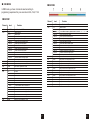
DMX MODE3
MASTER SLAVE MODE
Channel
Ch1
Ch2
Level
0-255
In this mode, one can run the whole system in synchronized effect.
Maximum 31pcs can be linked in a daisy chain as Master/Slave
operating
Function
Rotate from 0-270°
0-7
Shutter closed
8-15
Shutter open
16-151
Linear Strobe frequency adjustment from 1 to 20HZ
152-159
Pulse open effect low speed
160-167
Pulse open effect medium speed
168-175
Pulse open effect high speed
176-183
Pulse close effect low speed
184-191
Pulse close effect medium speed
192-199
Pulse close effect high speed
200-207
Random strobe effect low speed
208-215
Random strobe effect medium speed
216-223
Random strobe effect hight speed
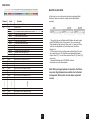
Ch3
224-255
0-255
Shutter open
General-dimmer. Linear intensity adjustment 0-100%
Ch4
0-255
Group1 Red Linear adjustment 0-100%
Ch5
0-255
Group 1 Green Linear adjustment 0-100%
Ch6
0-255
Group 1 Blue Linear adjustment 0-100%
Ch7
0-255
Group2 Red Linear adjustment 0-100%
Ch8
0-255
Group 2 Green Linear adjustment 0-100%
Ch9
0-255
Group 2 Blue Linear adjustment 0-100%
Ch10
0-255
Group3 Red Linear adjustment 0-100%
Ch11
0-255
Group 3 Green Linear adjustment 0-100%
Ch12
0-255
Group 3 Blue Linear adjustment 0-100%
Ch109
0-255
Group36 Red Linear adjustment 0-100%
Ch110
0-255
Group 36 Green Linear adjustment 0-100%
Ch111
0-255
Group 36 Blue Linear adjustment 0-100%
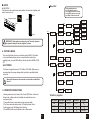
1. One unit is to be set as Master and this Master unit needs to work
under PROGRAM or Auto or Sound mode. Also, you need to set
Slave Number for total number of Slave units. i.e., there are 5 Slave
units (not including Master unit) in the daisy chain, then Slave
Number is 5.
2. Other units are to be set in Slave mode and and Slave ID is to be
set for each Slave unit. The first Slave connected with the Master
unnit is Slave ID [1], the next Slave units are Slave ID [2], Slave ID [3],
and son on.
3. Operate the Master unit in PROGRAM, Auto and
Sound mode to run the whole system.
Note! After prolonged periods of operation, the fixture
may reach high temperatures and dim due to thermal
management. After a while of cool down, output will
recover.
9
10