1
Operator’s Manual MAS-100™
Professional Microbial Air Monitoring System
for the Microbiological Testing of Air
MAS-100™ is a registered trade mark of MBV AG, Switzerland
from Firmware Version 5.0x
MBV AG
Microbiology and Bioanalytic
Laubisrütistrasse 24
CH-8712 Stäfa
Tel. +41 44 928 30 80
Fax +41 44 928 30 89
Mail: [email protected]
www.mbv.ch
MAS-100_Usermanual_blank_010606e.doc
Date: 02.2006
Version: 01 Revision: 06
www.mbv.ch
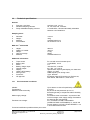
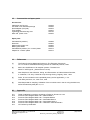
Table of contents
1
Introduction
4
2
Basic principle
4
3
Most important advantages of the MAS-100™
™
5
3.1
3.2
First time use of MAS-100
New: SQS- Sequential air sampling
5
5
4
General functions
6
4.1
4.2
4.3
4.4
4.5
4.6
4.7
4.8
4.9
4.10
4.11
4.12
Overview
First time use of MAS-100™ = Activation of calibration reminder
Switching ON and OFF the MAS-100™
Calibration reminder
Selectabel Mode 3
Last volume used
Select other volumes
Delay function
User menu
Start sampling
Adjusting Petri dish
Adjusting RODAC plates
6
6
6
7
7
7
7
8
8
8
9
9
5
Perform a “Manual” air sampling
10
5.1
5.2
5.3
5.4
5.5
Switch the MAS-100™ „ON” for manual sampling
Sampling interrupted; failed
Switching off the MAS-100™
Interrupting a test
Airflow blocked
10
11
11
11
12
6
Perform air sampling in “Template mode”
13
6.1
Switch the MAS-100™ „ON” for template sampling
13
7
Perform air sampling in “Selectable-Mode”
15
8
Instrument settings “Parameter Mode 4”
16
8.1
8.2
8.3
8.4
8.5
8.6
8.7
8.8
8.9
8.10
8.11
8.12
8.13
8.14
8.15
8.16
8.17
Clear protocol data
Connecting a Printer
Print protocol
Back to main menu
Set time and date
Selecting date format (EU or US) and changing time and date
Battery discharge?
Anemometer mode
Change volumes
Delay menu (Change / Activate / Deactivate )
Select operation mode
Manual mode
Selectable mode
Template mode
Select SQS mode
User menu
Back to main menu
16
16
16
17
17
18
18
18
18
19
19
19
19
19
20
20
20
MBV AG, CH-8712 Stäfa +41 44 928 30 80
Released and approved : Hzi
02.2006 /
Version: 01
Revision: 06
MAS-100_Usermanual_blank_010606e.doc
page 2 of 34
9
Sampling head
21
9.1
9.2
9.3
Adjustment of Petri dish
Sampling head 400 x 0,7
Sterilization of sampling head
21
21
21
10
Software for MAS-100™
21
10.1
Software download new MAS-100™ C&C
21
11
Interpreting results
22
12
Charging the MAS-100™
22
12.1
12.2
12.3
12.4
Battery charging
Battery discharge
Battery status display
Battery replacement
22
22
22
23
13
Calibration
23
13.1
13.2
Protected mode
Calibration reminder
23
23
14
Technical specifications
24
14.1
Environmental conditions
24
15
Components check list
25
16
Care and maintenance
25
17
Warranty
25
18
Accessories and spare parts
26
19
References
26
20
Appendix
26
20.1
20.2
20.3
20.4
20.5
20.6
20.7
Table of statistical corrections according to Feller for SH 400 x 0.7mm
Firmware Flow Diagram MAS-100™: Manual Mode 1
Firmware Flow Diagram MAS-100™: Template Mode 2
Firmware Flow Diagram MAS-100™: Selectable Mode 3
Firmware Flow Diagram MAS-100™: Parameters Mode 4
Firmware Flow Diagram MAS-100™: Calibration reminder Mode 5
CE Conformity declaration
27
28
29
30
31
33
34
MBV AG, CH-8712 Stäfa +41 44 928 30 80
Released and approved : Hzi
02.2006 /
Version: 01
Revision: 06
MAS-100_Usermanual_blank_010606e.doc
page 3 of 34
1
Introduction
There is increasing need for effective air sampling in all areas where airborne micro-organisms may
contaminate or otherwise affect industrial products and processes. Monitoring is especially important in:
•
•
•
•
•
the pharmaceutical industry
the food industry
hospitals
the cosmetics industry
the environment
Today a number of monitoring methods are available, most of which are based on the impaction
principle. During development of the MAS-100™, all the shortcomings of existing sampling systems were
eliminated, and their best aspects retained, leading to the creation of a user-friendly, dependable and
precise air sampler for standard Petri dishes.
The MAS-100™ aspirates 100 liters of air per minute, allowing up to 2000 liters to be sampled per cycle.
This performance enables sampling to be carried out according to the strict conditions of monitoring in
sterile and „clean” areas (see point 1 in chapter 19).
The impaction velocity (speed at which airborne micro-organisms hit the surface of the agar) is
approximately 11 meters per second, corresponding to stage 5 of the Andersen Sampler (see point 3 in
chapter 19). This velocity guarantees that all particles > 1 µm are collected. Comparisons with other
methods of air sampling ( see point 2 in chapter 19) have not revealed any significant differences in the
numbers of micro-organisms collected.
The MAS-100™ corresponds to International Standard
ISO 14698-1:2003(E) 1
Note:
2
Basic principle
The MAS-100™ is a high-performance instrument that is based on the principle of the Andersen air
sampler (see point 3 in chapter 19), which aspirates air through a perforated plate. The resultant airflow
is directed onto a standard agar poured plate. After the collection cycle, the Petri dish is incubated and
the colonies are counted. The MAS-100™ operates with a high-performance suction device, and the
aspirated volume is continuously monitored. The system measures the inflow of air and regulates the
aspirated volume to a constant value of 100 liters per minute. The MAS-100™ automatically regulates
this volume if there are external factors preventing a steady flow of air, or if overfilled Petri dishes are
blocking or impeding flow. For measurement in pharmaceutical industry the recommended sampling
volume – according to international guidelines – should be 1000 liters.
1
ISO 14698-1:2003(E) Cleanrooms and associated controlled environments - Biocontamination control
Part1: general principles and methodes; chapter 3.1.13; 5.3;
MBV AG, CH-8712 Stäfa +41 44 928 30 80
Released and approved : Hzi
02.2006 /
Version: 01
Revision: 06
MAS-100_Usermanual_blank_010606e.doc
page 4 of 34
3
•
•
•
•
•
•
•
•
•
•
•
•
•
•
•
•
3.1
Most important advantages of the MAS-100™
new: individual activation of calibration reminder
new: Adapter-Kit for RODAC-Plates
new: Validated Firmware MAS-100 V5.0X by Novatek for „Environmental Monitoring” software
new: SQS-Cycle (see point 5 in chapter 19) may be selected. If this cycle is activated, the desired
volume may be split up to 20 sequences over a period of total 24 hours
Uses standard 90-100mm Petri dishes
Data communication for error-free results and automatic record-keeping
Manual and/or template mode
Build in anemometer for automatic volume compensation: Differences in Petri dish fills cannot affect
airflow
Indication of low airflow
Real time clock and calendar
Compact and easy to use
Easy to calibrate
Adjustable for different Petri dish sizes
100/240V, 50-60kHz power unit, or battery operation
According to international Guidelines: Isokinetic measurement, 0.45 m/sec, 100 liters / minute
Sampling volume adjustable from 1 – 2000 liters
First time use of MAS-100™
If the MAS-100™ is used for the first time or after a calibration the “calibration reminder" has to be set.
(see 4.2 and 20.6)
3.2
New: SQS- Sequential air sampling 5
A newly developed control system ( Software V 5.0x) allows a measurement with the MAS-100™ over a
prolonged time with a single agar plate. Hereby, without any microbial loss, up to 20 air samples can be
accumulated on the same Petri dish over a period of several hours. The main advantage of this method
is that the risk of secondary contamination by the operators during the exchange of plates is reduced to
a minimum. This is of very great importance for ambient air monitoring in sterile zones. In addition, by
collecting sequential samples over a prolonged period of time the randomization is improved and thus a
more reliable result obtained. Moreover, instead of several 90mm standard Petri dishes, only one dish
has to be evaluated, thus reducing the expenditure on equipment and labour.
5
SQS-Sequential air sampling; Validation of the microbial count in the air using the MAS-100; Swiss
Pharama 26 (2004) No.11,9-11
MBV AG, CH-8712 Stäfa +41 44 928 30 80
Released and approved : Hzi
02.2006 /
Version: 01
Revision: 06
MAS-100_Usermanual_blank_010606e.doc
page 5 of 34
4
General functions
4.1
Overview
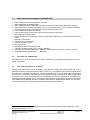
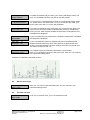
The MAS-100™ has built-in dialog software. To accept a parameter or command, answer the question
„Modify?” by pressing the „yes” or „no” button. The program works its way automatically through all the
required parameters. Once you have set the aspirated volume and delay, the program goes to the
„Start ?” prompt. When you press „yes”, the MAS-100™ starts to sample the pre-set volume of air, and a
green light indicates that the instrument is operating. The sampled volume and time remaining are
continuously displayed. Once the pre-set volume has been sampled, the red „stop” LED lights.
4.2
First time use of MAS-100™ = Activation of calibration reminder
MAS100 V5.XX
S/N: XXXXX
Press „yes“ to switch on the MAS-100™ for the first time. The firmware
version is shown on the display. The calibration reminder has to be set by
the first user. (see 20.6)
Set calibration
reminder Y/N
If you select „no” the instrument will go off immediately. If you select „yes“
next window will be displayed.
Set reminder to
12 month Y/N
The reminder is set by the manufacturer to 12 month. If you would like to
change , push „no” as many times until you get the time for recalibration
between 1 and 12 month. If you select 0, the calibration reminder is
deactivated. Push „yes” to accept the displayed value.
Are you sure to
set xx month Y/N
If you select „no” the instrument will go off immediately. If you push „yes“ the
selected time for recalibration starts to count down. The last two month will
be displayed as 60 days. After this the menu will proceed as written in (4.3).
Calibration
valid: XX month
The time until next calibration is shown . The last 2 month will be displayed
in days.
4.3
Switching ON and OFF the MAS-100™
MAS100 V5.XX
S/N: XXXXX
Calibration
valid: XX months
Press „yes“ to switch on the MAS-100™
The firmware version V5.XX and the serial number of the instrument is
shown on the display. (see 20.2)
After a few seconds the display will indicate the remaining time until next
calibration.
XXXXX litres
left to aspirate
Again a few seconds after the display will show the total amount of liters
which can be sampled with the battery charge.
Volume:XXXX Y/N?
The last used volume is displayed. Accept by pushing „yes”. If you push „no”
next step is displayed.
Select other
volumes Y/N? _
With „yes” you can select other volumes. Accept a volume with „no” the
menu changes into the start menu.
MBV AG, CH-8712 Stäfa +41 44 928 30 80
Released and approved : Hzi
02.2006 /
Version: 01
Revision: 06
MAS-100_Usermanual_blank_010606e.doc
page 6 of 34
dd.mm.yy
hh:mm
Start? (Y/N)
With „yes“ start the sampling. With „no” the menu starts with the last used
volume.
If no further manipulations are made on the Instrument and no run is started, the instrument will switch
off automatically after 5 minutes.
Exception:
With the calibration reminder being activated and the calibration deadline
reached, the display first shows „Calibration time expired” and then „Please
recalibrate unit”. If you press „yes“ or „no“, you will see the date on which the
MAS-100™ was last calibrated. The program then moves to the next prompt.
Note:
The MAS-100™ is permanently on if connected to the battery charger.
Note:
After a collection cycle the instrument will display the last volume collected.
It will shut off after 30 minutes unless you press „yes“ or „no“„ to activate the
5-minute automatic shut off.
4.4
Calibration reminder
Calibration time
expired!
Please
recalibrate unit
A calibration reminder is displayed once the calibration expiry date has been
reached. The calibration reminder is set from the manufacturer to 12 month.
The last two month will be displayed as 60 days.
The reminder may be set from 0 up to 12 month. 0 month means
deactivation of calibration reminder.
Last calibration
Volume:XXXX Y/N?
If yes or no is pushed the last calibration date is displayed.
Note:
To program the calibration reminder see Mode 5 (see 4.2 and 13.2).
4.5
Selectabel Mode 3
In parameter Mode 3 it is possible to select between „manual mode”, „template mode” or „selectable
mode” (see 20.4)
•
•
•
4.6
The „manual mode” is selected if no PC is connected to the MAS-100 ™
The „selectable mode” is selected if only a few data are stored and transferred to the PC
The „template mode” is used if all information is transferred from and to the PC
Last volume used
After the MAS-100 is started always the last volume or SQS-cycle used will be displayed and may be
used again without changing any parameters.
4.7
Select other volumes
Volume:XXXX Y/N?
If the volume is displayed and „no” is pressed the MAS-100™ changes to the
volume selection menu. If you accept with „yes” the start menu is displayed.
MBV AG, CH-8712 Stäfa +41 44 928 30 80
Released and approved : Hzi
02.2006 /
Version: 01
Revision: 06
MAS-100_Usermanual_blank_010606e.doc
page 7 of 34
Select other
volumes Y/N ?
4.8
Delay function
Delay:
0:00
Modify ? (Y/N)
4.9
If the delay function is activated in Parameter Mode 4, the display shows
„Change delay? (Y/N)“. By choosing „yes“ you may set a start delay
between 1 and 60 minutes. This function makes sense if the room in which
the sampling takes place has to be left during the sampling process.
User menu
User X
change user? Y/N
4.10
The MAS-100™ has 5 pre-set sampling volumes: 50, 100, 250, 500 and
1000 liters. These can be found in parameter Mode 5 under „Change
volumes?” Each of these volumes can be modified between 0 and 2000
liters. Setting a volume to 0 will blank it from the display in the main menu.
Each volume can be re-activated and be displayed again. Accept a
displayed volume by pressing „no“.
If the user menu is activated it is possible to choose between 10 user
names. The user names may be programmed with the MAS-100 C&C
software (see 10.2)
Start sampling
dd.mm.yy
hh:mm
Start? (Y/N)
To start sampling, press „yes“. If a delayed start has been programmed, the
sampling cycle only starts when the delay time has elapsed.
Volume [l]: XXXX
Time:
h.mm
During the run the display shows the sampled volume and counts down the
time until the total sampling volume is reached.
MBV AG, CH-8712 Stäfa +41 44 928 30 80
Released and approved : Hzi
02.2006 /
Version: 01
Revision: 06
MAS-100_Usermanual_blank_010606e.doc
page 8 of 34
4.11
Adjusting Petri dish
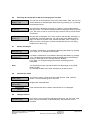
Before using the MAS-100 for the fist time you will need to adjust the blue Petri dish support.
Lift off the perforated lid and place a Petri dish on the dish support. Use a 3 mm Allen key to adjust the
three blue jaws until the Petri dish is securely supported and there is no play. Check that the Petri dish is
properly supported by turning the sampling head to the horizontal position. The Petri dish support is now
adjusted. The procedure need only be repeated at most if you change Petri dish manufacturer.
Note:
4.12
Do not over-tighten the blue jaws. If you do, the Petri dish may break and
shed plastic debris in the aspiration unit and block the motor.
Adjusting RODAC plates
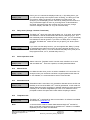
New : The MAS-100 may be used with commercially available contact plates. The use of a special
Adapter No. 1.09214.0001 and Sampling head N0. 1.09213.0001 is necessary.
Note:
•
Take the allen key and exchange the 3
existing blue jaws by removing the allen screw
and replace with the 3 new blue jaws.
•
Place the positioning template and mark the
centre (see picture) with a marker pen.
•
Remove the positioning template and put the
Adapter ring as shown in the picture bellow.
•
Put now your contact plate in the adaptor and
tighten the 3 allen screws. The marked point
should be in the centre of the contact plate as
shown in the picture.
Tighten the blue jaws and make sure that the stainless steel adapter holds
firmly .
MBV AG, CH-8712 Stäfa +41 44 928 30 80
Released and approved : Hzi
02.2006 /
Version: 01
Revision: 06
MAS-100_Usermanual_blank_010606e.doc
page 9 of 34
5
Perform a “Manual” air sampling
5.1
Switch the MAS-100™ „ON” for manual sampling
To work in manual mode you just push the yes button to switch on the MAS-100™.
Note:
•
•
•
•
•
•
•
The MAS-100™ must be in the manual mode. If it is in the selectable or in
the template mode change to manual mode (see 4.5 and 6).
Place the MAS-100™ on a firm support.
Open the perforated lid (with attached dust cover) by rotating counter clock wise.
Place a closed standard Petri dish 2 filled with agar on top of the dish support.
Take the lid off the Petri dish.
Close the MAS-100 perforated lid.
The sampling head can be adjusted to any angle from horizontal to vertical airflow direction.
Program the MAS-100 as follows
MAS100 V5.XX
S/N: XXXXX
Calibration
valid XX months
Press „yes“ to switch on the MAS-100™
The firmware version V5.XX and the serial number of the instrument is
shown on the display.
After a few seconds the display will indicate the remaining time until next
calibration.
Exception:
With the calibration reminder being activated and the calibration deadline
reached, the display first shows „Calibration time expired” and then „Please
recalibrate unit”. If you press „yes“ or „no“, you will see the date on which the
MAS-100™ was last calibrated. The program then moves to the next prompt.
XXXXX litres
left to aspirate
Again a few seconds after the display will show the total amount of liters
which can be sampled with the current battery capacity.
Volume:XXXX Y/N?
The last used volume is displayed. Accept by pushing „yes”. If you push „no”
next step is displayed.
Select other
volumes Y/N? _
With „yes” you can select other volumes. Accept a volume with „no” the
menu changes into the start menu.
User X
change user ? Y/N
If the user menu is activated (see 8.16) it is possible to change the user with
„yes“ and accept it wit „no“.
Delay:
mm:ss
Modify? Y/N
Modify „Delay” with „yes” and accept with pressing „no“. If „Delay” is not
active, the start menu will be displayed.
dd.mm.yy hh:mm
Start? (Y/N)
Date and time are displayed. To start the sampling press „yes“. To change
some of the parameters press „no“ and change the desired parameters. If
no further manipulations are made on the instrument and no run is started,
the instrument will shut down automatically after 5 minutes.
2
Petri dish or if the contact plate adapter is used contact plate.
MBV AG, CH-8712 Stäfa +41 44 928 30 80
Released and approved : Hzi
02.2006 /
Version: 01
Revision: 06
MAS-100_Usermanual_blank_010606e.doc
page 10 of 34
Note:
The MAS-100™ is permanently on if connected to the battery charger.
Volume [l]: XXXX
Time:
h.mm
During the run the display shows the sampled volume and counts down the
time until the total sampling volume is reached.
passed
test completed
After the sampling cycle, the message „passed test completed” indicates
that the total volume has been sampled without any disturbances and the
test is valid.
Note:
After a collection cycle the instrument will display the last volume collected.
Press „yes“ or „no“ to activate the 5-minute automatic shut-off.
Volume [l]: XXXX
Time:
0:00
At the end of the sampling the total volume sampled is displayed and the
time shows 0:00 and the red (stop) LED is on.
5.2
Sampling interrupted; failed
failed!
repeat test!
Air flow blocked
•
If the air flow was blocked and the MAS-100 could not get 100 liter/min “air
flow blocked” will be displayed and the red LED is blinking. Quit with „yes” or
„no”
Make sure that the dust cover was removed before start was pushed, and
there is not to much agar in the Petri dish which could block the wholes on
the sampling head.
Note:
•
If „failed repeat test” is displayed the test was interrupted by pressing „no”
during sampling.
Open the sampling head, cover the Petri dish with the lid and remove the Petri dish from the dish
support.
The Petri dish is now ready for incubation.
5.3
Switching off the MAS-100™
Volume [l]: XXXX
Time:
0:00
After sampling, the red (stop) LED will light up and the total volume collected
will be displayed. In this position the MAS-100™ will automatically shut down
after 30 minutes. In all other menu positions the MAS-100™ switches off
automatically after 5 minutes.
Note:
After a collection cycle the instrument will display the last volume collected.
Press „yes“ or „no“ to activate the 5-minute automatic shut-down.
5.4
Interrupting a test
failed!
repeat test!
If the „no“ button was pressed during sampling, the instrument will display
„failed! repeat test!”. Repeat the test by using a new Petri dish filled with
media.
MBV AG, CH-8712 Stäfa +41 44 928 30 80
Released and approved : Hzi
02.2006 /
Version: 01
Revision: 06
MAS-100_Usermanual_blank_010606e.doc
page 11 of 34
If the MAS-100™ was activated in the „template mode”, the interrupted test
will not be registered by the software, unless the total volume has been
collected without interruption.
Note:
5.5
Airflow blocked
failed!
repeat test!
If the built-in sensor does not attain 100 liters of air per minute, the message
„failed! repeat test!” and „Air flow blocked” appears on the display and the
red LED flashes. Sampling is stopped. Remove the Petri dish and start a
new test. Press „yes“ or „no“ to cancel the error message. Repeat the test.
Air flow blocked
If the air flow was blocked and the MAS-100 could not get 100 liter/min air
flow blocked will be displayed and the red LED is blinking. Quit with „yes” or
„no”
Note:
Make sure that the dust cover was removed before start was pushed, there
is not to much agar in the Petri dish which could block the wholes on the
sampling head.
MBV AG, CH-8712 Stäfa +41 44 928 30 80
Released and approved : Hzi
02.2006 /
Version: 01
Revision: 06
MAS-100_Usermanual_blank_010606e.doc
page 12 of 34
6
Perform air sampling in “Template mode”
6.1
Switch the MAS-100™ „ON” for template sampling
To work with templates the calibration MAS100 C&C software is needed. It is possible to download the
software from internet: www.mbv.ch . A special communication cable between PC and MAS-100™ is
provided by the local distributor. More details are given in the Software manual.
Note:
•
•
•
•
•
•
•
The MAS-100 must be in the selectable or in the template mode
(see 4.5 and 6)
Place the MAS-100™ on a firm support.
Open the perforated lid (with attached dust cover) by rotating counter clock wise.
Place a closed standard Petri dish filled with agar on top of the dish support.
Take the lid off the Petri dish.
Close the MAS-100™ perforated lid.
The sampling head can be adjusted to any angle from horizontal to vertical airflow direction.
Program the MAS-100™ as follows
MAS100 V5.XX
S/N: XXXXX
Calibration
valid XX months
Press „yes“ to switch on the MAS-100™
The firmware version V5.XX and the serial number of the instrument is
shown on the display.
After a few seconds the display will indicate the remaining time until next
calibration.
Exception:
With the calibration reminder being activated and the calibration deadline
reached, the display first shows „Calibration time expired” and then „Please
recalibrate unit”. If you press „yes“ or „no“, you will see the date on which the
MAS-100™ was last calibrated. The program then moves to the next prompt.
XXXXX litres
left to aspirate
Again a few seconds after the display will show the total amount of litres
which can be sampled with the battery charge.
Manual mode
modify? (Y/N)
Template mode
modify? (Y/N)
Template name
Modify? Y/N?
With „yes“ you can modify from Manual to Template mode. With „no” you
change to next menu point. volume is accepted.
To accept Template mode push „no” . The first Template name will be
displayed.
Choose the Template you like to work with and accept by pressing „no”.
Example: Template name = Insulin 123
MBV AG, CH-8712 Stäfa +41 44 928 30 80
Released and approved : Hzi
02.2006 /
Version: 01
Revision: 06
MAS-100_Usermanual_blank_010606e.doc
page 13 of 34
Location
Device
Each template may contain up to 10 sampling places defined with Location
and Device.
Push „no” to choose the position you would like to take the sample. If the
position has already been measured and the rum was not interrupted the
position is hidden and appears only after having transferred the data to a PC
or if the values have been erased in the MAS-100 (see Clear protocol data
8.1)
Example:
1. Location name = Fill_Line 123_A, Device = Position 123_A
2. Location name = Fill_Line 123_B, Device = Position 123_B
Delay:
mm:ss
Modify? Y/N
If delay menu is activated modify „Delay” with „yes” and accept with pressing
„no“. If „Delay” is not active, the start menu will be displayed.
User X
change user ? Y/N
If the user menu is activated (see 8.16) it is possible to change the user with
„yes“ and accept it with „no“.
Delay:
mm:ss
Modify? Y/N
The „Delay” may be accepted by pressing yes and changed by pressing
„no“. If „Delay” is not active, the start menu will be displayed.
dd.mm.yy hh:mm
Start? (Y/N)
Date and time are displayed. To start the sampling press „yes“. To change
some of the parameters press „no“ and change the desired parameters. If
no further manipulations are made on the instrument and no run is started,
the instrument will shut down automatically after 5 minutes.
Note:
The MAS-100™ is permanently on if connected to the battery charger.
Volume [l]: XXXX
Time:
h.mm
During the sampling the aspirated volume and the remaining sampling time
are displayed.
passed
test completed
After the sampling cycle, the message „passed test completed” indicates
that the total volume has been sampled without any disturbances and the
test is valid.
Note:
After a sampling run the last used volume is displayed. Push „yes“ or „no“ to
shut off the MAS-100 after 5 minutes.
Volume [l]: XXXX
Time:
0:00
Nach dem Sammelvorgang wird das total gesammelte Volumen angezeigt
und die verbleibende Zeit ist 0:00 und die rote (stop) LED leuchtet auf.
6.2
Interrupted sampling
failed!
repeat test!
Air flow blocked
•
•
If „failed repeat test” is displayed the test was interrupted by pressing „no”
during sampling.
If the air flow was blocked and the MAS-100 could not get 100 liter/min air
flow blocked will be displayed and the red LED is blinking. Quit with „yes” or
„no”
Open the sampling head, cover the Petri dish with the lid and remove the Petri dish from support.
The Petri dish is now ready for incubation.
MBV AG, CH-8712 Stäfa +41 44 928 30 80
Released and approved : Hzi
02.2006 /
Version: 01
Revision: 06
MAS-100_Usermanual_blank_010606e.doc
page 14 of 34
7
Perform air sampling in “Selectable-Mode”
Selectable mode is used if the user wants both, to work with individual samples and with preset values
in the „Template mode”. In this mode the display asks before each sampling run, whether sampling is to
be performed manually or at a location designated by the template. In „Template mode”, the user is
prompted to select the protocol and location before sampling is started.
MBV AG, CH-8712 Stäfa +41 44 928 30 80
Released and approved : Hzi
02.2006 /
Version: 01
Revision: 06
MAS-100_Usermanual_blank_010606e.doc
page 15 of 34
8
Instrument settings “Parameter Mode 4”
Volume XXXX Y/N?
If the MAS-100 is working in the Protected mode (see 13.1) the access
without the MAS-100 C&C Software, is only possible to the following menu
points:
• Print protocol
• Battery discharge
• Anemometer mode
Note:
8.1
Clear protocol data
Clear protocol
data? (Y/N)
8.2
Pressing „yes“ and „no“ simultaneously for about 5 seconds after you
activated the MAS-100 or in any other menu position, will take you to the
instrument settings „Parameter Mode 4”. This mode allows to erase data in
the memory if the „template mode” was used. It is also possible to connect a
printer. All other user-specific data such as date, time, volume, start delay
etc. can be set.
Press „yes” to erase protocol data. If you are in the selectable mode you can
choose between erasing the manual or the template data. With the function
„Clear all prot.” It is possible to erase all data collected in the PC mode. With
the function „Modify? (Y/N) an individual protocol may be selected and the
data erased. During this process the red and green LED’s are flashing and a
message „Clear data in progress” is displayed. Erasing all the protocol data
together may take up to 2 minutes.
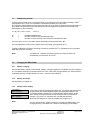
Connecting a Printer
The output is configured for a portable thermo printer*
(model on picture: CUSTOM s’print®)
A connection cable is available from your supplier.
(* ask MAS-100 ™ supplier for other printer models)
8.3
Print protocol
Print
Protocol ? (Y/N)
It is possible to connect a printer directly to the MAS-100™. The output is
configured for a portable thermo printer (model CUSTOM s’print®)
A connection cable is available from your supplier.
Protocol 1..10
Modify ? (Y/N)
You can choose one of the protocol or print all protocols.
MBV AG, CH-8712 Stäfa +41 44 928 30 80
Released and approved : Hzi
02.2006 /
Version: 01
Revision: 06
MAS-100_Usermanual_blank_010606e.doc
page 16 of 34
no data present,
empty memory !
No printer
device connected
If no data are present and you select „yes” nothing will happen. When you
push „no” the display will show you that no data are present.
If „Print protocol” is activated and no printer is connected the display shows
„no“ printer device connected. Push „no“ to go to the next step. With „yes“
back to main menu with „no“ to the user parameter.
Change online
print mode? Y/N
If you want to change the print mode push „yes”. Press as many times „yes”
until you have found the number of samples after which you would like to
have a print out. After the total possible stored amount of samples the next
message will be displayed.
Online print
deactivated
If „yes” is pressed the print mode will be activated or deactivated. If activated
next step will be displayed.
Print after
xx
samplings Y/N _
If „yes” is pressed the number of samples may be increased before the
samples must be printed out. When the instrument is delivered the max.
number is 50. With the MAS-100 C&C Software this value may be set up to
100. Quit to next menu with „no”.
Print calib.
parameters (Y/N)
It is possible to print the calibration parameters. (see example)
With „no” it is possible to go back to the main menu. With „yes” you continue
in the parameter setting menu.
Example of a calibration parameter printout :
8.4
Back to main menu
Back to main
Menu? (Y/N)
8.5
With „yes“ you return to the Start-Menu with „no” you continue in the
instrument settings-menu.
Set time and date
Set time and
date? (Y/N)
Push „no“ to proceed. Push „yes” to choose date format.
MBV AG, CH-8712 Stäfa +41 44 928 30 80
Released and approved : Hzi
02.2006 /
Version: 01
Revision: 06
MAS-100_Usermanual_blank_010606e.doc
page 17 of 34
8.6
Selecting date format (EU or US) and changing time and date
Date:
EUR
Modify? (Y/N)
The first item in the Parameter menu is the „Date mode“. With „yes“ you can
switch between US and European date format. By pressing „no“ you accept
the displayed format.
Time
hh.mm.ss.
Then the time is displayed. Pressing „no“ places a cursor underneath the
first digit. Press „no“ until the required number is displayed. When you press
„yes“, the cursor moves on to the next digit. Continue until you have set the
correct time.
Date
dd.mm.yy
Now the date is displayed. The cursor moves to the first digit. Pressing „no“
changes the numerical value and „yes“ places the cursor below the next
digit. You return to the start of the „Set time and date” menu. Clicking „no“
takes you to the next prompt. ( Please note that US format is: mm-dd-yy,
EUR format is: dd.mm.yy)
8.7
Battery discharge?
Battery
discharge? (N)
For battery maintenance it is possible to discharge the battery by pressing
„yes”. Push „no” to proceed to next position.
Batt. discharge:
XXXXX litres_
For battery maintenance it is possible to discharge the battery by pressing
„yes”. The batteries will discharge while the display shows a decreasing
number of liters and the run and stop LED are blinking.
If you push „no” during discharge the process of discharge will be
interrupted.
Note:
The discharge process may last several hours depending on the actual
battery charge.
Do recharge the MAS-100™ after discharge for at least 3 hours.
8.8
Anemometer mode
Anemometer
mode? (Y/N)
This mode is used to check the anemometer function. After a start up
phase.., the anemometer goes to 100 L/min.
Anemometer mode
Please wait..x
Displays the measured liters.
Anemometer
error !!!
8.9
If the anemometer has a problem Anemometer error is displayed.
Change volumes
Change
volumes? (Y/N)
Each of the 5 pre-set volumes (standard volumes 50, 100, 250, 500, 1000
liters) may be customized. A value between 0 and 2000 liters can be
specified.
MBV AG, CH-8712 Stäfa +41 44 928 30 80
Released and approved : Hzi
02.2006 /
Version: 01
Revision: 06
MAS-100_Usermanual_blank_010606e.doc
page 18 of 34
Volume 1 = 50
Modify? (Y/N)
8.10
Press „yes“ to increment the displayed value by 1. By holding down „yes“
you can scroll quickly to the required value. Pressing „no“ takes you to the
next volume. Setting a volume to 0 will delete it from the screen. For
example, you could display just two volumes by setting the other three to 0.
They are activated again as soon as you assign them a value between 1
and 2000. Continue through the volumes until you get to the „change
volumes?” display. Quit with „no” to go to next menu step.
Delay menu (Change / Activate / Deactivate )
Change
delay? (Y/N)
The MAS-100™ has a start menu that enables you, if you wish, to set a delay
time between 1 and 60 minutes before the start of a sampling cycle . The
last used delay time will be displayed. By pressing „yes“, you can set a delay
time between 0 and 60 minutes. If you enter 0 as delay time, no delay is
activated. The MAS-100™ starts as soon as you press „yes“ at the „Start?”
prompt.
activated
Modify ? (Y/N)
If you never use the delay function, you can suppress the „Delay?” prompt
by deactivating the delay in this menu (to exit the program answer „no“ to
„deactivate delay menu?”). You can reactivate the delay at any time (to exit
the program answer „no“ to „activate delay menu?”).
8.11
Select operation mode
XXXX mode
Modify? (Y/N)
8.12
Manual mode
Manual mode
Modify ? (Y/N)
8.13
Use Manual mode when you do not wish to establish a PC connection. For
example, when your work does not follow a regular pattern and/or there is
no PC available, it is recommended to work in manual mode.
Selectable mode
Selectable mode
Modify? (Y/N)
8.14
Select manual or Template mode? Use this menu to define how to work
with the MAS-100™. There are 3 options, as briefly described below.
Selectable mode is used when only sometimes data are sent to the PC and
flexibility in the use of the MAS-100™ must be guaranteed. In this mode the
display asks before each sampling run whether sampling is to be performed
manually or at a location designated by the PC. In PC mode the user is
prompted to select the report and location before sampling is started.
Template mode
Template mode
Modify? (Y/N)
The MAS-100™ is equipped for data communication. A software is available
as freeware on (www.mbv.ch).
Note:
A communication cable to transfer data between MAS-100™ and the PC,
which comes with user instructions for the MAS-100™ software, is available
separately from your MAS-100 distributor.
MBV AG, CH-8712 Stäfa +41 44 928 30 80
Released and approved : Hzi
02.2006 /
Version: 01
Revision: 06
MAS-100_Usermanual_blank_010606e.doc
page 19 of 34
8.15
Select SQS mode
Select SQS
Mode? (Y/N)
The SQS mode allows you to divide a given volume of air into sub volumes,
over a given period of time. Select „yes” to activate this function
SQS: total time
Modify? (Y/N)
SQS: total time will be displayed if this mode is active.
deactivated
Mode? (Y/N)
Deactivated will be displayed if the SQS mode is inactive.
SQS: cycles: xx
modify? (Y/N)
Choose between 1 and 20 cycles. The number of cycles will divide the total
volume into corresponding sub volumes
SQS time: h:mm
modify? (Y/N)
Choose between 1 and 24 hours and minutes. Be sure to choose a total
time in witch the Petri dish does not dry out. Up to 8 hour have been
successfully tested by the manufacturer but have to be validated by the
customer.
[l]
CYCLE TIME
XXXX XX
hh:mm
After setting the relevant parameters the next two windows are displayed
showing the selected volume, the number of cycles and the total sampling
period.
XX.XX.XX
hh:mm
Start? (Y/N)
Push„yes” to start sampling in SQS-mode. If you want to change any of the
parameters push „no”. You will be directed to the selection menu.
Note:
To work again in normal sampling mode deactivate the SQS-Cycle in the
Parameter 4 Mode.
8.16
User menu
Select user
Menu? (Y/N)
If you press „yes” it is possible to activate or deactivate the user menu. If
activated, it is possible to allocate 1 out of 10 user names to the relevant air
sampling tests.
activated
Modify? (Y/N)
The default names are User 1 etc. To define proper user names you need
the C&C communication and calibration Software. ( see 10.2)
8.17
Back to main menu
Back to main
Menu? (Y/N)
With „yes” the MAS-100™ will go to the start menu. With „no” the MAS-100
starts from first menu point of the selected Mode.
MBV AG, CH-8712 Stäfa +41 44 928 30 80
Released and approved : Hzi
02.2006 /
Version: 01
Revision: 06
MAS-100_Usermanual_blank_010606e.doc
page 20 of 34
9
Sampling head
9.1
Adjustment of Petri dish
Before using the MAS-100™ the first time you will need to adjust the blue Petri dish support.
Take off the perforated lid and place a Petri dish on the dish support. Use a 3 mm Allen key (supplied)
to adjust the three blue jaws symmetrical, until the Petri dish is securely supported and it is fixed in
place. Check that the Petri dish is properly supported by turning the sampling head to the horizontal
position. The Petri dish support is now adjusted. This procedure has not to be repeated unless you
change the Petri-dish manufacturer.
Note:
9.2
Do not over-tighten the blue jaws. The Petri dish may break and plastic parts
could block the unit.
Sampling head 400 x 0,7
The MAS-100™ runs with 100 liters/min. The calculated impaction speed is approx. 11 m/sec with the
sampling head with 400 holes with a diameter of 0,7mm.
Note:
9.3
Be sure to use 400 x 0.7 mm Feller conversion table(see 20.1)
Sterilization of sampling head
The sampling head may be sterilized at 121°C for 20 minutes.
10
Software for MAS-100™
10.1
Validated Software for MAS-100™
The MAS-100™ may be connected to a validated LIMS Software from the Canadian Company Novatek.
With this Software it is possible to exchange data between the MAS-100™ and a computer. More
information you will find over: http://www.ntint.com/prod-envmon.shtml
10.2
Software download new MAS-100™ C&C
The MAS-100™ C&C Software is a terminal software which enables the user to communicate with the
MAS-100™ in an easy way. The user gets all information about the settings in the MAS-100™ but is not
authorized to change any calibration parameters. Please find the software on the internet www.mbv.ch,
button „Software”. Choose MAS-100™ C&C Software Version 2.7x or higher. The software will be
installed automatically on your PC.
Note:
To communicate between MAS-100™ and a PC you need a special
communication cable. The cable is part of the MAS-100
C&C communication kit.
MBV AG, CH-8712 Stäfa +41 44 928 30 80
Released and approved : Hzi
02.2006 /
Version: 01
Revision: 06
MAS-100_Usermanual_blank_010606e.doc
page 21 of 34
11
Interpreting results
First the total microbial count is corrected based on the statistical correction table according to Feller 4
(see Appendix 20.1), then it is converted to contaminant particles per cubic meter.
The correction table is based on the presumption that, as the number of organisms being impinged on a
given plate during sampling rises, the chance that several organisms will enter the same hole in the
perforated lid is also increasing.
Pr = N [1/N + 1/N-1+ 1/N-2........1/N-r+1]
Pr
N
=
=
r
=
Probable statistical total
Number of holes in the perforated lid (400)
Number of colony-forming units counted on standard Petri dish
For each colony count „r” the table gives a statistically corrected total count „Pr”.
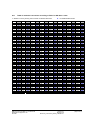
For easy application of this formula, please refer to the table (see Appendix 20.1)
(A table of statistical corrections according to Feller for the MAS-100™ in a plastified cover is provided
separately with each sampler).
The MAS-100™ software corrects the results according to Feller and
automatically converts them to CFU/m3.
Note:
12
Charging the MAS-100™
12.1
Battery charging
Connect the battery charger on the handle. „Battery charging” appears on the display and the red light is
on. A complete recharging cycle takes about 3.5 hours. With a fully charged battery, the instrument has
a sampling capacity of approximately 7.0 hours. .(value for new batteries)
12.2
Battery discharge
See description in chapter 8.7
12.3
Battery status display
Low battery!
Show capacity?
XXXXX litres
left to aspirate
Note:
If the battery capacity decreases the MAS-100™ will display the total amount
of litres which can still be sampled without recharging the batteries. The
Low battery display appears from a total sampling volume below 10’000
litres. Press yes to see the total amount of volume which is possible to
sample. If you press “no” the MAS-100™ will start the sampling.
Recharge the batteries as soon as possible (see chapter 12.1).
Use only the MAS-100™ battery charger to recharge the NiMH battery. The
charging circuitry of the MAS-100™ prevents overcharging of the battery.
MBV AG, CH-8712 Stäfa +41 44 928 30 80
Released and approved : Hzi
02.2006 /
Version: 01
Revision: 06
MAS-100_Usermanual_blank_010606e.doc
page 22 of 34
12.4
Battery replacement
If the batteries have to be changed, loosen the bottom screw and replace the batteries with an original
battery pack from the manufacturer. We advise that this is done by a service engineer who has been
instructed by the supplier.
After changing the battery pack recharge the MAS-100™ for at least 3.5
hours.
Note:
13
Calibration
The MAS-100™ is calibrated in the factory for a mass flow of 100 liters/min. Detailed information are
provided in the calibration certificate which is delivered with each instrument.
Only authorized person may exchange any mechanical parts in the
instrument or change any of the software settings in the „service” menu.
Note:
13.1
Protected mode
If you use the MAS-100 C&C software it is possible to block the calibration value and/or all settings in
the „Parameter Mode 4” see point “Protected mode “ in the Instruction-manual of the software.
Note:
13.2
To communicate between MAS-100™ and a PC you need a special
communication cable. The cable is part of the MAS-100C&C communication
kit.
Calibration reminder
The MAS-100™ has an integrated calibration reminder. It can be set between 0 and 12 months. If 0
month is selected the calibration reminder is deactivated. If 6 months is set, the reminder will add 6
months to the actual date in the MAS-100™. If after 6 months the instrument is turned on, the display will
show the following message:
Calibration time expired! Please recalibrate unit.
When pressing down the „yes“ or „no“ button, the display will show the date of the last calibration. After
releasing the button the menu proceeds to the start line.
Each time the MAS-100™ is turned on, this message will be displayed until the instrument is recalibrated
and the reminder is set to the corresponding value.
MBV AG, CH-8712 Stäfa +41 44 928 30 80
Released and approved : Hzi
02.2006 /
Version: 01
Revision: 06
MAS-100_Usermanual_blank_010606e.doc
page 23 of 34
14
Technical specifications
General:
●
●
●
Flow rate: 100 Liters
Standard sampling volumes:
Freely definable sampling volumes:
100 liters / min. ± 2.5%
50, 100, 250, 500, 1000 liter
1 to 2000 liters ,volumes individually selectable
between 0 and 2000 liters.
Sampling head :
●
●
●
●
Diameter:
Weight:
Material:
Autoclavable:
110 mm
190 g
Anodized aluminum
20 minutes at 121°C
MAS-100 ™ with handle
●
●
●
●
●
Height:
Width incl. handle:
Weight:
Case for storage
Material:
260 mm
180 mm
2.2 kg
plastic
Anodized aluminum
Additional information:
●
●
●
●
●
●
●
●
●
●
14.1
Tripod screw:
Battery pack:
Motor:
Battery charger input:
Charger output:
Display:
Lifetime RTC Battery:
Driving motor:
Processor:
CE approval:
For use with normal camera tripod
9 cells NiMH, 10.8 V
6V
100-240 Volt, 47-63 Hz
24 V DC, 1.5 A, 36 W
Alphanumeric liquid crystal display, 32 characters
Approx. 10 years
PWM frequency for driving motor
Type : 80C552
EN 55022 Class B, EN 61000-4-2, ENV 50140,
ENV 50204, EN 61000-4-4, ENV 50141
Environemental conditions
Altitude:
Temperature:
Maximum relative humidity:
Up to 2000 m or above if specified by manufacturer
0 to 40°C
80 percent for temperatures up to 31°C,
decreasing linearly to 50 percent relative humidity
at 40°C;
Fluctuations must not exceed ± 10 percent of the
nominal voltage; other supply voltage: fluctuations
as stated by the manufacturer
Acc. to INSTALLATION CATEGORIES
(OVERVOLTAGE CATEGORIES) I,II, and III and
normal category is II;POLLUTION DEGREE 1 or 2
in accordance with IEC 664
Mains supply-voltage:
Transient over-voltage:
Technical modification possible without prior notice.
MBV AG, CH-8712 Stäfa +41 44 928 30 80
Released and approved : Hzi
02.2006 /
Version: 01
Revision: 06
MAS-100_Usermanual_blank_010606e.doc
page 24 of 34
15
Components check list
The MAS-100™ is delivered in an plastic case containing the following:
1 MAS-100™ , complete system with sampling head (400 x 0.7)
1 battery charger
1 allen key 3 mm (for centering the Petri dish)
1 mains cable
1 plastified „Table of statistical corrections according to Feller”
1 calibration certificate
1 calibration certificate for DA-100
1 MAS-100 Operator’s Manual CD
16
Care and maintenance
The MAS-100™ should be periodically calibrated (see 13).
The sampling head is autoclavable (20min/121°C). When the MAS-100™ is moved to a sterile or „clean”
area, we suggest to wipe it with a suitable disinfectant. Between sampling cycles, the lid may also be
cleaned with disinfectant. Make sure that the holes in the perforated lid are not clogged.
17
Warranty
With the purchase of the MAS-100™ you will receive a 1-year warranty against any failure resulting from
malfunction of electrical and electronic components (see invoice date).
The MAS-100™ is a laboratory instrument and should only be used by qualified personnel.
Note:
The MAS-100™ is calibrated and a screw in the sampling head is sealed. If
the seal is removed by a unauthorized person the warranty will decay.
MBV AG, CH-8712 Stäfa +41 44 928 30 80
Released and approved : Hzi
02.2006 /
Version: 01
Revision: 06
MAS-100_Usermanual_blank_010606e.doc
page 25 of 34
18
Accessories and spare parts
Accessories:
Calibration unit DA-100
PC-cable / C&C Software package
Quick adapter (for tripod)
Tube adapter
Lightweight Shoulder bag, blue
MAS-100™ plastic case
1.09228
1.09226
1.09223
1.09224
1.09126
1.09225
Spare parts:
Perforated lid (400x0.7)
Dustcover
Mains power supply unit
Battery pack NiMH
Perforated lid (400x0.7) for “contact” plates
Adapter for “contact” plates
19
1.09088
1.09084
1.09085
1.09229
1.09213
1.09214
References
[1]
The Rules Governing Medicinal Products In The European Community
Vol. IV: Guide to Good Manufacturing practice for medicinal products, 1992
[2]
MAS-100, Qualification of air sampler systems: The MAS-100
Meier R. und Zingre H., (Swiss Pharma 1-2/00)
[3]
New Sampler for the Collection, Sizing, and Enumeration of Viable Airborne Particles,
A. Andersen, U.S. Army Chemical Corps Proving Groung, Dugway, Utha., 1958
[4]
Feller, W. An introduction to the probability theory and its application, p. 175.
John Wiley and sons, Inc., New York, 1950
[5]
SQS-Sequential air sampling; Validation of the microbial count in the air using the MAS-100;
Swiss Pharama 26 (2004) No.11,9-11
20
20.1
20.2
20.3
20.4
20.5
20.6
20.7
Appendix
Table of statistical corrections according to Feller for SH 400 x 0.7mm
Firmware Flow Diagram MAS-100™: Manual Mode 1
Firmware Flow Diagram MAS-100™: Template Mode 2
Firmware Flow Diagram MAS-100™: Selectable Mode 3
Firmware Flow Diagram MAS-100™: Parameters Mode 4
Firmware Flow Diagram MAS-100™: Calibration reminder Mode 5
CE Conformity declaration
MBV AG, CH-8712 Stäfa +41 44 928 30 80
Released and approved : Hzi
02.2006 /
Version: 01
Revision: 06
MAS-100_Usermanual_blank_010606e.doc
page 26 of 34
20.1
Table of statistical corrections according to Feller for SH 400 x 0.7mm
r = Number of colony forming units counted on standard Petri dish
Pr = Probable statistical total
r
Pr
r
Pr
r
Pr
r
Pr
r
Pr
r
Pr
r
Pr
r
Pr
1
2
3
4
5
6
7
8
9
10
11
12
13
14
15
16
17
18
19
20
21
22
23
24
25
26
27
28
29
30
31
32
33
34
35
36
37
38
39
40
41
42
43
44
45
46
47
48
49
50
1
2
3
4
5
6
7
8
9
10
11
12
13
14
15
16
17
18
19
20
22
23
24
25
26
27
28
29
30
31
32
33
34
35
37
38
39
40
41
42
43
44
45
47
48
49
50
51
52
53
51
52
53
54
55
56
57
58
59
60
61
62
63
64
65
66
67
68
69
70
71
72
73
74
75
76
77
78
79
80
81
82
83
84
85
86
87
88
89
90
91
92
93
94
95
96
97
98
99
100
54
56
57
58
59
60
61
63
64
65
66
67
68
70
71
72
73
74
76
77
78
79
80
82
83
84
85
87
88
89
90
92
93
94
95
97
98
99
101
102
103
104
106
107
108
110
111
112
114
115
101
102
103
104
105
106
107
108
109
110
111
112
113
114
115
116
117
118
119
120
121
122
123
124
125
126
127
128
129
130
131
132
133
134
135
136
137
138
139
140
141
142
143
144
145
146
147
148
149
150
116
118
119
120
122
123
124
126
127
128
130
131
133
134
135
137
138
140
141
142
144
145
147
148
150
151
153
154
156
157
158
160
161
163
164
166
167
169
171
172
174
175
177
178
180
181
183
185
186
188
151
152
153
154
155
156
157
158
159
160
161
162
163
164
165
166
167
168
169
170
171
172
173
174
175
176
177
178
179
180
181
182
183
184
185
186
187
188
189
190
191
192
193
194
195
196
197
198
199
200
189
191
193
194
196
197
199
201
202
204
206
207
209
211
212
214
216
218
219
221
223
224
226
228
230
232
233
235
237
239
241
242
244
246
248
250
252
254
255
257
259
261
263
265
267
269
271
273
275
277
201
202
203
204
205
206
207
208
209
210
211
212
213
214
215
216
217
218
219
220
221
222
223
224
225
226
227
228
229
230
231
232
233
234
235
236
237
238
239
240
241
242
243
244
245
246
247
248
249
250
279
281
283
285
287
289
291
293
295
297
299
301
304
306
308
310
312
314
317
319
321
323
325
328
330
332
335
337
339
342
344
346
349
351
353
356
358
361
363
366
368
371
373
376
378
381
384
386
389
391
251
252
253
254
255
256
257
258
259
260
261
262
263
264
265
266
267
268
269
270
271
272
273
274
275
276
277
278
279
280
281
282
283
284
285
286
287
288
289
290
291
292
293
294
295
296
297
298
299
300
394
397
400
402
405
408
411
413
416
419
422
425
428
431
433
436
439
442
445
449
452
455
458
461
464
467
471
474
477
480
484
487
491
494
497
501
504
508
511
515
519
522
526
530
534
537
541
545
549
553
301
302
303
304
305
306
307
308
309
310
311
312
313
314
315
316
317
318
319
320
321
322
323
324
325
326
327
328
329
330
331
332
333
334
335
336
337
338
339
340
341
342
343
344
345
346
347
348
349
350
557
561
565
569
573
578
582
586
591
595
599
604
608
613
618
622
627
632
637
642
647
652
657
662
667
673
678
684
689
695
701
706
712
718
724
730
737
743
749
756
763
769
776
783
791
798
805
813
820
828
351
352
353
354
355
356
357
358
359
360
361
362
363
364
365
366
367
368
369
370
371
372
373
374
375
376
377
378
379
380
381
382
383
384
385
386
387
388
389
390
391
392
393
394
395
396
397
398
399
400
836
844
853
861
870
879
888
897
907
917
927
937
947
958
969
981
992
1005
1017
1030
1043
1057
1071
1086
1102
1118
1134
1152
1170
1189
1209
1230
1252
1276
1301
1327
1356
1387
1420
1456
1496
1541
1591
1648
1715
1795
1895
2028
2228
2628
MBV AG, CH-8712 Stäfa +41 44 928 30 80
Released and approved : Hzi
02.2006 /
Version: 01
Revision: 06
MAS-100_Usermanual_blank_010606e.doc
page 27 of 34
20.2
Firmware Flow Diagram MAS-100™: Manual Mode 1
Manual Mode 1
yes
no
software version and
serial number
MAS-100 V 5.XX
S/N: XXXXX
calibration valid
xx month (days)
Calibration time
expired !
Please recalibrate
unit
yes
if calibration time is not
expired it displays the time
until calibration
If calibration reminder is
activated and calibration
time is expired
no
XX.XX.XX XX:XX
Start?
yes
no
Volume [l]: XXXX
(Delay:)Time : XX:XX
If delay time is activated
Delay time will be
displayed first
yes or no
after run, back to start
during run forward to
failed! repeat test!
failed!
repeat test !
Last calibration
XX.XX.XX
Delay: X:XX
Modify? (Y/N)
If delay time is activated
max. delay 60 min.
XXXXX litres
left to aspirate
Volume: XXXX Y/N?
last volume selected
Volume: XXXX Y/N?
yes
yes
no
passed
test completed
Select other
volumes Y/N ?
yes
no
no
after 3 sec.display
changes to Volume: Time:
Press yes to start next
sample.
After 30 Min automatic
shut off
continues to next active
menu / user or delay or
start
XXXX
YES=inc. litres
yes
no
defined volumes are
displayed
Select volume:
XXXX modify Y/N?
yes
no
User 1
Change user? Y/N
yes
no
Delay: X:XX
Modify? (Y/N)
yes
If delay time is activated
max. delay 60 min.
MAS100_Mode1_01.vsd
no
MBV AG, CH-8712 Stäfa +41 44 928 30 80
Released and approved : Hzi
02.2006 /
Version: 01
Revision: 06
MAS-100_Usermanual_blank_010606e.doc
page 28 of 34
20.3
Firmware Flow Diagram MAS-100™: Template Mode 2
Template Mode 2
yes
no
MAS-100 V 5.XX
S/N: XXXXX
calibration valid
xx month (days)
Calibration time
expired !
Please recalibrate
unit
yes
software version and
serial number
if calibration time is not
expired it displays the time
until calibration
If calibration reminder is
activated and calibration
time is expired
no
Last calibration
XX.XX.XX
yes
no
Volume [l]: XXXX
(Delay:)Time : XX:XX
yes
no
during run
yes
no
after run
failed!
repeat test !
no
passed
test completed
Protocol XX..XX
Modify? (Y/N)
no
All protocol
positions done!
Room XX
Location XX
yes
no
Delay: X:XX
Modify? (Y/N)
yes
no will change to the next
possible sampling place
after 3 sec.display
changes to Volume: Time:
Press yes to start next
sample.
After 30 Min automatic
shut off
If all positions in a
protocoll are sampled the
display shows:
All protocol positions
done!
The next protocol will be
displayed.
The protocols must be
cleared in the Mode 5 in
order to use the same
protocol again
If delay time is activated
max. delay 60 min.
MAS100_Mode2_01.vsd
no
MBV AG, CH-8712 Stäfa +41 44 928 30 80
Released and approved : Hzi
02.2006 /
If delay time is activated
Delay time will be
displayed first
Mr. XXXXXX
Change user? Y/N
Mr. XXXXXX
Change user? Y/N
yes
yes starts the sampling
Room XX
Location XX
XXXXX litres
left to aspirate
yes
XX.XX.XX XX:XX
Start?
Version: 01
Revision: 06
MAS-100_Usermanual_blank_010606e.doc
page 29 of 34
20.4
Firmware Flow Diagram MAS-100™: Selectable Mode 3
Selectable Mode 3
yes
no
software version and
serial number
MAS-100 V 5.XX
S/N: XXXXX
Calibration valid
xx month (days)
If calibration time is not
expired it displays the time
until calibration
Calibration time
expired !
Please recalibrate
unit
If calibration reminder is
activated and calibration
time is expired
yes
no
Last calibration
XX.XX.XX
XXXXX litres
left to aspirate
Volume: XXXX Y/N?
yes
no
If Manual mode was
selected
User XX
Change user? Y/N
continue in Mode 1
yes
If Template Mode 2 was
selected
no
Protocol XX..XX
Modify? Y/N?
yes
no
Room XX
Location XX
yes
XX.XX.XX XX:XX
Start? (Y/N)
yes
If all positions in all protocolls are done the
display shows
All protocolls done!
The values in protocols must be cleared in
Mode 4
Clear protocol data? (Y/N)
no
shows the next position in
the protocol which has not
been sampled
To change to Manual or
Template mode go to
Start display and push no
no
Template mode
modify? (Y/N)
To change to Manual or
Template mode push no
MAS100_Mode3_01.vsd
MBV AG, CH-8712 Stäfa +41 44 928 30 80
Released and approved : Hzi
02.2006 /
Version: 01
Revision: 06
MAS-100_Usermanual_blank_010606e.doc
page 30 of 34
20.5
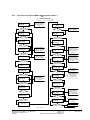
Firmware Flow Diagram MAS-100™: Parameters Mode 4
Parameters Mode 4
push no and yes
button for 5 seconds
and release after this
time
XXXXXXXXX
XXXXXXXXX
yes
no
yes
Clear protocol
data? (Y/N)
yes
no
yes
yes
yes
if Template mode is
active "no" clears the
selected template
no
Print protocol ? (Y/N)
no
no
push no first. Then
change the value
above the cursor with
no. Accept new value
with yes
Time
xx:xx:xx
yes
if Template mode is
active no clears
selected template
no
push no first. Then
change the value
above the cursor with
no. Accept new value
with yes
Date
xx.xx.xx
yes
no
yes
prints data if printer is
connected
yes
yes
no
Print after XX
samplings Y/N
Online print
deactivated is
displayed if no number
is selected
no
yes
yes discharge
batteries LED are
blinking
if yes is pushed
MAS-100 runs at
100 L/min for
anemometer test
no
Change
volumes? (Y/N)
yes
no
no
Volume 1 - 5 = XXXX
Modiy ? (Y/N)
Print calib.
parameters (Y/N)
yes
no
Anemometer
mode? (Y/(N)
Print after XX
samplings Y/N
yes
no
Battery
discharge? (Y/N)
Change online
print mode? Y/N
yes
yes goes back to start
of selected Mode
Date mode:EUR/USA
Modify? (Y/N)
no
clear manual
mode protocols
no
Set time and
date ? (Y/N)
Clr. man. prot.
Modify ? (Y/N)
yes
Back to main menu?
(Y/N)
yes
no
no
with yes activate or
deactivate delay
function
Change
delay? (Y/N)
prints data if printer is
connected
yes
1-5 Volume may be
modified from 0 to
2000 Litres, if 0
volume is selected it
will not be displayed
no
continue next page
MAS100_Mode4_01.vsd
MBV AG, CH-8712 Stäfa +41 44 928 30 80
Released and approved : Hzi
02.2006 /
Version: 01
Revision: 06
MAS-100_Usermanual_blank_010606e.doc
page 31 of 34
Continue: Firmware Flow Diagram MAS-100™: Parameters Mode 4
Select operation
mode? (Y/N)
yes
Choose Manual
Selectableor Template
Mode
no
Select SQS
mode? (Y/N)
yes
no
deactivated
Modify? (Y/N)
SQS: total time
Modify? (Y/N)
yes
total time over the
SQS-cycle is active
no
Select users
menu (Y/N)
yes
no
User menu: on/off
Modify (Y/N)
yes
no
Back to main menu?
(Y/N)
yes
no
start to first menu line
clear protocol data?
goes back to start of
selected mode
MAS100_Mode4_01.vsd
MBV AG, CH-8712 Stäfa +41 44 928 30 80
Released and approved : Hzi
02.2006 /
Version: 01
Revision: 06
MAS-100_Usermanual_blank_010606e.doc
page 32 of 34
20.6
Firmware Flow Diagram MAS-100™: Calibration reminder Mode 5
Calibration reminder Mode 5
yes
Initial activation
calibration reminder;
only the first time in
use
no
MAS100 V5.XX
S/N: XXXXX
Set calibration
reminder Y/N
yes
if you push no the
MAS will go off
with no change month
from 0-12 . "0" means
no reminder is active.
12 month is the
default setting
no
Set reminder to
12 month? Y/N
yes
no
Are you sure to
set xx month Y/N
yes
if you push no the
MAS will go off
no
program continues in
normal running mode
Calibration
valid: XX month
MAS100_Mode5_01_Cal_Rem.vsd
MBV AG, CH-8712 Stäfa +41 44 928 30 80
Released and approved : Hzi
02.2006 /
Version: 01
Revision: 06
MAS-100_Usermanual_blank_010606e.doc
page 33 of 34
20.7
CE Conformity declaration
CE Konformitätserklärung
CE Conformity Declaration
MBV AG
Laubisrütistr. 24
CH-8712 Stäfa
Tel.: +41 44 928 30 80
Fax: +41 44 928 30 89
www.mbv.ch
Das bezeichnete Gerät entspricht der einschlägigen grundlegenden Anforderungen der
aufgeführten EG-Richtlinien und Normen. Bei Änderungen am Gerät verliert diese Erklärung
ihre Gültigkeit.
The device named below fulfills the relevant fundamental requirements of the EC directives
and standards listed. In the case of unauthorized modification to the device, this declaration
becomes invalid.
Gerätebezeichnung
Gerätetyp
MAS-100™
Mikrobiologischer Luftkeimsammler
Device name:
Device type
MAS-100™
Microbiological Air Sampler
EMV: EG-Richtlinien/Normen
EN 55022 Class B, EN 61000-4-2,
ENV 50140, ENV 50204,
EN 61000-4-4, ENV 50141
Relevant directives/standards:
MBV AG
H. Zingre
A. Barmettler
Director
Director
Staefa, 4. Februar 2003
MBV AG, CH-8712 Stäfa +41 44 928 30 80
Released and approved : Hzi
02.2006 /
Version: 01
Revision: 06
MAS-100_Usermanual_blank_010606e.doc
page 34 of 34