1
552 User Guide and Technical Information
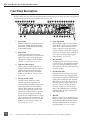
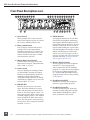
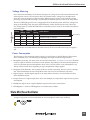
9) Link LED
Illuminates blue when Inputs are linked
as a stereo pair. Stereo linking configurations are selected in the Setup Menu. See
Stereo Linking.
10) Input Pan
Controls the Left/Right balance of the
input signal to the outputs.
11) Input Polarity (Inputs 2 and 4 only)
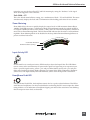
Illuminates blue when the Input’s polarity is reversed. To toggle the state of the
input polarity, hold the selected input’s
PFL then press the Battery Check button.
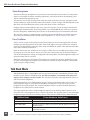
12) Zoom LED
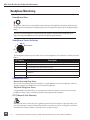
Illuminates blue when the Output Meter
is in Zoom Mode. Zoom Mode allows
the user to view higher resolution in the
0 to +20 dBu range on the Output Meter.
To toggle Zoom on and off, press in on
the Headphone Controller. The Zoom
Function is defeated in the Setup Menu
Function Meter Ballistics. See Metering.
13) Time Code LED
Time Code is selected from the Setup
Menu. When on, the LED flashes blue
when Time Code is active but not being
received The LED Illuminates solid blue
when the unit is receiving valid time
code. Time Code is connected to the
RTN B TA3 connector and is stamped to
files generated by the 552’s recorder. See
Time Code.
14) AES Out LED
Illuminates blue when one or more of
the AES outputs is active. See Digital
Outputs.
15) Output Meter
Multi -segment LED output meter. Scale
is normally -30 dBu to +20 dBu. In Zoom
Mode, scale changes from 0 dBu to
+20 dBu. To engage Zoom mode, press
in on the Headphone Controller. See
Metering.
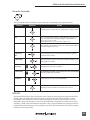
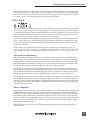
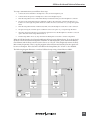
16) Recorder Controller
Controls the Integrated Digital Recorder. Record Mode is enabled in the
Setup Menu. When enabled, push up
to Record, press in to Pause/Stop, push
down to Play, push left to Rewind, push
right to Fast Forward. See Digital Audio
Recorder.
17) Record LED
Indicates the status of the recording media. The LED is off when the recorder is
in standby mode. Flashes yellow when
no SD card is inserted. Illuminates solid
red while recording, flashes red when
record is pending. Illuminates solid
green while in playback mode. Flashes
green while playback is paused. Illuminates solid yellow when media is busy.
The LED is off when recorder is off.
18) Slate/Tone LED
Illuminates yellow when either the slate
mic or tone is latched on.
19) Slate Mic/Tone Switch
Slide left to activate the Slate Microphone, slide again to deactivate. For
momentary action hold for one second
or longer. Slide Slate Mic/Tone switch
right to activate the Tone Oscillator. Tone
will latch if held for 2 seconds or longer,
slide again to deactivate. This switch
also functions as input type and phantom power select. See Tone Oscillator/
Slate Mic. See also Talk Back for additional
features.
20) Limiter LED
Each Output has its own Limiter LED.
The LEDs Illuminate yellow when the
Output Limiter is active. See Output
Limiter.
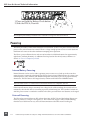
21) Power LED
When powering with internal AA batteries, the LED illuminates green when
the 552 is on, turns yellow when low
voltage point is reached, and flashes
red when voltage reaches a critical level
and batteries should be changed. When
powering with external DC, the LED
illuminates green when the 552 is on,
flashes red when voltage drops below
the set threshold. See Powering.
9