1
Advanced searching options – at your fingertips!
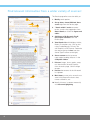
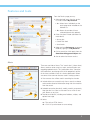
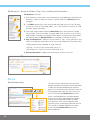
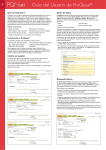
The Advanced Search page:
1. Multiple query boxes offer the
ability to create more complex
searches and limit query fields to
specific indexed information* such
as Author, Title, or Subject.
5
3
1
2. Further define the search query
with additional selections* available
in the Limit to area, such as:
• 2a – Source Type
2b
2a
• 2b – Document Type
• 2c – Language
3. Search Tools, such as Thesauri,*
Field Code lists,* Search Tips, and
Subject Areas, are available.
2c
4. Pre-select Display Options before
viewing the Search Results Page:
• 4a – Sort by
• 4b – Items per page
4a
4b
5. Other Search Options allow for
searching for Tables & Figures,
Look Up Citation, Command Line
search, or Text Match search.
*Determined by the database(s) selected
for searching.
Search tips for every searcher
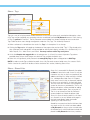
ProQuest allows you to search quickly and efficiently, and provides advanced search features.
Quick Tips
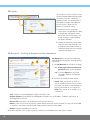
• Broaden your search by separating your search terms with OR; combine terms or phrases with AND.
• Look for phrases by enclosing them in quotation marks, e.g. “wind energy.”
• Use Advanced Search to search using specific information, such as Authors or Subjects.
• Use Publications to browse issues of a newspaper, journal, or magazine, or search for articles in a specific magazine.
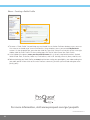
How ProQuest interprets your search
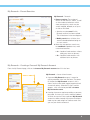
You can search just by typing words into the search form (Basic, Advanced, or on Results pages) and ProQuest will:
• Look for results containing all your search terms. A search on “wind energy” is the same as a search for
“wind AND energy”, and will not retrieve results with just the word “wind” or just the word “energy”.
4