1
Gigaset E360 / SWZ-PTT en / English for Internet / overview.fm / 30.08.2006
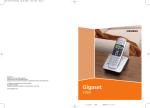
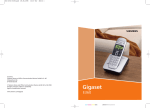
The handset at a glance
The handset at a glance
1 Direct dialling keys (I to III)
2 Display in idle status (example)
3 Battery charge level
eVU
(1/3 charged to fully charged)
1
13
U
2
3
09:19
§§Menu §
4
12
5
11
6
10
9
= flashes: battery almost flat
e V U flashes: battery charging
4 Display keys (page 12)
5 Control key (page 12)
6 End call key, On/off key
End call, cancel function, go back one menu
level (press briefly), back to idle status (press
and hold), activate/deactivate handset
(press and hold in idle status)
7 Hash key
Keypad lock on/off (press and hold in
idle status, page 12)
Insert a pause (press and hold for dialling)
Switch between uppercase/lowercase letters and digits for text entry (page 32)
8 Microphone
9 Recall key
Enter flash (press and hold)
10 Connection socket for headset
11 Talk key
Answer a call, start dialling
12 Handsfree key
Toggle between earpiece and
handsfree mode
Lights up: handsfree activated
– Flashes: incoming call
13 Voice portal key
7
8
Base station at a glance
Version 4, 16.09.2005
1
1 Registration/paging key
1