1
DBT-268 Bluetooth GPS Receiver User’s Guide
3. Operation
3.1 Getting Start
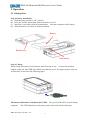
Step 1: Battery Installation
(a) Slide the power switch to “off” position.
(b) Press the “PUSH” button then slide the bottom cover off.
(c) Insert the Li-ion battery into the compartment. Note the orientation of the battery.
(d) Slide the bottom cover back to locked condition.
Battery
Bottom cover
Push button
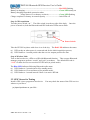
Step 2: Charge
Please charge the battery to full capacity when first time to use. Connect the attached
adaptor cord to the mini USB jack (Please note that this port is for charge purpose only, not
for data link), as shown in the following figure.
The battery indication is with dual-color LEDs. The green LED will be on until charge
completes. The LED indication for the battery status is described in the following.
DBT-268 User’s Guide v1.0
7