1
Kollmorgen
System Startup
4.1.2.3 Setting Drive Address
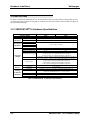
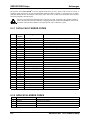
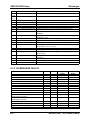
The following table shows the MultiDrop DIP switch address settings (Note: OFF = 0)
Drive Address
Switch 5
Switch 4
Switch3
Switch 2
Switch 1
* 0 (single unit addressing only)
0
0
0
0
0
1
0
0
0
0
1
2
0
0
0
1
0
3
0
0
0
1
1
4
0
0
1
0
0
5
0
0
1
0
1
6
0
0
1
1
0
7
0
0
1
1
1
8
0
1
0
0
0
9
0
1
0
0
1
A
0
1
0
1
0
B
0
1
0
1
1
C
0
1
1
0
0
D
0
1
1
0
1
E
0
1
1
1
0
F
0
1
1
1
1
G
1
0
0
0
0
H
1
0
0
0
1
I
1
0
0
1
0
J
1
0
0
1
1
K
1
0
1
0
0
L
1
0
1
0
1
M
1
0
1
1
0
N
1
0
1
1
1
O
1
1
0
0
0
P
1
1
0
0
1
Q
1
1
0
1
0
R
1
1
0
1
1
S
1
1
1
0
0
T
1
1
1
0
1
U
1
1
1
1
0
V
1
1
1
1
1
Table 4-1 Address Switch Settings
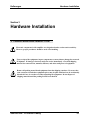
CAUTION
When the switch setting is set for binary 0, the drive assumes a single-line serial
configuration.
SERVOSTAR® CD Product Family
4-3