1
Check Absolute Tolerance
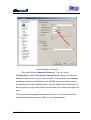
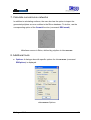
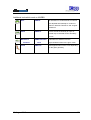
Then check Rhino’s Absolute Tolerance. To do so, select
Tools/Options and then Document Properties/Units. Adjust the tolerance
setting to match the size of your current model. If it is too small, rhinoreverse
will assign a high level of flexibility to the NURBS surfaces in order to reach
the transitional tolerance between them. This will lead to increased amount of
data to process, longer times required to calculate new surfaces and larger file
sizes.
We recommend setting absolute tolerance value to 0.01 when working with
models with dimensions around 1000 mm (see figure above).
30 August 2013
7