1
Include and Using
The include keyword is used to include code from another file. The included file is essentially inserted into
the calling file as if it were written into that file. This allows spreading the code for you script among several
different files. This is one method of keeping your code organized into manageable chunks, or keeping often
used functions in a single file. The format is Include “myIncludeFile.rsl” and should be found at the beginning
of your script before any function declarations.
Below, is a sample file with a couple of functions which do some simple text manipulation. If we were to find
that we were using these functions rather often, we could easily include these functions in our scripts.
TextStuff.rsl:
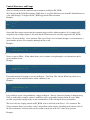
Function RevText$(S$)
; This function reverses the order of the characters of a supplied string
Length = Len(S)
For i = 0 To Length
Result$ = Result + Mid$(S, Length - i, 1)
Next
Return Result
End Function
Function FirstCap$(S$)
; This function capitalizes the first character in a supplied string
; A holds the upper case version of the first character on the left side
; of the string
A$ = Upper$(Left$(S, 1))
; B holds the rest of the string
B$ = Right$(S, Len(S) - 1)
; Result now holds the reunited string
Result$ = A + B
Return Result
End Function
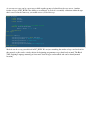
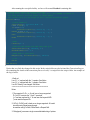
Including and using this file is a very simple process:
myScript.rsl:
Include “TextStuff.rsl”
Function Main()
Player = Actor()
namePlayer$ = Name(Player)
nameReverse$ = RevText(namePlayer)
; Change the players name to it’s reverse spelling
SetName(Player, nameReverse)
End Function