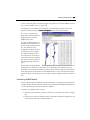
1
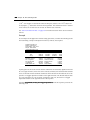
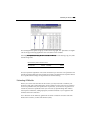
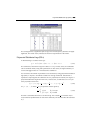
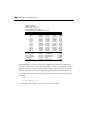
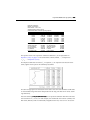
Chapter 13. Time Series Regression In this section we discuss single equation regression techniques that are important for the analysis of time series data: testing for serial correlation, estimation of ARMA models, using polynomial distributed lags, and testing for unit roots in potentially nonstationary time series. The chapter focuses on the specification and estimation of time series models. A number of related topics are discussed elsewhere: standard multiple regression techniques are discussed in Chapters 11 and 12, forecasting and inference are discussed extensively in Chapters 14 and 15, vector autoregressions are discussed in Chapter 20, and state space models and the Kalman filter are discussed in Chapter 22. Serial Correlation Theory A common finding in time series regressions is that the residuals are correlated with their own lagged values. This serial correlation violates the standard assumption of regression theory that disturbances are not correlated with other disturbances. The primary problems associated with serial correlation are: OLS is no longer efficient among linear estimators. Furthermore, since prior residuals help to predict current residuals, we can take advantage of this information to form a better prediction of the dependent variable. Standard errors computed using the textbook OLS formula are not correct, and are generally understated. If there are lagged dependent variables on the right-hand side, OLS estimates are biased and inconsistent. EViews provides tools for detecting serial correlation and estimation methods that take account of its presence. In general, we will be concerned with specifications of the form: y t = x t ′¯ + u t u t = z t − 1 ′° + " t (13.1) where x t is a vector of explanatory variables observed at time t, z t − 1 is a vector of variables known in the previous period, b and g are vectors of parameters, u t is a disturbance term, and " t is the innovation in the disturbance. The vector z t − 1 may contain lagged values of u, lagged values of e, or both. 296Chapter 13. Time Series Regression 296 The disturbance u t is termed the unconditional residual. It is the residual based on the ′ structural component ( x t ¯ ) but not using the information contained in z t − 1 . The innovation " t is also known as the one-period ahead forecast error or the prediction error. It is the difference between the actual value of the dependent variable and a forecast made on the basis of the independent variables and the past forecast errors. The First-Order Autoregressive Model The simplest and most widely used model of serial correlation is the first-order autoregressive, or AR(1), model. The AR(1) model is specified as y t = x t ′¯ + u t u t = ½u t − 1 + " t (13.2) The parameter r is the first-order serial correlation coefficient. In effect, the AR(1) model incorporates the residual from the past observation into the regression model for the current observation. Higher-Order Autoregressive Models More generally, a regression with an autoregressive process of order p, AR(p) error is given by y t = x t ′¯ + u t u t = ½ 1u t − 1 + ½2 u t − 2 + … + ½ p u t − p + " t (13.3) The autocorrelations of a stationary AR(p) process gradually die out to zero, while the partial autocorrelations for lags larger than p are zero. Testing for Serial Correlation Before you use an estimated equation for statistical inference (e.g. hypothesis tests and forecasting), you should generally examine the residuals for evidence of serial correlation. EViews provides several methods of testing a specification for the presence of serial correlation. The Durbin-Watson Statistic EViews reports the Durbin-Watson (DW) statistic as a part of the standard regression output. The Durbin-Watson statistic is a test for first-order serial correlation. More formally, the DW statistic measures the linear association between adjacent residuals from a regression model. The Durbin-Watson is a test of the hypothesis r = 0 in the specification: u t = ½u t − 1 + " t . (13.4) Testing for Serial Correlation297 297 If there is no serial correlation, the DW statistic will be around 2. The DW statistic will fall below 2 if there is positive serial correlation (in the worst case, it will be near zero). If there is negative correlation, the statistic will lie somewhere between 2 and 4. Positive serial correlation is the most commonly observed form of dependence. As a rule of thumb, with 50 or more observations and only a few independent variables, a DW statistic below about 1.5 is a strong indication of positive first order serial correlation. See Johnston and DiNardo (1997, Chapter 6.6.1) for a thorough discussion on the Durbin-Watson test and a table of the significance points of the statistic. There are three main limitations of the DW test as a test for serial correlation. First, the distribution of the DW statistic under the null hypothesis depends on the data matrix x. The usual approach to handling this problem is to place bounds on the critical region, creating a region where the test results are inconclusive. Second, if there are lagged dependent variables on the right-hand side of the regression, the DW test is no longer valid. Lastly, you may only test the null hypothesis of no serial correlation against the alternative hypothesis of first-order serial correlation. Two other tests of serial correlationthe Q-statistic and the Breusch-Godfrey LM test overcome these limitations, and are preferred in most applications. Correlograms and Q-statistics If you select View/Residual Tests/Correlogram-Q-statistics on the equation toolbar, EViews will display the autocorrelation and partial autocorrelation functions of the residuals, together with the Ljung-Box Q-statistics for high-order serial correlation. If there is no serial correlation in the residuals, the autocorrelations and partial autocorrelations at all lags should be nearly zero, and all Q-statistics should be insignificant with large p-values. Note that the p-values of the Q-statistics will be computed with the degrees of freedom adjusted for the inclusion of ARMA terms in your regression. There is evidence that some care should be taken in interpreting the results of a Ljung-Box test applied to the residuals from an ARMAX specification (see Dezhbaksh, 1990, for simulation evidence on the finite sample performance of the test in this setting). Details on the computation of correlograms and Q-statistics are provided in greater detail in Chapter 7, Series, on page 167. Serial Correlation LM Test Selecting View/Residual Tests/Serial Correlation LM Test carries out the Breusch-Godfrey Lagrange multiplier test for general, high-order, ARMA errors. In the Lag Specification dialog box, you should enter the highest order of serial correlation to be tested. The null hypothesis of the test is that there is no serial correlation in the residuals up to the specified order. EViews reports a statistic labeled F-statistic and an Obs*R-squared 298Chapter 13. Time Series Regression 298 2 2 ( N R the number of observations times the R-square) statistic. The N R statistic has 2 an asymptotic  distribution under the null hypothesis. The distribution of the F-statistic is not known, but is often used to conduct an informal test of the null. See Serial Correlation LM Test on page 297 for further discussion of the serial correlation LM test. Example As an example of the application of these testing procedures, consider the following results from estimating a simple consumption function by ordinary least squares: Dependent Variable: CS Method: Least Squares Date: 08/19/97 Time: 13:03 Sample: 1948:3 1988:4 Included observations: 162 Variable Coefficient Std. Error t-Statistic Prob. C GDP CS(-1) -9.227624 0.038732 0.952049 5.898177 0.017205 0.024484 -1.564487 2.251193 38.88516 0.1197 0.0257 0.0000 R-squared Adjusted R-squared S.E. of regression Sum squared resid Log likelihood Durbin-Watson stat 0.999625 0.999621 13.53003 29106.82 -650.3497 1.672255 Mean dependent var S.D. dependent var Akaike info criterion Schwarz criterion F-statistic Prob(F-statistic) 1781.675 694.5419 8.066045 8.123223 212047.1 0.000000 A quick glance at the results reveals that the coefficients are statistically significant and the fit is very tight. However, if the error term is serially correlated, the estimated OLS standard errors are invalid and the estimated coefficients will be biased and inconsistent due to the presence of a lagged dependent variable on the right-hand side. The Durbin-Watson statistic is not appropriate as a test for serial correlation in this case, since there is a lagged dependent variable on the right-hand side of the equation. Selecting View/Residual Tests/Correlogram-Q-statistics from this equation produces the following view: Estimating AR Models299 299 The correlogram has spikes at lags up to three and at lag eight. The Q-statistics are significant at all lags, indicating significant serial correlation in the residuals. Selecting View/Residual Tests/Serial Correlation LM Test and entering a lag of 4 yields the following result: Breusch-Godfrey Serial Correlation LM Test: F-statistic Obs*R-squared 3.654696 13.96215 Probability Probability 0.007109 0.007417 The test rejects the hypothesis of no serial correlation up to order four. The Q-statistic and the LM test both indicate that the residuals are serially correlated and the equation should be re-specified before using it for hypothesis tests and forecasting. Estimating AR Models Before you use the tools described in this section, you may first wish to examine your model for other signs of misspecification. Serial correlation in the errors may be evidence of serious problems with your specification. In particular, you should be on guard for an excessively restrictive specification that you arrived at by experimenting with ordinary least squares. Sometimes, adding improperly excluded variables to your regression will eliminate the serial correlation. For a discussion of the efficiency gains from the serial correlation correction and some Monte-Carlo evidence, see Rao and Griliches (l969). 300Chapter 13. Time Series Regression 300 First-Order Serial Correlation To estimate an AR(1) model in EViews, open an equation by selecting Quick/Estimate Equation and enter your specification as usual, adding the expression AR(1) to the end of your list. For example, to estimate a simple consumption function with AR(1) errors, CS t = c 1 + c 2 GDP t + u t u t = ½u t − 1 + " t (13.5) you should specify your equation as cs c gdp ar(1) EViews automatically adjusts your sample to account for the lagged data used in estimation, estimates the model, and reports the adjusted sample along with the remainder of the estimation output. Higher-Order Serial Correlation Estimating higher order AR models is only slightly more complicated. To estimate an AR(k), you should enter your specification, followed by expressions for each AR term you wish to include. If you wish to estimate a model with autocorrelations from one to five: CS t = c 1 + c 2 GDP t + u t u t = ½1u t − 1 + ½ 2 u t − 2 + … + ½5u t − 5 + " t (13.6) you should enter cs c gdp ar(1) ar(2) ar(3) ar(4) ar(5) By requiring that you enter all of the autocorrelations you wish to include in your model, EViews allows you great flexibility in restricting lower order correlations to be zero. For example, if you have quarterly data and want to include a single term to account for seasonal autocorrelation, you could enter cs c gdp ar(4) Nonlinear Models with Serial Correlation EViews can estimate nonlinear regression models with additive AR errors. For example, suppose you wish to estimate the following nonlinear specification with an AR(2) error: c CS t = c 1 + GDP t 2 + u t ut = c 3u t − 1 + c 4u t − 2 + " t (13.7) Estimating AR Models301 301 Simply specify your model using EViews expressions, followed by an additive term describing the AR correction enclosed in square brackets. The AR term should contain a coefficient assignment for each AR lag, separated by commas: cs = c(1) + gdp^c(2) + [ar(1)=c(3), ar(2)=c(4)] EViews transforms this nonlinear model by differencing, and estimates the transformed nonlinear specification using a Gauss-Newton iterative procedure (see How EViews Estimates AR Models on page 302). Two-Stage Regression Models with Serial Correlation By combining two-stage least squares or two-stage nonlinear least squares with AR terms, you can estimate models where there is correlation between regressors and the innovations as well as serial correlation in the residuals. If the original regression model is linear, EViews uses the Marquardt algorithm to estimate the parameters of the transformed specification. If the original model is nonlinear, EViews uses Gauss-Newton to estimate the AR corrected specification. For further details on the algorithms and related issues associated with the choice of instruments, see the discussion in TSLS with AR errors, beginning on page 278. Output from AR Estimation When estimating an AR model, some care must be taken in interpreting your results. While the estimated coefficients, coefficient standard errors, and t-statistics may be interpreted in the usual manner, results involving residuals differ from those computed in OLS settings. To understand these differences, keep in mind that there are two different residuals associated with an AR model. The first are the estimated unconditional residuals, u t = y t − x t ′b , (13.8) which are computed using the original variables, and the estimated coefficients, b. These residuals are the errors that you would observe if you made a prediction of the value of y t using contemporaneous information, but ignoring the information contained in the lagged residual. Normally, there is no strong reason to examine these residuals, and EViews does not automatically compute them following estimation. The second set of residuals are the estimated one-period ahead forecast errors, " . As the name suggests, these residuals represent the forecast errors you would make if you computed forecasts using a prediction of the residuals based upon past values of your data, in addition to the contemporaneous information. In essence, you improve upon the uncondi- 302Chapter 13. Time Series Regression 302 tional forecasts and residuals by taking advantage of the predictive power of the lagged residuals. 2 For AR models, the residual-based regression statisticssuch as the R , the standard error of regression, and the Durbin-Watson statistic reported by EViews are based on the one-period ahead forecast errors, " . A set of statistics that is unique to AR models is the estimated AR parameters, ½ i . For the simple AR(1) model, the estimated parameter ½ is the serial correlation coefficient of the unconditional residuals. For a stationary AR(1) model, the true r lies between 1 (extreme negative serial correlation) and +1 (extreme positive serial correlation). The stationarity condition for general AR(p) processes is that the inverted roots of the lag polynomial lie inside the unit circle. EViews reports these roots as Inverted AR Roots at the bottom of the regression output. There is no particular problem if the roots are imaginary, but a stationary AR model should have all roots with modulus less than one. How EViews Estimates AR Models Textbooks often describe techniques for estimating AR models. The most widely discussed approaches, the Cochrane-Orcutt, Prais-Winsten, Hatanaka, and Hildreth-Lu procedures, are multi-step approaches designed so that estimation can be performed using standard linear regression. All of these approaches suffer from important drawbacks which occur when working with models containing lagged dependent variables as regressors, or models using higher-order AR specifications; see Davidson and MacKinnon (1994, pp. 329341), Greene (1997, p. 600607). EViews estimates AR models using nonlinear regression techniques. This approach has the advantage of being easy to understand, generally applicable, and easily extended to nonlinear specifications and models that contain endogenous right-hand side variables. Note that the nonlinear least squares estimates are asymptotically equivalent to maximum likelihood estimates and are asymptotically efficient. To estimate an AR(1) model, EViews transforms the linear model y t = x t ′¯ + u t u t = ½u t − 1 + " t (13.9) into the nonlinear model, y t = ½y t − 1 + ( x t − ½x t − 1 )′¯ + " t , (13.10) by substituting the second equation into the first, and rearranging terms. The coefficients r and b are estimated simultaneously by applying a Marquardt nonlinear least squares algorithm to the transformed equation. See Appendix D, Estimation Algorithms and Options, on page 645 for details on nonlinear estimation. ARIMA Theory303 303 For a nonlinear AR(1) specification, EViews transforms the nonlinear model y t = f ( x t, ¯ ) + u t u t = ½u t − 1 + " t (13.11) into the alternative nonlinear specification y t = ½y t − 1 + f ( x t, ¯ ) − ½f ( x t − 1, ¯ ) + " t (13.12) and estimates the coefficients using a Marquardt nonlinear least squares algorithm. Higher order AR specifications are handled analogously. For example, a nonlinear AR(3) is estimated using nonlinear least squares on the equation y t = ( ½ 1 y t − 1 + ½ 2 y t − 2 + ½ 3 y t − 3 ) + f ( x t, ¯ ) − ½ 1 f ( x t − 1, ¯ ) − ½ 2 f ( x t − 2, ¯ ) − ½ 3 f ( x t − 3, ¯ ) + " t (13.13) For details, see Fair (1984, pp. 210214), and Davidson and MacKinnon (1996, pp. 331 341). ARIMA Theory ARIMA (autoregressive integrated moving average) models are generalizations of the simple AR model that use three tools for modeling the serial correlation in the disturbance: The first tool is the autoregressive, or AR, term. The AR(1) model introduced above uses only the first-order term but, in general, you may use additional, higher-order AR terms. Each AR term corresponds to the use of a lagged value of the residual in the forecasting equation for the unconditional residual. An autoregressive model of order p, AR(p) has the form u t = ½ 1u t − 1 + ½ 2 u t − 2 + … + ½ p u t − p + " t . (13.14) The second tool is the integration order term. Each integration order corresponds to differencing the series being forecast. A first-order integrated component means that the forecasting model is designed for the first difference of the original series. A second-order component corresponds to using second differences, and so on. The third tool is the MA, or moving average term. A moving average forecasting model uses lagged values of the forecast error to improve the current forecast. A first-order moving average term uses the most recent forecast error, a second-order term uses the forecast error from the two most recent periods, and so on. An MA(q) has the form: u t = " t + µ 1" t − 1 + µ 2 " t − 2 + … + µ q " t − q . (13.15) 304Chapter 13. Time Series Regression 304 Please be aware that some authors and software packages use the opposite sign convention for the q coefficients so that the signs of the MA coefficients may be reversed. The autoregressive and moving average specifications can be combined to form an ARMA(p,q) specification u t = ½1u t − 1 + ½ 2 u t − 2 + … + ½p u t − p + " t + µ1" t − 1 + µ2 " t − 2 + … + µq " t − q (13.16) Although econometricians typically use ARIMA models applied to the residuals from a regression model, the specification can also be applied directly to a series. This latter approach provides a univariate model, specifying the conditional mean of the series as a constant, and measuring the residuals as differences of the series from its mean. Principles of ARIMA Modeling (Box-Jenkins 1976) In ARIMA forecasting, you assemble a complete forecasting model by using combinations of the three building blocks described above. The first step in forming an ARIMA model for a series of residuals is to look at its autocorrelation properties. You can use the correlogram view of a series for this purpose, as outlined in Correlogram on page 165. This phase of the ARIMA modeling procedure is called identification (not to be confused with the same term used in the simultaneous equations literature). The nature of the correlation between current values of residuals and their past values provides guidance in selecting an ARIMA specification. The autocorrelations are easy to interpreteach one is the correlation coefficient of the current value of the series with the series lagged a certain number of periods. The partial autocorrelations are a bit more complicated; they measure the correlation of the current and lagged series after taking into account the predictive power of all the values of the series with smaller lags. The partial autocorrelation for lag 6, for example, measures the added predictive power of u t − 6 when u 1, …, u t − 5 are already in the prediction model. In fact, the partial autocorrelation is precisely the regression coefficient of u t − 6 in a regression where the earlier lags are also used as predictors of u t . If you suspect that there is a distributed lag relationship between your dependent (lefthand) variable and some other predictor, you may want to look at their cross correlations before carrying out estimation. The next step is to decide what kind of ARIMA model to use. If the autocorrelation function dies off smoothly at a geometric rate, and the partial autocorrelations were zero after one lag, then a first-order autoregressive model is appropriate. Alternatively, if the autocorrelations were zero after one lag and the partial autocorrelations declined geometrically, a first-order moving average process would seem appropriate. If the autocorrelations appear Estimating ARIMA Models305 305 to have a seasonal pattern, this would suggest the presence of a seasonal ARMA structure (see Seasonal ARMA Terms on page 308). For example, we can examine the correlogram of the DRI Basics housing series in the HS.WF1 workfile by selecting View/Correlogram from the HS series toolbar: The wavy cyclical correlogram with a seasonal frequency suggests fitting a seasonal ARMA model to HS. The goal of ARIMA analysis is a parsimonious representation of the process governing the residual. You should use only enough AR and MA terms to fit the properties of the residuals. The Akaike information criterion and Schwarz criterion provided with each set of estimates may also be used as a guide for the appropriate lag order selection. After fitting a candidate ARIMA specification, you should verify that there are no remaining autocorrelations that your model has not accounted for. Examine the autocorrelations and the partial autocorrelations of the innovations (the residuals from the ARIMA model) to see if any important forecasting power has been overlooked. EViews provides views for diagnostic checks after estimation. Estimating ARIMA Models EViews estimates general ARIMA specifications that allow for right-hand side explanatory variables. Despite the fact that these models are sometimes termed ARIMAX specifications, we will refer to this general class of models as ARIMA. To specify your ARIMA model, you will: Difference your dependent variable, if necessary, to account for the order of integration. Describe your structural regression model (dependent variables and regressors) and add any AR or MA terms, as described above. 306Chapter 13. Time Series Regression 306 Differencing The d operator can be used to specify differences of series. To specify first differencing, simply include the series name in parentheses after d. For example, d(gdp) specifies the first difference of GDP, or GDPGDP(1). More complicated forms of differencing may be specified with two optional parameters, n and s. d(x,n) specifies the n-th order difference of the series X: n d ( x, n ) = ( 1 − L ) x , (13.17) where L is the lag operator. For example, d(gdp,2) specifies the second order difference of GDP: d(gdp,2) = gdp – 2*gdp(–1) + gdp(–2) d(x,n,s) specifies n-th order ordinary differencing of X with a seasonal difference at lag s: n s d ( x, n, s ) = ( 1 − L ) ( 1 − L )x . (13.18) For example, d(gdp,0,4) specifies zero ordinary differencing with a seasonal difference at lag 4, or GDPGDP(4). If you need to work in logs, you can also use the dlog operator, which returns differences in the log values. For example, dlog(gdp) specifies the first difference of log(GDP) or log(GDP)log(GDP(1)). You may also specify the n and s options as described for the simple d operator, dlog(x,n,s). There are two ways to estimate integrated models in EViews. First, you may generate a new series containing the differenced data, and then estimate an ARMA model using the new data. For example, to estimate a Box-Jenkins ARIMA(1, 1, 1) model for M1, you can enter: series dm1 = d(m1) ls dm1 c ar(1) ma(1) Alternatively, you may include the difference operator d directly in the estimation specification. For example, the same ARIMA(1,1,1) model can be estimated by the one-line command ls d(m1) c ar(1) ma(1) The latter method should generally be preferred for an important reason. If you define a new variable, such as DM1 above, and use it in your estimation procedure, then when you forecast from the estimated model, EViews will make forecasts of the dependent variable DM1. That is, you will get a forecast of the differenced series. If you are really interested in forecasts of the level variable, in this case M1, you will have to manually transform the Estimating ARIMA Models307 307 forecasted value and adjust the computed standard errors accordingly. Moreover, if any other transformation or lags of M1 are included as regressors, EViews will not know that they are related to DM1. If, however, you specify the model using the difference operator expression for the dependent variable, d(m1), the forecasting procedure will provide you with the option of forecasting the level variable, in this case M1. The difference operator may also be used in specifying exogenous variables and can be used in equations without ARMA terms. Simply include them in the list of regressors in addition to the endogenous variables. For example, d(cs,2) c d(gdp,2) d(gdp(-1),2) d(gdp(-2),2) time is a valid specification that employs the difference operator on both the left-hand and righthand sides of the equation. ARMA Terms The AR and MA parts of your model will be specified using the keywords ar and ma as part of the equation. We have already seen examples of this approach in our specification of the AR terms above, and the concepts carry over directly to MA terms. For example, to estimate a second-order autoregressive and first-order moving average error process ARMA(2,1), you would include expressions for the AR(1), AR(2), and MA(1) terms along with your other regressors: c gov ar(1) ar(2) ma(1) Once again, you need not use the AR and MA terms consecutively. For example, if you want to fit a fourth-order autoregressive model to take account of seasonal movements, you could use AR(4) by itself: c gov ar(4) You may also specify a pure moving average model by using only MA terms. Thus, c gov ma(1) ma(2) indicates an MA(2) model for the residuals. The traditional Box-Jenkins or ARMA models do not have any right-hand side variables except for the constant. In this case, your list of regressors would just contain a C in addition to the AR and MA terms. For example, c ar(1) ar(2) ma(1) ma(2) is a standard Box-Jenkins ARMA (2,2). 308Chapter 13. Time Series Regression 308 Seasonal ARMA Terms Box and Jenkins (1976) recommend the use of seasonal autoregressive (SAR) and seasonal moving average (SMA) terms for monthly or quarterly data with systematic seasonal movements. A SAR(p) term can be included in your equation specification for a seasonal autoregressive term with lag p. The lag polynomial used in estimation is the product of the one specified by the AR terms and the one specified by the SAR terms. The purpose of the SAR is to allow you to form the product of lag polynomials. Similarly, SMA(q) can be included in your specification to specify a seasonal moving average term with lag q. The lag polynomial used in estimation is the product of the one defined by the MA terms and the one specified by the SMA terms. As with the SAR, the SMA term allows you to build up a polynomial that is the product of underlying lag polynomials. For example, a second-order AR process without seasonality is given by ut = ½ 1ut − 1 + ½ 2ut − 2 + " t , (13.19) n which can be represented using the lag operator L, L x t = x t − n as 2 ( 1 − ½ 1L − ½ 2 L )u t = " t . (13.20) You can estimate this process by including ar(1) and ar(2) terms in the list of regressors. With quarterly data, you might want to add a sar(4) expression to take account of seasonality. If you specify the equation as sales c inc ar(1) ar(2) sar(4) then the estimated error structure would be: 2 4 ( 1 − ½ 1L − ½ 2 L ) ( 1 − ÁL )u t = " t . (13.21) The error process is equivalent to: u t = ½ 1 u t − 1 + ½ 2 u t − 2 + Áu t − 4 − Á½ 1 u t − 5 − Á½ 2 u t − 6 + " t . (13.22) The parameter f is associated with the seasonal part of the process. Note that this is an AR(6) process with nonlinear restrictions on the coefficients. As another example, a second-order MA process without seasonality may be written u t = "t + µ 1"t − 1 + µ 2 "t − 2 , (13.23) or using lag operators, 2 u t = ( 1 + µ 1 L + µ 2 L )" t . (13.24) You can estimate this second-order process by including both the MA(1) and MA(2) terms in your equation specification. Estimating ARIMA Models309 309 With quarterly data, you might want to add sma(4) to take account of seasonality. If you specify the equation as cs c ad ma(1) ma(2) sma(4) then the estimated model is: CS t = ¯ 1 + ¯ 2 AD t + u t 2 4 u t = ( 1 + µ 1 L + µ 2 L ) ( 1 + !L )" t (13.25) The error process is equivalent to u t = " t + µ 1 " t − 1 + µ 2 " t − 2 + !" t − 4 + !µ 1 " t − 5 + !µ 2 " t − 6 . (13.26) The parameter w is associated with the seasonal part of the process. This is just an MA(6) process with nonlinear restrictions on the coefficients. You can also include both SAR and SMA terms. Output from ARIMA Estimation The output from estimation with AR or MA specifications is the same as for ordinary least squares, with the addition of a lower block that shows the reciprocal roots of the AR and MA polynomials. If we write the general ARMA model using the lag polynomial r(L) and q(L) as ½ ( L )u t = µ ( L )" t , (13.27) then the reported roots are the roots of the polynomials −1 ½( x ) = 0 and −1 µ( x ) = 0 . (13.28) The roots, which may be imaginary, should have modulus no greater than one. The output will display a warning message if any of the roots violate this condition. If r has a real root whose absolute value exceeds one or a pair of complex reciprocal roots outside the unit circle (that is, with modulus greater than one), it means that the autoregressive process is explosive. If q has reciprocal roots outside the unit circle, we say that the MA process is noninvertible, which makes interpreting and using the MA results difficult. However, noninvertibility poses no substantive problem, since as Hamilton (1994, p. 65) notes, there is always an equivalent representation for the MA model where the reciprocal roots lie inside the unit circle. Accordingly, you should re-estimate your model with different starting values until you get a moving average process that satisfies invertibility. Alternatively, you may wish to turn off MA backcasting (see Backcasting MA terms on page 312). 310Chapter 13. Time Series Regression 310 If the estimated MA process has roots with modulus close to one, it is a sign that you may have over-differenced the data. The process will be difficult to estimate and even more difficult to forecast. If possible, you should re-estimate with one less round of differencing. Consider the following example output from ARMA estimation: Dependent Variable: R Method: Least Squares Date: 08/14/97 Time: 16:53 Sample(adjusted): 1954:06 1993:07 Included observations: 470 after adjusting endpoints Convergence achieved after 25 iterations Backcast: 1954:01 1954:05 Variable Coefficient Std. Error t-Statistic Prob. C AR(1) SAR(4) MA(1) SMA(4) 8.614804 0.983011 0.941898 0.513572 -0.960399 0.961559 0.009127 0.018788 0.040236 0.000601 8.959208 107.7077 50.13275 12.76402 -1598.423 0.0000 0.0000 0.0000 0.0000 0.0000 R-squared Adjusted R-squared S.E. of regression Sum squared resid Log likelihood Durbin-Watson stat Inverted AR Roots Inverted MA Roots 0.991557 0.991484 0.269420 33.75296 -47.98992 2.099958 .99 .99 -.99 Mean dependent var S.D. dependent var Akaike info criterion Schwarz criterion F-statistic Prob(F-statistic) .98 -.00+.99i -.00 -.99i 6.978830 2.919607 0.225489 0.269667 13652.76 0.000000 -.51 This estimation result corresponds to the following specification: y t = 8.61 + u t 4 4 ( 1 − 0.98L ) ( 1 − 0.94 L )u t = ( 1 + 0.51L ) ( 1 − 0.96L )" t (13.29) or equivalently, to y t = 0.0088 + 0.98y t − 1 + 0.94 y t − 4 − 0.92 y t − 5 + " t + 0.51" t − 1 − 0.96" t − 4 − 0.49" t − 5 (13.30) Note that the signs of the MA terms may be reversed from those in textbooks. Note also that the inverted roots have moduli very close to one, which is typical for many macro time series models. Estimation Options ARMA estimation employs the same nonlinear estimation techniques described earlier for AR estimation. These nonlinear estimation techniques are discussed further in Chapter 12, Additional Regression Methods, on page 283. Estimating ARIMA Models311 311 You may need to use the Estimation Options dialog box to control the iterative process. EViews provides a number of options that allow you to control the iterative procedure of the estimation algorithm. In general, you can rely on the EViews choices but on occasion you may wish to override the default settings. Iteration Limits and Convergence Criterion Controlling the maximum number of iterations and convergence criterion are described in detail in Iteration and Convergence Options on page 651. Derivative Methods EViews always computes the derivatives of AR coefficients analytically and the derivatives of the MA coefficients using finite difference numeric derivative methods. For other coefficients in the model, EViews provides you with the option of computing analytic expressions for derivatives of the regression equation (if possible) or computing finite difference numeric derivatives in cases where the derivative is not constant. Furthermore, you can choose whether to favor speed of computation (fewer function evaluations) or whether to favor accuracy (more function evaluations) in the numeric derivative computation. Starting Values for ARMA Estimation As discussed above, models with AR or MA terms are estimated by nonlinear least squares. Nonlinear estimation techniques require starting values for all coefficient estimates. Normally, EViews determines its own starting values and for the most part this is an issue that you need not be concerned about. However, there are a few times when you may want to override the default starting values. First, estimation will sometimes halt when the maximum number of iterations is reached, despite the fact that convergence is not achieved. Resuming the estimation with starting values from the previous step causes estimation to pick up where it left off instead of starting over. You may also want to try different starting values to ensure that the estimates are a global rather than a local minimum of the squared errors. You might also want to supply starting values if you have a good idea of what the answers should be, and want to speed up the estimation process. To control the starting values for ARMA estimation, click on the Options button in the Equation Specification dialog. Among the options which EViews provides are several alternatives for setting starting values that you can see by accessing the drop-down menu labeled Starting Coefficient Values for ARMA. ARMA EViews default approach is OLS/TSLS, OLS/TSLS which runs a preliminary estimation without the ARMA terms and then starts nonlinear estimation from those values. An alternative is to use fractions of the OLS or TSLS coefficients as starting values. You can choose .8, .8 .5, .5 .3, .3 or you can start with all coefficient values set equal to zero. 312Chapter 13. Time Series Regression 312 The final starting value option is User Supplied. Supplied Under this option, EViews uses the coefficient values that are in the coefficient vector. To set the starting values, open a window for the coefficient vector C by double clicking on the icon, and editing the values. To properly set starting values, you will need a little more information about how EViews assigns coefficients for the ARMA terms. As with other estimation methods, when you specify your equation as a list of variables, EViews uses the built-in C coefficient vector. It assigns coefficient numbers to the variables in the following order: First are the coefficients of the variables, in order of entry. Next come the AR terms in the order you typed them. The SAR, MA, and SMA coefficients follow, in that order. Thus the following two specifications will have their coefficients in the same order: y c x ma(2) ma(1) sma(4) ar(1) y sma(4)c ar(1) ma(2) x ma(1) You may also assign values in the C vector using the param command: param c(1) 50 c(2) .8 c(3) .2 c(4) .6 c(5) .1 c(6) .5 The starting values will be 50 for the constant, 0.8 for X, 0.2 for AR(1), 0.6 for MA(2), 0.1 for MA(1) and 0.5 for SMA(4). Following estimation, you can always see the assignment of coefficients by looking at the Representations view of your equation. You can also fill the C vector from any estimated equation (without typing the numbers) by choosing Procs/Update Coefs from Equation in the equation toolbar. Backcasting MA terms By default, EViews backcasts MA terms (Box and Jenkins, 1976). Consider an MA(q) model of the form y t = X t ′¯ + u t u t = " t + µ 1" t − 1 + µ 2 " t − 2 + … + µ q " t − q (13.31) Given initial values, ¯ and Á , EViews first computes the unconditional residuals u t for t = 1, 2, ¼,T, and uses the backward recursion: " t = u t − Á 1 " t + 1 − … − Á q " t + q (13.32) to compute backcast values of e to " − ( q − 1) . To start this recursion, the q values for the innovations beyond the estimation sample are set to zero: " T + 1 = " T + 2 = … = " T + q = 0 . Next, a forward recursion is used to estimate the values of the innovations (13.33) Estimating ARIMA Models313 313 " t = u t − Á 1" t − 1 − … − Á q " t − q , (13.34) using the backcasted values of the innovations (to initialize the recursion) and the actual residuals. If your model also includes AR terms, EViews will r-difference the u t to eliminate the serial correlation prior to performing the backcast. Lastly, the sum of squared residuals (SSR) is formed as a function of the b and f, using the fitted values of the lagged innovations: ssr ( ¯, Á ) = T § t = p+1 2 ( y t − X t ′¯ − Á 1 " t − 1 − … − Á q " t − q ) . (13.35) This expression is minimized with respect to b and f. The backcast step, forward recursion, and minimization procedures, are repeated until the estimates of b and f converge. If backcasting is turned off, the values of the pre-sample e are set to zero: " −( q − 1) = … = " 0 = 0 , (13.36) and forward recursion is used to solve for the remaining values of the innovations. Dealing with Estimation Problems Since EViews uses nonlinear least squares algorithms to estimate ARMA models, all of the discussion in Chapter 12, Solving Estimation Problems on page 289, is applicable, especially the advice to try alternative starting values. There are a few other issues to consider that are specific to estimation of ARMA models. First, MA models are notoriously difficult to estimate. In particular, you should avoid high order MA terms unless absolutely required for your model as they are likely to cause estimation difficulties. For example, a single large spike at lag 57 in the correlogram does not necessarily require you to include an MA(57) term in your model unless you know there is something special happening every 57 periods. It is more likely that the spike in the correlogram is simply the product of one or more outliers in the series. By including many MA terms in your model, you lose degrees of freedom, and may sacrifice stability and reliability of your estimates. If the underlying roots of the MA process have modulus close to one, you may encounter estimation difficulties, with EViews reporting that it cannot improve the sum-of-squares or that it failed to converge in the maximum number of iterations. This behavior may be a sign that you have over-differenced the data. You should check the correlogram of the series to determine whether you can re-estimate with one less round of differencing. Lastly, if you continue to have problems, you may wish to turn off MA backcasting. 314Chapter 13. Time Series Regression 314 TSLS with ARIMA errors Two-stage least squares or instrumental variable estimation with ARIMA poses no particular difficulties. For a detailed discussion of how to estimate TSLS specifications with ARMA errors, see Two-stage Least Squares on page 275. Nonlinear Models with ARMA errors EViews will estimate nonlinear ordinary and two-stage least squares models with autoregressive error terms. For details, see the extended discussion in Nonlinear Least Squares beginning on page 282. EViews does not currently estimate nonlinear models with MA errors. You can, however, use the state space object to specify and estimate these models (see ARMAX(2, 3) with a Random Coefficient on page 568). Weighted Models with ARMA errors EViews does not have procedures to automatically estimate weighted models with ARMA error termsif you add AR terms to a weighted model, the weighting series will be ignored. You can, of course, always construct the weighted series and then perform estimation using the weighted data and ARMA terms. Diagnostic Evaluation If your ARMA model is correctly specified, the residuals from the model should be nearly white noise. This means that there should be no serial correlation left in the residuals. The Durbin-Watson statistic reported in the regression output is a test for AR(1) in the absence of lagged dependent variables on the right-hand side. As discussed above, more general tests for serial correlation in the residuals can be carried out with View/Residual Tests/ Correlogram-Q-statistic and View/Residual Tests/Serial Correlation LM Test . Test For the example seasonal ARMA model, the residual correlogram looks as follows: Polynomial Distributed Lags (PDLs)315 315 The correlogram has a significant spike at lag 5 and all subsequent Q-statistics are highly significant. This result clearly indicates the need for respecification of the model. Polynomial Distributed Lags (PDLs) A distributed lag is a relation of the type y t = w t ± + ¯ 0 x t + ¯ 1 x t − 1 + … + ¯ kx t − k + " t (13.37) The coefficients b describe the lag in the effect of x on y. In many cases, the coefficients can be estimated directly using this specification. In other cases, the high collinearity of current and lagged values of x will defeat direct estimation. You can reduce the number of parameters to be estimated by using polynomial distributed lags (PDLs) to impose a smoothness condition on the lag coefficients. Smoothness is expressed as requiring that the coefficients lie on a polynomial of relatively low degree. A polynomial distributed lag model with order p restricts the b coefficients to lie on a p-th order polynomial of the form 2 ¯ j = ° 1 + ° 2 ( j − c ) + ° 3 ( j − c ) + … + ° p + 1( j − c ) p (13.38) for j = 1, 2, ¼, k, where c is a pre-specified constant given by c = (k ) ⁄ 2 (k − 1 ) ⁄ 2 if p is even if p is odd (13.39) The PDL is sometimes referred to as an Almon lag. The constant c is included only to avoid numerical problems that can arise from collinearity and does not affect the estimates of b. 316Chapter 13. Time Series Regression 316 This specification allows you to estimate a model with k lags of x using only p parameters (if you choose p > k, EViews will return a Near Singular Matrix error). If you specify a PDL, EViews substitutes Equation (13.38) into Equation (13.37) yielding yt = ® + ° 1z1 + ° 2 z2 + … + ° p + 1z p + 1 + "t (13.40) where z1 = x t + x t − 1 + … + x t − k z 2 = − cxt + ( 1 − c )x t − 1 + … + ( k − c )x t − k " " … p p (13.41) p zp + 1 = ( −c ) x t + ( 1 − c ) x t − 1 + … + ( k − c ) x t − k Once we estimate g from Equation (13.40), we can recover the parameters of interest b, and their standard errors using the relationship described in Equation (13.38). This procedure is straightforward since b is a linear transformation of g. The specification of a polynomial distributed lag has three elements: the length of the lag k, the degree of the polynomial (the highest power in the polynomial) p, and the constraints that you want to apply. A near end constraint restricts the one-period lead effect of x on y to be zero: p ¯ − 1 = ° 1 + ° 2 ( − 1 − c ) + … + ° p + 1( − 1 − c ) = 0 . (13.42) A far end constraint restricts the effect of x on y to die off beyond the number of specified lags: p ¯ k + 1 = ° 1 + ° 2 ( k + 1 − c ) + … + ° p + 1( k + 1 − c ) = 0 . (13.43) If you restrict either the near or far end of the lag, the number of g parameters estimated is reduced by one to account for the restriction; if you restrict both the near and far end of the lag, the number of g parameters is reduced by two. By default, EViews does not impose constraints. How to Estimate Models Containing PDLs You specify a polynomial distributed lag by the pdl term, with the following information in parentheses, each separated by a comma in this order: The name of the series. The lag length (the number of lagged values of the series to be included). The degree of the polynomial. A numerical code to constrain the lag polynomial (optional): Polynomial Distributed Lags (PDLs)317 317 1 constrain the near end of the lag to zero. 2 constrain the far end. 3 constrain both ends. You may omit the constraint code if you do not want to constrain the lag polynomial. Any number of pdl terms may be included in an equation. Each one tells EViews to fit distributed lag coefficients to the series and to constrain the coefficients to lie on a polynomial. For example, ls sales c pdl(orders,8,3) fits SALES to a constant, and a distributed lag of current and eight lags of ORDERS, where the lag coefficients of ORDERS lie on a third degree polynomial with no endpoint constraints. Similarly, ls div c pdl(rev,12,4,2) fits DIV to a distributed lag of current and 12 lags of REV, where the coefficients of REV lie on a 4th degree polynomial with a constraint at the far end. The pdl specification may also be used in two-stage least squares. If the series in the pdl is exogenous, you should include the PDL of the series in the instruments as well. For this purpose, you may specify pdl(*) as an instrument; all pdl variables will be used as instruments. For example, if you specify the TSLS equation as sales c inc pdl(orders(-1),12,4) with instruments fed fed(-1) pdl(*) the distributed lag of ORDERS will be used as instruments together with FED and FED(1). Polynomial distributed lags cannot be used in nonlinear specifications. Example The distributed lag model of industrial production (IP) on money (M1) yields the following results: 318Chapter 13. Time Series Regression 318 Dependent Variable: IP Method: Least Squares Date: 08/15/97 Time: 17:09 Sample(adjusted): 1960:01 1989:12 Included observations: 360 after adjusting endpoints Variable Coefficient Std. Error t-Statistic Prob. C M1 M1(-1) M1(-2) M1(-3) M1(-4) M1(-5) M1(-6) M1(-7) M1(-8) M1(-9) M1(-10) M1(-11) M1(-12) 40.67568 0.129699 -0.045962 0.033183 0.010621 0.031425 -0.048847 0.053880 -0.015240 -0.024902 -0.028048 0.030806 0.018509 -0.057373 0.823866 0.214574 0.376907 0.397099 0.405861 0.418805 0.431728 0.440753 0.436123 0.423546 0.413540 0.407523 0.389133 0.228826 49.37171 0.604449 -0.121944 0.083563 0.026169 0.075035 -0.113143 0.122245 -0.034944 -0.058795 -0.067825 0.075593 0.047564 -0.250728 0.0000 0.5459 0.9030 0.9335 0.9791 0.9402 0.9100 0.9028 0.9721 0.9531 0.9460 0.9398 0.9621 0.8022 R-squared Adjusted R-squared S.E. of regression Sum squared resid Log likelihood Durbin-Watson stat 0.852398 0.846852 7.643137 20212.47 -1235.849 0.008255 Mean dependent var S.D. dependent var Akaike info criterion Schwarz criterion F-statistic Prob(F-statistic) 71.72679 19.53063 6.943606 7.094732 153.7030 0.000000 Taken individually, none of the coefficients on lagged M1 are statistically different from 2 zero. Yet the regression as a whole has a reasonable R with a very significant F-statistic (though with a very low Durbin-Watson statistic). This is a typical symptom of high collinearity among the regressors and suggests fitting a polynomial distributed lag model. To estimate a fifth-degree polynomial distributed lag model with no constraints, enter the commands: smpl 59.1 89.12 ls ip c pdl(m1,12,5) The following result is reported at the top of the equation window: Polynomial Distributed Lags (PDLs)319 319 Dependent Variable: IP Method: Least Squares Date: 08/15/97 Time: 17:53 Sample(adjusted): 1960:01 1989:12 Included observations: 360 after adjusting endpoints Variable Coefficient Std. Error t-Statistic Prob. C PDL01 PDL02 PDL03 PDL04 PDL05 PDL06 40.67311 -4.66E-05 -0.015625 -0.000160 0.001862 2.58E-05 -4.93E-05 0.815195 0.055566 0.062884 0.013909 0.007700 0.000408 0.000180 49.89374 -0.000839 -0.248479 -0.011485 0.241788 0.063211 -0.273611 0.0000 0.9993 0.8039 0.9908 0.8091 0.9496 0.7845 R-squared Adjusted R-squared S.E. of regression Sum squared resid Log likelihood Durbin-Watson stat 0.852371 0.849862 7.567664 20216.15 -1235.882 0.008026 Mean dependent var S.D. dependent var Akaike info criterion Schwarz criterion F-statistic Prob(F-statistic) 71.72679 19.53063 6.904899 6.980462 339.6882 0.000000 This portion of the view reports the estimated coefficients g of the polynomial in Equation (13.38) on page 315. The terms PDL01, PDL02, PDL03, , correspond to z 1, z 2, … in Equation (13.40). The implied coefficients of interest ¯ j in equation (1) are reported at the bottom of the table, together with a plot of the estimated polynomial: The Sum of Lags reported at the bottom of the table is the sum of the estimated coefficients on the distributed lag and has the interpretation of the long run effect of M1 on IP, assuming stationarity. Note that selecting View/Coefficient Tests for an equation estimated with PDL terms tests the restrictions on g, not on b. In this example, the coefficients on the fourth- (PDL05) and fifth-order (PDL06) terms are individually insignificant and very close to zero. To test the 320Chapter 13. Time Series Regression 320 joint significance of these two terms, click View/Coefficient Tests/Wald-Coefficient Restrictions and type c(6)=0, c(7)=0 in the Wald Test dialog box. (See Chapter 14 for an extensive discussion of Wald tests in EViews.) EViews displays the result of the joint test: Wald Test: Equation: IP_PDL Null Hypothesis: F-statistic Chi-square C(6)=0 C(7)=0 0.039852 0.079704 Probability Probability 0.960936 0.960932 There is no evidence to reject the null hypothesis, suggesting that you could have fit a lower order polynomial to your lag structure. Nonstationary Time Series The theory behind ARMA estimation is based on stationary time series. A series is said to be (weakly or covariance) stationary if the mean and autocovariances of the series do not depend on time. Any series that is not stationary is said to be nonstationary. A common example of a nonstationary series is the random walk: y t = y t − 1 + "t , (13.44) where e is a stationary random disturbance term. The series y has a constant forecast value, conditional on t, and the variance is increasing over time. The random walk is a difference stationary series since the first difference of y is stationary: y t − y t − 1 = ( 1 − L )y t = " t . (13.45) A difference stationary series is said to be integrated and is denoted as I( d) where d is the order of integration. The order of integration is the number of unit roots contained in the series, or the number of differencing operations it takes to make the series stationary. For the random walk above, there is one unit root, so it is an I(1) series. Similarly, a stationary series is I(0). Standard inference procedures do not apply to regressions which contain an integrated dependent variable or integrated regressors. Therefore, it is important to check whether a series is stationary or not before using it in a regression. The formal method to test the stationarity of a series is the unit root test.