1
 Step3. Set the lens position
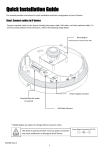
1) Remove the dome cover. 2) Set the lens position by rotating the camera gimbal; to pan, rotate the reinforced lower body of the gimbal; to tilt, vertically adjust the camera gimbal. A. To adjust lens position, rotate the camera gimbal B. To pan, rotate the lower body of the camera gimbal C. Tilt the lens by vertically adjusting the camera gimbal !
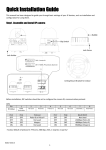
Caution Refrain from continuously rotating the camera gimbal with excessive force to a single direction as it is attached with the IR‐LED cable inside the dome. 3) The figure and table below explains the lens switch settings. SW1 PAL/NTSC
SW2 TELE SW3 WIDE SW4 SW5 FAR NEAR SW6 Auto‐
Focus NC3502 Ver1.3 3