1
Overview of APM Medical
47
Add/Edit Chargeback (7.20.3.1)
Chargeback claims can be entered where a single document claiming a
rebate from several contracts is received. There are three parts to a
chargeback claim:
• Chargeback header, top frame. Holds customer’s reference number,
dates, and the total chargeback amount (sum of all claims).
• Chargeback Schedule frame. Holds customer, contract, and control
amounts and date details.
• Chargeback line within Chargeback Schedule frame. Holds product
claim details. Details of individual chargeback lines are entered. The
total of these lines must equal the claim field in the top screen.
Product details are entered through an F6 options menu. An asterisk
(*) next to a claim line indicates a discrepancy and an associated
reason code exists for that claim line.
A status of E is automatically given a start of data entry and remains until
the sum of the associated product lines plus discrepancies equals the
control total.
Note When chargebacks have been entered through this option, each
customer line and associated products can be viewed as per a single
billback claim at View Product Claims (7.20.3.18.1.F6.D). Editing of the
claim can only be carried out through Add/Edit Chargeback.
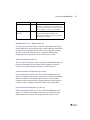
Chargeback Header Frame Options
F6 options from the Chargeback header frame allow various associated
functions to be performed after all the information has been completed.
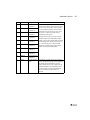
Options
Number Descriptions
Approve Chargeback
A
Approves all customer lines on the chargeback.
All chargeback lines must have entered amounts
equal and greater than 0.
View Unapplied Cash
B
View cash amounts that are available to be
applied.
Post Chargeback
C
Posts claims into MFG/PRO. General ledger
entries, credit notes, and vouchers are created at
time of posting. To post a chargeback, the status
must be approved.
Table 2.9
Chargeback Header
Frame Options