1
1.2 EYE-02 Camera Description
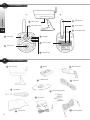
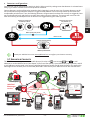
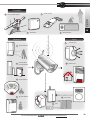
Please refer to the picture A on the inside front cover of this manual.
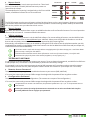
You can access, control and configure the EYE-02 camera via web by establishing your account
on www.jablotool.com.
1.3 EYE-02 Camera Internal Components
User Guide
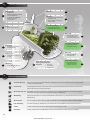
Internal components of the EYE-02 camera are displayed in the picture “D” on the back cover of this manual.
2. Camera Installation
Before installing the camera, ensure you have a SIM card provided by your GSM operator with an activated
EDGE/GPRS internet connection and MMS service.
Some SIM cards are protected by a PIN code. It is necessary to disable the SIM card's PIN code protection.
To do this, insert the SIM into your mobile phone and disable the PIN security code. If this is not observed,
the EYE-02 camera may not operate correctly.
EN
2.1 Package Contents
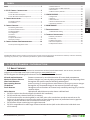
Unpack the camera and check the package contents. Please refer to picture “B” on inside front cover of this manual.
Use only batteries, chargers and accessories approved by JABLOCOM for use with this particular model.
The use of any unapproved device may invalidate any approval or warranty, and may be dangerous.
2.2 Installation
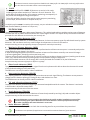
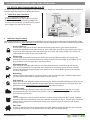
For an extended graphic version of the installation procedure, see the Quick Guide manual.
Before inserting the SIM card into the camera make sure that:
- PIN protection is disabled
- MMS service is enabled
- Internet data access is enabled
•
Insert the SIM card and battery into the camera
•
Install the camera in the selected position
Unscrew and open the battery cover.
Mark and drill out mounting holes in the wall.
Mount the camera holder firmly.
•
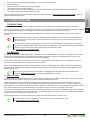
Insert the SIM card.
Adjust the camera position.
Connect the camera to a power source
EYE-02.ENG.MAN.User_Manual.21
-4-
Insert the battery and screw the cover back on.
Remove the lens protection.