1
Reference GL/eDEP/USER/1/1.13
eDEP
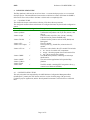
8.2.3 Debugging
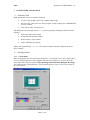
The following hints are given for application debugging • Activate Java console (Launch Java Web Start, go to Files -> Preferences, in Advanced sub
menu, check Activate Java console.)
•
When you are debugging, you may need to empty the cache of the navigator.
•
Sometimes the application cache for Java Web Start is corrupted. Launch Java Web Start to
check.
8.2.4
JNLP file example
Please note that JNLP files are very sensitive to character encoding. Under Windows, use Word Pad
and save as “text only” (not MS-DOS text, nor Unicode text).
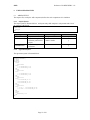
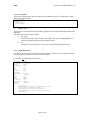
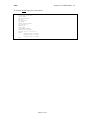
File atc.jnlp :
<?xml version="1.0" encoding="utf-8"?>
<jnlp spec="1.0+"
codebase="http://pc-speech13/webstart/edep"
href="atc.jnlp">
<information>
<title>GSDK Demonstrator</title>
<vendor>Eurocontrol Experimental Centre</vendor>
<description>ATC Application</description>
<icon href="images/GSDK.gif"/>
<offline-allowed/>
</information>
<resources>
<j2se version="1.3+"/>
<jar href="lib/applications.jar"/>
<jar href="lib/gsdk.jar"/>
</resources>
<security>
<all-permissions/>
</security>
<application-desc main-class="atcapp.ATCapplication">
<argument>-r</argument>
<argument>resources/atcapp/resources.gsdk</argument>
<argument>-trans</argument>
<argument>-x</argument>
<application-desc/>
</jnlp>
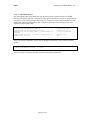
Note:
If the application requires all security permission, setting the java.security.policy property for the JVM
is useless. The behaviour of the application will be the same as if we use a java.policy file like this:
grant
{
permission java.security.AllPermission;
};
Page 60 of 63