1
IV. Adjusting skew feed
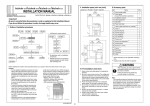
2. If there is any clearance, adjust the height by
turning the adjustment screw on the right side
viewed from the back.
Clockwise: The rear side will move up.
Counterclockwise: The rear side will move down.
• If further adjustment is required, adjust the height
by using the adjustment screw on the left side
viewed from the back together.
Clockwise: The rear side will move up.
Counterclockwise: The rear side will move down.
1. Close the reverse automatic document feeder.
2. Plug the power cord into the power outlet and
turn on the machine.
3. Check how the edges of the chart are misaligned.
The amount of the deviation of the chart will be X.
X
Deviation in + (plus)
X
Deviation in - (minus)
9J07IXC043DA
4. Place the chart in the document feeding tray (with
the side having an arrow facing up).
A0HUIXC008DA
3. Affix the labels B to the position shown below.
A01HIXC011DC
5. Make copies 5 times repeatedly in single side
mode.
6. Fold all 5 sample copies as illustrated and check
for any deviation.
Deviation on the sample will be Y.
A0HUIXC009DA
Y
Deviation in + (plus)
Y
Deviation in - (minus)
9J07IXC043DA
Installation Manual
E-4
Y111070-8