1
Socket
4. Socket Assembly on Base
Assemble the Base with the Nipple-attached Socket in as
shown in the diagram.
Note 1) Make sure that the Heatpipe Grooves are alignedwhen
assembling the Socket with the Base.
Note 2) If the Base and Socket are not properly assembled, it
may cause the Base to be unbalanced. Make sure that
the Base is properly set into the Socket.
Base
Nipple
Heatpipe
Groove
5. Installation of Base Assembly
Insert the Rubber Rings into the Nipples installed on the
Base Assembly.
Align and insert the Base Assembly’s Nipples into the VGA
Card’s Mounting Holes.
(Note)
Make sure that the Base Assembly is installed so that the
center of the Base Assembly is closely adhered to the center of
the VGA Chipset.
Base
Assembly
Rubber Ring
Nipple
6. Installation of Fixing Nuts on the Base
Assembly
Place a PVC Washer over each Nipple installed on the rear
side of the VGA card.
Slightly screw each of the four Spring-attached Fixing Nuts
onto each Nipple, then tighten each Fixing Nut one rotation
at a time until all are completely tightened.
Note 1) Make sure that the VGA Chipset and Base Assembly
do not get disconnected while simultaneously flipping
the Base Assembly and VGA Card.
Note 2) Fully tightening one Fixing Nut at a time may result in
damaging the VGA Chipset. Please tighten each
Fixing Nut one rotation at a time until all are completely
tightened.
Rubber
Ring
Mounting
Hole
Fixing Nut
PVC Washer
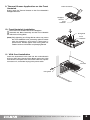
7. Thermal Grease Application on the Base
Evenly apply the Thermal Grease on the Heatpipe Grooves of
the Base.
Thermal Grease
Heatpipe
Groove
8. Rear Heatsink Installation
Insert the Rear Heatsink in the direction of the slot (in the
direction of the arrow) from the VGA Card’s center as
shown on the diagram.
Insert the Rear Heatsink so that the Heatpipe’s straight line
section is closely adhered to the Base’s Heatpipe Grooves.
Note 1) Make sure that the Heatpipes do not come in contact
with the side of the VGA Card when connecting the
Rear Heatsink with the VGA Card. Heatpipe must be
distanced by at least 3 mm from the PCB side.
Heatpipe
Groove
Note 2) Make sure that the Heatsink Fins do not come in
contact with the rear side of the VGA Card or with other
components when connecting the Rear Heatsink with
the VGA Card.
Rear Heatsink
※
The specifications of any product may change without prior notice to improve performance.
4