1
im Vertrieb von
CAMBOARD
Electronics
Contents
Contents
1
2
3
4
4.1
4.2
4.3
5
5.1
5.2
5.3
6
6.1
6.2
6.3
7
Introduction
Getting Started
Overview
Your RC-7B / RC-7BE
Defining the RC-7B Front Panel
Defining the RC-7BE Front Panel
Defining the RC-7B / RC-7BE Side Panel
Using Your Media / Room Controller
Operating the RC-7B / RC-7BE
Using the Macro Buttons
An Example of Operating the RC-7B / RC-7BE
Flash Memory Upgrade
Downloading from the Internet
Connecting the PC to the RS-232 Port
Upgrading Firmware
Technical Specifications
1
2
2
4
4
5
6
8
11
12
12
13
13
13
13
14
Figures
Figure 1: RC-7B Front Panel
Figure 2: RC-7BE Front Panel
Figure 3: Side Panel of the RC-7B and RC-7BE (Enlarged View)
Figure 4: Side Panel of the RC-7B and RC-7BE
Figure 5: RC-7BE (Front Perspective) Configuration
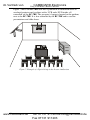
Figure 6: RC-7BE (Rear Perspective) Configuration
Figure 7: Example of a Typical Setup in the Lecture Auditorium
Figure 8: RC-7B / RC-7BE Operation Example
Figure 9: The KFR-Programmer Window
4
5
6
7
8
9
10
12
14
Tables
Table 1: RC-7B Front Panel
Table 2: RC-7BE Front Panel
Table 3: The Commands Configuration Example
Table 4: Technical Specifications of the RC-7B / RC-7BE
www.camboard.de
4
5
11
14
i
Tel. 07131 [email protected]
Fax 07131 911203