1
WI-MOD-9-D Radio Modem
User Manual v1.9
Chapter Four
CONFIGURATION
4.1
Before Configuring
Configuration comprises selecting parameter values for the operation of the WI-MOD-9-D unit.
Four pre-set configurations may be achieved using the four DIP switches. These configurations
cover most applications - refer section 4.7.
Before you start configuration, parameter settings must be decided. The main parameters are:•
Addressing - system address, group address, unit address.
•
Character type. You need to find out the character type of the host devices connected to the
WI-MOD-9-D units. The most common character type is 8 data bits, no parity, 1 start bit
and 1 stop bit.
•
Serial Data Rate. You need to find out the serial data rate used by the host devices. It is
possible to have different serial rates configured at different modules in the same system.
•
Radio Data Rate. You need to decide what radio data rate you wish to use. It does not have
to be the same as the serial data rate. Remember that the radio range for 115200 and 57600
bits/sec will not be as good as that for 19200. We recommend that you use 19200 bits/sec
unless your application requires the faster data rate.
•
Operating mode . You need to decide which operating mode you wish to use. Modes are
transparent or controlled (auto-connect, single-connect, low power mode), error-checked or
no-error-check,. These modes are discussed in more detail in following sections.
The other configuration parameters do not need to be selected, and are provided as a means of
"fine tuning" the operation of the WI-MOD-9-D units.
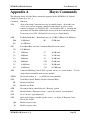
Configuration may be achieved by three different methods:
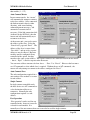
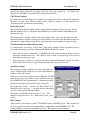
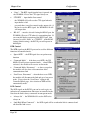
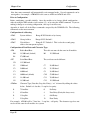
1. Using a Windows configuration program run on a PC. This is the most common way of
configuring.
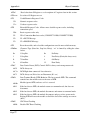
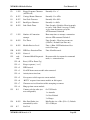
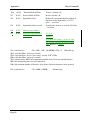
2. Using Hayes AT commands. This method can be performed manually by the user from a PC
terminal (for example, Hyperterminal), or can be performed automatically by the host
device.
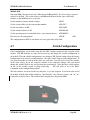
3. Using the four DIP switches located in the end-plate of the module. It is not possible to
select addressing using these switches, so these switches are normally used as a quick way to
try other configuration modes or data rates.
Note: If you are adding a new WI-MOD-9-D to an existing system with older modules, you
will need to set configuration register S21 to 0 to make it compatible with the older
modules.
Older modules have serial number less than xxxx 190 xxxx - for example, serial number 0804
187 9469 will need to have register S21 set to 0.
WI-MOD-9-D Manual v 1.9
Page 32