1
Functions can be controlled by a personal computer:
• Turn the ON or OFF
• Changing input signals
• Button input by remote control
• Reading warning data
• Picture adjustment
By making a programme, you can also control this projector by a personal computer automatically.
[EXAMPLE]
Time
Movement
8:40 a.m.
Turn the power ON
Change input to RGB
Turn the power OFF
Turn the power ON
Change input to VIDEO
Turn the power OFF
0:20 p.m.
1:00 p.m.
3:00 p.m.
5:20 p.m.
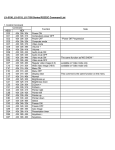
Commands to be used (ASCII code)
00!
00_r1
00"
00!
00_v1
00"
1) Interface
PROTOCOL
BAUD RATE
DATA LENGTH
PARITY BIT
STOP BIT
FLOW CONTROL
RS-232C
9600 [bps]
8 [bits]
NONE
1 [bits]
NONE
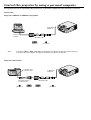
This projector uses RXD, TXD and GND lines for RS-232C control.
For RS-232C cable,the reverse type cable should be used.
2) Control command diagram
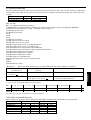
The command is structured by the address code, function code, data code and end code. The length of the
command is different by each function.
Address code
30h 30h
'0' '0'
[Address code]
[Function code]
[Data code]
[End code]
Function code
Function
Function
Data code
Data
Data
End code
0Dh
30h 30h (In ASCII code, '0' '0') fixed.
A code of each fixed control move
A code of each fixed control data (number) and not always indicated.
0Dh (In ASCII code, ' ') fixed.
3) Control sequence
(1)
(2)
(3)
(4)
•
The command from a personal computer to the projector will be sent in 400ms.
The projector will send a return command 400ms* after it has received an encode. if the command isn’t
received correctly, the projector will not send the retirn command.
The personal computer checks the command and confirms that if the command which has been sent has
been executed or not.
This projector sends various codes, other than the return code. When having a control sequence by RS232C, reject other codes from personal computer side.
* : The sending time of return command may delay depending on the condition (during changing the input
signal, playing back the PC card, etc.).
APPENDIX
HEX
ASCII