1
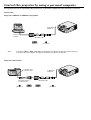
Control this projector by using a personal computer (Continue)
When a personal computer sends the command, data code will not be attached. On the other hand, the projector
which has received a command will attach the recent operating status then send.
[Example ] Input was Video when the operating status of the input terminal was confirmed.
Sending commands
from the PC etc.
30 30 76 49 OD
'0' '0' 'v' 'I' ' '
Status code from
projector
Meaning
Commnd for confirm input
30 30 76 49 76 31 0D
'0' '0' 'v' 'I' 'v' '1' ' '
Command (Input is Video)
carrired out
8) Picture adjustment commands
The picture adjustment commands execute the picture adjustment setting of this projector. If the personal computer doesn’t
send the commands without attaching the data code, the projector which has received the command replays the setting data
as data code.
ASCII
P
Q
R
S
T
CONTRAST
BRIGHTNESS
SHARPNESS
TINT
COLOR
HEX
50h
51h
52h
53h
54h
How to set the grade
The data code of CONTRAST and BRIGHTNESS is structured by the difference data of R from G, the main data and the difference
data of B from G. Use ASCII letters code to set the grade for setting data. Please refer to the table below for HEX code.
ASCII
HEX
'+'
2Bh
'–'
2Dh
[Example 1]
'0'
30h
'1'
31h
'2'
32h
'3'
33h
'4'
34h
'5'
35h
'6'
36h
'7'
37h
'8'
38h
'9'
39h
Set the difference data of R from G to +10, the setting main data to 0 and the difference data of
B from to -5.
Sending commands
from the PC etc.
30 30 50 2B 31 30 2B 30 30 2D 30 35 0D
'0' '0' 'P' '+' '1' '0' '+' '0' '0' '-' '0' '5' ' '
Status code from
projector
Meaning
30 30 50 2B 31 30 2B 30 30 2D 30 35 0D
'0' '0' 'P' '+' '1' '0' '+' '0' '0' '-' '0' '5' ' '
[Example 2]
Command for setting the
picture control
Command received
(Command echo back)
The TINT was set to +10 when the setting status was confirmed.
Sending commands
from the PC etc.
30 30 53 0D
'0' '0' 'S' ' '
Status code from
projector
Meaning
Command for confirm
setting of TINT
Command (setting of TINT
is +10) carried out
30 30 53 2B 31 30 0D
'0' '0' 'S' '+' '1' '0' ' '
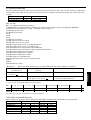
• When the command of CONTRAST or BRIGHTNESS is sent from the computer, the setting of the COLOR TEMP on the
menu is set to “USER”.
• For the same condition as “HIGH” or “LOW” of the COLOR TEMP, change the CONTRAST and BRIGHTNESS settings as
shown below.
COLOR TEMP “HIGH”
CONTRAST
BRIGHTNESS
difference data
of R from G
-10
+00
COLOR TEMP “LOW”
difference data
of B from G
+10
+00
CONTRAST
BRIGHTNESS
difference data
of R from G
+10
+00
difference data
of B from G
-10
+00