1
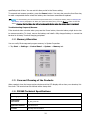
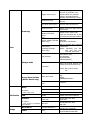
BLUE + 1
F9
BLUE + 2
F10
BLUE + 3
F11
BLUE + 4
Toggle the wireless radio on and off
BLUE + 5
Increase screen brightness
BLUE + 6
Increase volume
BLUE + 8
Decrease screen brightness
BLUE + 9
Decrease volume
BLUE + 0
Delete
BLUE + SP
Align the screen
(Press ESC to exit)
BLUE + Start
Enter suspend mode
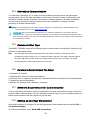
The keypad is color-coded in blue to indicate these key combinations.
☞N OTE: The color-coded indicators are located upper each key.
5.7. RED Key Combinations
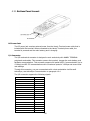
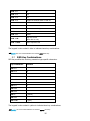
RED key modifies the next key pressed to type specific characters.
Key Combination
Function
RED + 1
!
RED + 2
@
RED + 3
#
RED + 4
$
RED + 5
%
RED + 6
^
RED + 7
&
RED + 8
(
RED + 9
)
RED + .
- (minus)
RED + 0
*
RED + SP
+ (plus)
The keypad is color-coded in yellow to indicate these key combinations.
☞NOTE: The color-coded indicators are located upper each key.
35