1
im Vertrieb von
CAMBOARD
Electronics
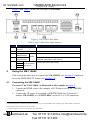
Using the VM-114H4C
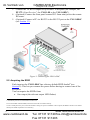
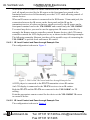
3. Connect the TP RJ-45 outputs to up to four TP acceptors (for example, the
PT-572+ Line Receiver1, the VM-114H or the VM-114H2C).
4. (Optional) Connect the front panel remote IR 3.5mm mini jack to the remote
IR sensor.
5. (Optional) Connect a PC via RS-232 to the RS-232 port on the VM-114H4C
(see Section 5.3).
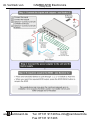
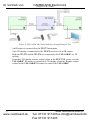
Figure 3: Connecting the VM-114H4C
5.2 Acquiring the EDID
Each input on the VM-114H4C has a factory default EDID loaded2 (see
Section 9). This lets you connect the power before having to connect one of the
acceptors.
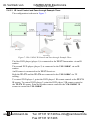
You can acquire the EDID3 from:
• One output (the relevant output LED flashes)
1 Alternatively the TP-574 Twisted Pair Line Receiver
2 The VM-114H4C reads the EDID, which is stored in the non-volatile memory
3 This is usually done only once, when the machine is being set up in an installation. Once acquired, the EDID is saved in non-volatile
memory and further acquisition is not necessary
8
www.camboard.de
KRAMER: SIMPLE CREATIVE TECHNOLOGY
Tel. 07131 [email protected]
Fax 07131 911203