1
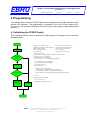
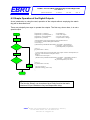
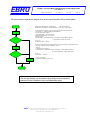
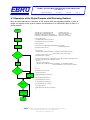
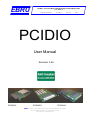
EBRU PCIDIO – PCI Card With 32/64 Optically Isolated Digital I/Os User Manual pcidio-en-um-3v5b.doc 01.12.2014 Rev. 3.5b Side 2 Table of Contents 1 Introduction .......................................................................................................................................... 4 1.1 Scope of Delivery.......................................................................................................................4 1.2 Description .................................................................................................................................4 1.3 System Requirements ...............................................................................................................6 1.4 Software Support .......................................................................................................................6 1.5 Notation in this Manual ..............................................................................................................6 2 Installation ............................................................................................................................................ 7 2.1 Installation under Windows 7/Vista/XP (32/64 Bit)....................................................................7 2.2 Installation under Windows 2000 ..............................................................................................7 3 Hardware............................................................................................................................................... 8 3.1 Block Diagram............................................................................................................................8 3.2 General Notes ............................................................................................................................8 3.3 Digital I/Os..................................................................................................................................9 3.3.1 External Power Supply.......................................................................................................... 10 3.3.2 Outputs of the I/Os ............................................................................................................... 10 3.3.3 Inputs of the I/Os .................................................................................................................. 11 3.3.4 Short-Circuit Recognition ...................................................................................................... 11 3.3.5 Outputs Watchdog................................................................................................................ 11 3.3.6 Controlling I/Os with Interrupts .............................................................................................. 11 3.4 Timer ........................................................................................................................................12 3.5 Managing Interrupts .................................................................................................................12 3.6 Address Jumper.......................................................................................................................13 3.7 General Data............................................................................................................................13 4 Programming .....................................................................................................................................14 4.1 Initialising the PCIDIO Family..................................................................................................14 4.2 Simple Operation of the Digital Outputs ..................................................................................15 4.3 Operation of the Digital Outputs with Watchdog Enabled.......................................................17 4.4 Operation of the Digital Inputs .................................................................................................18 4.5 Digital Inputs as Interrupt Source............................................................................................19 4.6 Handling the Timer with Interrupt Operation ...........................................................................20 4.7 Driver Concept .........................................................................................................................22 5 API Reference ....................................................................................................................................23 5.1 General Functions....................................................................................................................24 pcidioGetCountBoards .............................................................................................................. 24 pcidioInitCards.......................................................................................................................... 24 pcidioDeinitCards ..................................................................................................................... 25 pcidioGetSummaryOfAllBoards ................................................................................................. 25 pcidioGetBoardRevision ............................................................................................................ 27 pcidioGetBoardAddressJumper ................................................................................................. 27 pcidioGetBoardConfigurationData.............................................................................................. 28 pcidioGetDriverVersion ............................................................................................................. 28 pcidioGetPCIConfiguration ........................................................................................................ 29 pcidioSetTimer ......................................................................................................................... 30 EBRU GmbH • Am Laempertsbach 23 • D-99826 Nazza • Germany Tel:+49 36924 30 800 • Fax:+49 36924 42 204 www.ebru.de • [email protected]