1
SETTINGS SCREENS
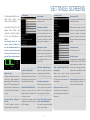
This page describes the windows «Vario config.» and
«User interface setting».
Vario config.
Interface setting
Device Name
Keep screen ON
Enables to customize your FlyNet
To permanently display the smart-
variometer name.
phone/tablet screen.
Variometer sensitivity
Full screen Displays the appli-
vity. If the selection is 30 cm, the
become a problem to combine
app sound is triggered when the
another variometer because the
variometer increases its altitude
PIN code window will no longer be
On Samsung Galaxy S5, the
gain by 30 cm increments.
visible).
der» the multitasking button on
Average vert. speed
Landscape mode
button for a few seconds to dis-
played average vertical ascent du-
Accessible through the displayed menu below, and
using the «3 points» key/button on your Smartphone or
Tablet.
Defines the variometer’s sensiti-
«menu» button is hidden «un-
cation in full screen mode (it may
Enables to select alternative dis-
the left. Just keep pressing the
Pivots the screen 90º.
ration speeds on DATA SCREEN.
play the FlyNet settings window!
Proximity sensor
The available durations are: 6 s,
To quickly switch between the MAP
12 s and 18 s.
SCREEN and the DATA SCREEN
simply swipe your hand over the
Automatic starting flight
Sink alarm / Negative Speed
Send recorded flight (IGC file)
screen even if wearing gloves (this
Flights
smartphones or tablets).
Selects the beeps threshold for
Flight recording starts as soon as
negative speeds. Possibilities :
The flight recording ends when mo-
a 8 km/h speed is reached. Restart
-1, -2.5, -3.5, -4.5 m / s or never.
vement is no longer detected for
the FlyNet App if you want an auto-
approximately 30 seconds (depen-
matic start for the next flight.
Flight auto stop
the first 5 minutes of the flight’s recording.
internet
is established.
Automatic altitude calibration
normal, analogic or vibration (this
As soon as you press «Start the
option is not be available on cer-
Display user name If enabled, Fly-
Flight» (manual or Automatic start),
tain smartphones or tablets).
Selects the beeps sound type :
No sound before «Waiting for
If Flynet Track connected, a FlyNet
To avoid unwanted sound an-
a GPS calibration.
noyance during the takeoff phase.
without
Net Track as soon as a network link
a calibration is done.
take-off»
made
calibration is done. Otherwise, it is
tead of smartphone/tablet
If you need the smartphone/tablet
only to record the flight.
7
Use imperial units for display in ft
(feet), kt (knots), ft/min (feet per minute), and NM (Nautical Miles).
Net pilots names are displayed on
the map depending on FlyNet pilots
display area.
Sound from FlyNet vario ins-
option is not be available on certain
connection are transmitted to Fly-
Variometer sound mode
ding on GPS strength signal). The
automatic stop is desabled during
automaticaly