1
CE-1601M
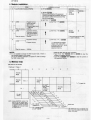
4. Module installation
Mode
1 A
f
Installation command
CD
To use the entire module as RAM file
TlTLE!
ENTER I
64KB RAM module
I
, Usersize
®
NEWO!ENTER!
61KB
[BecaOM the contents ofthe expansion
]:
(62,464B)
memory and data are all cleared, they must
be saved in another memory device if they
are to be used again.
®
B _{"KB'
....... ,...... ..... Proqrarn rnernory
[ BASIC test area ~
INIT"S2:",
J
C -{32KB
",,"
,,',
Expansion mernory
D
[EXpanSion
memory
f
t
r
I'
(j) INIT"S2,", "M"
1
®illffJ
29.5KB
I
48
(30,208B)
1
( [same value as the CE-1600 ]
is used for RAM file.
@ INIT"S2:",
t
Program memory
{'KB
i
@ INIT "S2:", "P" [§'ITgßJ
t
[EXpanSion memory ]
(SO) area increases
32.768 bytes more.
Rest of memory '" RAM file
'
"F"IENTERI
t
32.571 bytes
.
Reserve program area
= 189 bytes
Rest of memory ... RAM file
Directories
48
"P",
1'1.1 ENTER
~
~
I
t
r,
"n" represents the program
memory size. Ocld number
01 KBfrom 2to32 (32 - n) KB
represent the size 01
expansion rnemory,
f-
I
.
;
1
Rest of memory ... RAM file
NOTES:
oDelete all files using the KILL command.
oType TITLE "S2:" IENTERI NEW 0 IENTERI
(1) It is not possible to change the RAM module mode, if there is
data already existing in the module.
One of the following operations is required in order to change
the RAM module mode.
contents of progT~Rlemory.
o Type TITLE EN
NEW
the expansion memory.
(ffITEBJ
to clear the
to clear the contents of
5. Memory map
(Map seen Irom the SC7852)
< Address)
[Bank ]
OOOOH
o
1
2
3
5
4
7
6
System
ROM
-
4000H
I
I
System
ROM
(S2:
I
System
ROM
)
I
!
I
8000H
PC-1600·'
kanji memory
COOOH
1.
,
PC-1600
memory
-,
............ -, ~
-.
"\.
Amo
slol
can
orexpan
ing ban
lor RA
8 bank
"-
-T
~ -,
System
ROM
ROM
16KBX
S2 .
SI:
NOTE:
*1, *2: Japan only
I
~'"
'.;..
...
....'\..~
-,
0
"'-
~~
-,
1
~
~""
~ =x
"\.
CE-1601M'\.,_
( 32KBX 2) '\.,_
'\..
~
"\.
3
~-4
'"
~
,,~
2
,,--
~
""
"'"
-5
~-6
~
ru
CE-1600M(32KB)
or CE-1620M
-------------
-2-
7
Vertica
bank
,ar:::n)'.f.2~
The vertical bank 01 S2 is selecled when
data 01 0 10 9 are written in 28H 01 Ihe 1/0
space. (Write only)