1
1
1.
MODBUS/TCP MAP
Introduction
MODBUS TCP is a protocol commonly used for the integration of a SCADA system. It is also a vendorneutral communication protocol used to monitor and control industrial automation equipment such as PLCs,
sensors, and meters. In order to be fully integrated into industrial systems, Moxa’s switches support
Modbus TCP/IP protocol for real-time monitoring in a SCADA system.
Data Format and Function Code
MODBUS TCP supports different types of data format for reading. The primary four types of them are:
Data Access Type
Bit access
Physical Discrete Inputs
Internal Bits or Physical
Coils
Word access
Physical Input Registers
(16-bit access) Physical Output
Registers
Function
Code
2
1
Function Name
4
3
Read Input Registers
Read Holding Registers
Note
Read Discrete Inputs
Read Coils
Moxa Support
Moxa switches support Function Code 4 with 16-bit (2-word) data access for read-only information.
MODBUS Data Map and Information
Interpretation of Moxa Switches
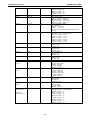
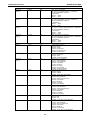
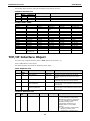
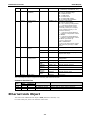
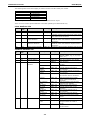
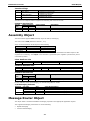
The data map addresses of Moxa switches shown in the following table start from MODBUS address
30001 for Function Code 4. For example, the address offset 0x0000 (hex) equals MODBUS address 30001,
and the address offset 0x0010 (hex) equals MODBUS address 30017. Note that all the information read
from Moxa switches are in hex mode. To interpret the information, refer to the ASCII table for the
translation (e.g. 0x4D = ‘M’, 0x6F = ‘o’).
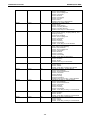
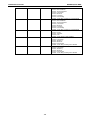
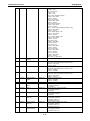
Address Offset
Data Type
0x0000
0x0001
0x0002
0x0010
1 word
1 word
1 word
20 words
0x0030
20 words
Interpretation
Description
System Information
HEX
Vendor ID = 0x1393
Unit ID (Ethernet = 1)
HEX
Product Code = 0x0003
ASCII
Vendor Name = “Moxa”
Word 0 Hi byte = ‘M’
Word 0 Lo byte = ‘o’
Word 1 Hi byte = ‘x’
Word 1 Lo byte = ‘a’
Word 2 Hi byte = ‘\0’
Word 2 Lo byte = ‘\0’
ASCII
Product Name = “EDS-408A”
Word 0 Hi byte = ‘E’
Word 0 Lo byte = ‘D’
Word 1 Hi byte = ‘S’
Word 1 Lo byte = ‘-’
Word 2 Hi byte = ‘4’