1
SDM025, SDM026, SDM250 and SDM275
MPEG-2 4:2:2 Decoder
User Guide
Table of Contents
Table of Contents ........................................................................................................................................1
Patent Notice ...............................................................................................................................................3
General Description.....................................................................................................................................4
Features.......................................................................................................................................................4
Applications .................................................................................................................................................4
Block Diagram .............................................................................................................................................5
Specifications (SDM275) .............................................................................................................................5
Ordering Information....................................................................................................................................6
Hardware Installation...................................................................................................................................7
Onboard Jumpers and Connectors (SDM275)............................................................................................8
Back Panel Connectors ...............................................................................................................................9
Installing the Device Drivers and the MPEG-2 File Player Application .......................................................9
Installing the Device Drivers and the MPEG-2 File Player Application .....................................................10
Using the MPEG-2 File Player Application for Windows...........................................................................12
Control Panel Buttons:...............................................................................................................................12
Menu Commands: .....................................................................................................................................13
Multiple Decoders in a Single Computer ...................................................................................................22
Play List .....................................................................................................................................................23
Sample MPEG Files ..................................................................................................................................23
Software License Agreement ....................................................................................................................24
Warning: This is a Class A product. In a domestic
environment this product may cause radio
interference in which case the user may be
required to take adequate measures.
Copyright 2002 Stradis, Inc.
16 November 2006
Trademarks: Microsoft, Windows, and Windows NT are registered trademarks of Microsoft Corporation.
Pentium is a registered trademark of Intel. Tini Q-G and Switchcraft are registered trademarks of Switchcraft,
Inc. Stradis is a registered trademark of Stradis, Inc.
Because of technical progress, specifications are subject to change without notice
2
Patent Notice
Notice: Use of this product is expressly prohibited without a license under the following applicable
patents.
For more information, contact:
Baryn S. Futa
Manager and C.E.O.
MPEG LA, LCC
250 Steele Street, Suite 300
Denver, CO 80206
Phone: 1-303-331-1880
Fax: 1-303-331-1879
e-mail: [email protected]
U.R.L.: www.mpegla.com
This is the list of patents covered by the MPEG-2 Patent Portfolio License as of September 30, 1998.
Columbia University
US Re 35,093
CA 2,096,431-C
DE 0630157
FR 0630157
GB 0630157
JP 2,746,749
France Telecom (CNET)
US 4,796,087
DE 3767919
FR 2599577
GB 0248711
IT 0248711
SE 0248711
FI 86241
Fujitsu
US 5,235,618
CA 2,029,320
DE 69030056.5
FR 431319
GB 431319
General Instrument
Corporation
US 4,394,774
US 4,698,672
DE P3789373.8
FR 0266049
GB 0266049
IT 0266049
US 5,068,724
AU 627421-B2
NO 179890-C
TW NI-52990
US 5,091,782
AT 139402-T1
AU 627684-B2
CA 2,038,043-C
DE 69120139-T2
DK 0451545 T3
ES 2088440-T3
FR 0451545
GB 0451545
GR 3020736
IT 0451545
NO 178419-C
NO 178420-C
TW NI-50643
Matsushita
US 5,113,255
AU 612543-B2
CA 2,016,523-C
CH 397402
DE 69027710
ES 2091790
GB 397402
FR 397402
IT 397402
JP 1,949,701
JP 2,695,244
KR 63,477
NL 397402
SE 397402
US 5,223,949
US 5,412,430
JP 2,699,703
JP 2,684,941
Mitsubishi
US 4,954,892
CA 2,000,156-C
DE 68913508-T2
FR 382892
GB 382892
IT 382892
JP 2,100,607
KR 58,957
SE 382892
US 5,072,295
AU 625476-B2
CA 2,023,543-C
DE 69027820-T2
FI 98421-B
FR 414193
GB 414193
IT 414193
JP 2,128,624
NL 414193
KR 77,808
SE 414193
JP 1,869,940
JP 2,510,456
Philips
US 4,849,812
CN 1013425-B
DE 3871998-T2
FR 282135-B
GB 282135-B
IT 282135-B
JP 2,534,534-B2
US 5,093,720
KR 9700364-B1
Kokusai Denshin Denwa Co., TW 29492-B
Ltd.
US 4,901,075
JP 1,835,550
AT 260748-B
CN 10619-B
DE 3750206-C0
FR 260748-B
GB 260748-B
IT 260748-B
NL 260748-B
SE 260748-B
TW 35350-B
US 5,021,879
DE 3855114-B
FR 290085-B
GB 290085-B
JP 2,630,809-B
US 5,027,206
AT E 1313335-B
AU 634173-B
BE 0359334-B
CH 0359334-B
CN 1018695-B
DE 68925011-B
ES 0359334-B
FR 92127-B
GB 0359334-B
GR 0359334-B
HK 96-1695-B
IT 0359334-B
US 5,128,758
MX 172405-B
US 5,179,442
US 5,333,135
US 5,606,539
AT E157830-B
BE 460751-B
DE 69127504-B
DK 460751-B
FR 460751-B
GB 460751-B
IT 460751-B
NL 460751-B
SE 460751-B
US 5,608,697
GB 2289196-B2
GB 2259229-B2
US 5,298,991
US 5,343,248
US 5,428,396
US 5,461,420
AU 672,812
US 5,481,553
AU 673244-B2
NZ 261907-B
TR 28436-B
TW 66605-B
US 5,510,840
US 5,539,466
AU 662548-B2
US 5,543,847
US 5,559,557
AU 669209-B2
US 5,666,461
AU 670,288
MY 109,945
TW 70,497
US 5,663,763
AU 667,970
JP 2,712,645
Toshiba Corporation
US 5,317,397
US 5,424,779
JP 2,755,851
US 5,467,136
JP 2,758,378
US 5,742,344
Victor Company Of Japan,
Limited (JVC)
US Re 34,965
JP 2,530,217
JP 2,072,546
DE 69024235
Samsung Electronics Co., Ltd. DE 69030819
FR 379217-B
US 5,654,706
FR 572046-B
KR 95,631
GB 379217-B
Scientific Atlanta
GB 572046-B
US 5,418,782
US Re 35,158
AU 683,134
JP 2,137,325
US 5,420,866
DE 69012405
AU 687844
DE 69031045
US 5,457,701
FR 395440-B
AU 680,680
FR 584840-B
GB 395440-B
Sony
GB 584840-B
US 4,864,393
NL 395440-B
DE 3854171-T2
NL 584840-B
GB 2205710-B2
US 5,175,618
US 5,191,436
DE 69123705
US 5,291,486
FR 484140-B
GB 2289194-B2
GB 484140-B
GB 2289195-B2
KR 94554
3
General Description
Stradis MPEG-2 Decoders are designed for easy integration into professional MPEG-2
based video systems. These flexible PCI card parses all standard MPEG streams, in all
MPEG video and audio formats. It decodes both high-quality 4:2:2 video and 4:2:0 video
at up to 50 Mbps – placing it at the head of the class in performance – and generates
output in any standard format you require. Additional capabilities include the insertion of
digital audio into the SMPTE 259M video signal, a Genlock input for external
synchronization from a master sync generator, and a proprietary clock-recovery-andsynchronization circuit that accepts real-time streams from a satellite or terrestrial
network. Stradis Decoders can even display the output on a VGA monitor; a special
burst transfer mode minimizes bus overhead and produces outstanding video.
Stradis MPEG-2 Decoders – Professional performance for world-class applications.
Features
z Application Program Interface for Windows® 98, Windows® 2000 and Windows NT®
simplifies integration into your system -- gives you complete control over all functions
z Parses all MPEG streams: MPEG-2 Elementary, Packetized Elementary (PES), Transport
and Program Streams and MPEG-1 Elementary and System Streams
z PCI bus master interface uses burst transfer mode to minimize bus overhead
z VCXO with clock recovery for real-time streams
z NTSC (525/60) or PAL (625/50)
z Serial Digital Interface (SMPTE 259M, 270 Mbits/second) video output with embedded audio
(SMPTE 272M-A)
z Sample-rate converter to convert MPEG audio bit-rates to SMPTE 272M-A 48 kHz
z Digital audio (AES3) output
z Balanced analog audio output supports 4 dBm nominal with 20 dB headroom with computer
controlled nominal line-level adjustment
z Automatic expansion of MPEG-1 and half-D1 formats to full frame size
z Supports 16:9 image aspect ratio using both Wide-Screen Signaling
(using ITU-R BT.1119-2) or pan and scan
z Genlock (external synchronization) input
z Video image can be displayed on the computer’s VGA monitor, with scan-rate and color
conversion
Applications
z
z
z
z
z
z
z
z
z
z
4
CATV ad insertion systems
Distance learning systems
Playback from video file servers
Theme park systems
TV broadcast systems
Video kiosks
Video over intranet
Video-on-demand systems
Advertising content distribution
Military systems
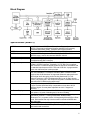
Block Diagram
Specifications (SDM275)
MPEG Streams
MPEG Video
MPEG Audio
Digital bitstream input
Digital video output
Analog video outputs
Audio output
Genlock
On-Screen Display
Host system requirements
Power requirements
Size
ISO/IEC 13818 and ISO/IEC 11172 compliant. Parses all streams:
MPEG-1 Elementary and System Streams and MPEG-2 Elementary,
Packetized Elementary (PES), Transport and Program Streams.
Decodes full 4:2:2 profile or MP@ML (4:2:0) up to 50 Mbits per second.
Decodes MPEG-1 layers 1 and 2, two channels, ISO/IEC 11172-3.
MPEG-2 layers 1 and 2, two channels ISO/IEC 13818-3.
Through the PCI bus.
SMPTE 259M digital video output with embedded audio (SMPTE 272M-A),
270 Mbits/second, BNC connector.
(M) NTSC, (M) NTSC-Japan, (B, D, G, H, I, M, N) PAL.
S-Video, mini-DIN connector; composite, 1V P-P, RS-170-A compliant,
BNC connector. Luma and chroma signals are filtered in accordance with
the standard requirements of RS-170-A and CCIR 624. A programmable
cross color reduction filter is also provided.
Balanced analog audio level up to 26 dBm, 600 ohms. Nominal output
level user selectable. For example, standard 0 dBm or 4 dBm nominal
line-level with 20 dB headroom is supported. Balanced analog audio and
AES3 digital audio through a positive-locking Switchcraft Tini Q-G
miniature connector. High-Z Unbalanced audio (up to 10 dBm) through
3.5mm (1/8") stereo jack. Also outputs through MPC standard sound card
connector with CD-ROM audio pass-through.
Composite video input, 1V P-P, BNC connector. Locks to the H-sync and
V-sync. Provides horizontal delay compensation to less than 19ns of
reference signal. Chroma phase adjustable to with 0.7 degrees of
reference.
8x2 to 740x480 NTSC or 8x2 to 720x576 PAL bitmap, using up to a 16
color palette, 16 levels of blending and 16 levels of shading.
Pentium-based PC with an available PCI short card slot conforming to
specification revision 2.1 running Windows98, Windows 2000,
Windows NT 4.0, or greater, with a VGA supporting Microsoft Direct Draw
mode. Disk transfer rate may limit the maximum sustained MPEG data
rate achievable.
5v (12 W typical), 12v (2.5 W typical), -12v (0.3 W typical)
Standard PCI short card, 6.875 in. (174.63 mm) by 4.2 in. (106.68 mm),
less bracket and connectors.
5
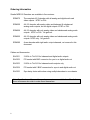
Ordering Information
Stradis MPEG-2 Decoders are available in five versions:
SDM275
The complete 4:2:2 decoder with all analog and digital audio and
video outputs. NTSC or PAL.
SDM250
A 4:2:2 decoder with analog video and balanced & unbalanced
analog audio outputs, but no digital outputs. NTSC or PAL.
SDM026
A 4:2:0 decoder with only analog video and unbalanced analog audio
outputs. NTSC or PAL. No genlock.
SDM025
A 4:2:0 decoder with only analog video and unbalanced analog audio
outputs. NTSC only. No genlock.
SDM290
A new decoder with eight audio output channels, not covered in this
document.
Cables and Accessories:
SAC001
3 XLRs to Tini Q-G for balanced and digital audio outputs
SAC002
PC bracket with BNC connector for sync-in or digital audio out
SAC003
2 XLRs to Tini Q-G for balanced audio outputs only
SAC004
PC bracket with 2 BNC connectors for sync-in and digital audio out
SAC005
Sync daisy chain cable when using multiple decoders in one chassis
Note: Specifications of these cables and accessories are available from Stradis for
those customers who wish to make them themselves.
6
Hardware Installation
1. Turn off the power to the computer and any device connected to it such as a
monitor, powered speakers, scanner, etc. Disconnect the power cord from the
wall or uninterruptible power supply.
2. Touch a metal surface on the computer to ground yourself and to discharge any
static electricity.
3. Remove the computer's cover.
4. Locate an unused PCI expansion slot.
5. Remove the metal cover from the back of the computer adjacent to the slot to be
used. Do not lose the screw.
6. Align the Stradis MPEG-2 Decoder Card with the PCI slot and press it down into
the connector. The card must be completely seated into the connector.
7. The Stradis MPEG-2 Decoder Card can be connected to play audio through the
PC’s sound card. Unplug your existing sound card cable from your CDROM
drive. Reconnect it to the Stradis card’s “CDROM OUT” connector. Plug another
cable into the Stradis card’s “CDROM IN” connector and plug the other end into
the CDROM drive. See photograph, page 8.
8. On the SDM275, external sync can be feed into JP5 or JP6, located in the upper
left corner of the card. JP3, nearby, selects between 75 ohm and Hi-Z
termination. See photograph, page 8.
9. Secure the Decoder Card into the expansion slot by replacing the screw removed
in step 5.
10. Replace the computer's cover and reconnect the power cables.
11. Proceed to “Installing the Device Drivers.”
7
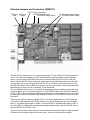
Onboard Jumpers and Connectors (SDM275)
JP5 Sync JP6 Sync
Input
Output
JP3 75 Ohm Terminator
J2 CDROM Audio Input
J3 CDROM Audio Output
J9 Composite Video Output
JP2 Digital Audio Output
JP5 and JP6 are used for sync-in or sync pass-through. JP3 can switch a 75-ohm terminator in
or out. If you have two boards in one PC chassis that you wish to genlock to an outside sync
source, you can use the SAC002 to feed sync to the first board. Set JP3 to Hi-Z on the first
board. Using a SAC005 "Sync daisy chain cable when using multiple decoders in one chassis",
you can then feed sync to the second board. Set JP3 to 75 Ohms on the second card. Or use
the SAC004 bracket with two BNCs and you can loop the sync through. Some customers prefer
this technique so they can use an external 75-ohm terminator.
J9 is an unfiltered video output. It is intended for applications where multiple boards need to be
synced together, but not to an external source. Use a SAC005 cable from J9 on the first board
to JP5 or JP6 on the second board. Additional boards may be daisy-chained. Set the first board
(in software) to Genlock off and the other boards to Genlock on. All boards will now sync to the
first board.
There are two options concerning digital audio. If you desire digital audio on a XLR connector,
our SAC001 cable provides three XLR connectors, two for balanced audio and one for digital
audio. If you desire digital audio on a BNC, use the SAC002 or SAC004 and connect to JP2. If
you use a BNC for digital audio and still need analog balanced audio, use the SAC003. Do not
use the SAC001 when JP2 is used.
J2 and J3 can be used to feed audio into a sound card and to loop CD-audio through the board.
CD audio will only feed through to the sound card – it does not feed the other outputs.
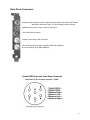
Back Panel Connectors
Left & right balanced analog audio and AES-3 Outputs, Switchcraft Tiny Q-G® TRA6M,
Mates with: Switchcraft TA6FL Tini Q-G® straight female cord plug
Unbalanced stereo audio output, 3.5mm (1/8 inch) jack
S-Video, Mini-DIN4 connector
Composite Video Output, RS-170A, BNC
White: Serial Digital Video Output, SMPTE 259M, BNC (SDM275)
Black: External Sync input, BNC (SDM250)
9
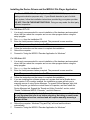
Installing the Device Drivers and the MPEG-2 File Player Application
The Stradis MPEG-2 File Player Application (SMPEGDEC.EXE) is provided for
testing and evaluation purposes only. If your Stradis decoder is part of a thirdparty system, follow the installation instructions provided by your system provider.
DO NOT FOLLOW THESE INSTRUCTIONS. Doing so may render the third-party
software inoperative.
For Windows NT 4.0:
1.
2.
3.
It is strongly recommended for correct installation of the hardware and associated
driver, that you reboot the computer and run no other program before using the
setup program.
Run setup from the Installation CD.
Enter the install password when prompted. The password is case-sensitive.
Note: The password is printed on the CD.
4.
5.
6.
Follow the instructions on the screen to complete the installation.
Reboot the computer.
Proceed to “Using the MPEG-2 Decoder Application for Windows.”
For Windows 98:
1.
2.
3.
It is strongly recommended for correct installation of the hardware and associated
driver, that you reboot the computer and run no other program before using the
setup program.
Run setup from the Installation CD.
Enter the install password when prompted. The password is case-sensitive.
Note: The password is printed on the CD.
4.
5.
Follow the instructions on the screen to complete the installation.
If you are installing this software release on a system that had a Stradis device
driver version 0.95 or earlier installed, the installation program will ask you to
manually remove it using Device Manager. To access Device Manager right click
on My Computer, go down the context menu to Properties, and then select the
Device Manager tab. Expand the “Sound and Video Controller” section, select
“Stradis Professional MPEG-2 Decoder,” and click Remove.
Note: If you are asked by the installation software to remove an old driver, it
is very important that you do so before rebooting. Not doing so could cause
the installation to become confused and will require manually removing a
number of files.
6.
7.
10
Reboot the computer. Windows “Plug and Play” will now load the drivers
automatically.
Proceed to “Using the MPEG-2 Decoder Application for Windows.”
For Windows 2000:
1.
2.
3.
4.
It is strongly recommended for correct installation of the hardware and associated
driver, that you reboot the computer and run no other program before using the
setup program.
Access Device Manager by right clicking on My Computer, go down the context
menu to Properties, and then select the Hardware tab. Click the “Driver Signature”
button. You must set “File Signature Verification” to either “Warn” or “Ignore.”
Run setup from the Installation CD.
Enter the install password when prompted. The password is case-sensitive.
Note: The password is printed on the CD.
5.
6.
Follow the instructions on the screen to complete the installation.
If you are installing this software release on a system that had a Stradis device
driver version 0.95 or earlier installed, the installation program will ask you to
manually remove it using Device Manager. Expand the “Sound and Video
Controller” section, select “Stradis Professional MPEG-2 Decoder,” and right click
and select “Uninstall.”
Note: If you are asked by the installation software to remove an old driver, it
is very important that you do so before rebooting. Not doing so could cause
the installation to become confused and will require manually removing a
number of files.
7.
8.
Reboot the computer. Windows “Plug and Play” will now load the drivers
automatically. If you set “Driver Signature” to “Warn” you will be warned that
Microsoft has not digitally signed the Stradis Driver. Click “OK” to complete the
installation.
Proceed to “Using the MPEG-2 Decoder Application for Windows.”
11
Using the MPEG-2 File Player Application for Windows
The MPEG-2 File Player Application (SMPEGDEC.EXE) is provided for testing and
evaluation purposes only. If your Stradis decoder is part of a third-party system,
follow the instructions provided by your system provider.
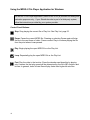
Control Panel Buttons:
Stop. Stop playing the current file or Play List. See Play List, page 23.
Pause. Pause the current MPEG file. Pressing or selecting Pause again will step
the file to the next frame of video. Press or select Play to continue playing the file
from the point where it was paused.
Play. Begin playing the open MPEG file or the Play List.
Loop. Repeatedly play the open MPEG file or the Play List.
Fast. Play the video in fast motion. Since the decoder card does this by playing
only I-frames, the fast play speed will be determined by the file’s IBP structure and
bit-rate. In general, lower bit-rate files will play faster than higher bit-rate files.
12
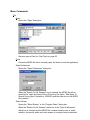
Menu Commands:
File
Open…
Opens the "Open" dialog box.
Also can open a Play List. See Play List, page 23.
Close
Closes the MPEG file that is currently open, but does not exit the application.
Open Preferences
Opens the "Open Preferences" dialog box.
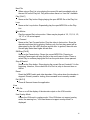
When the "Search For All Streams" box is checked, the MPEG file will be
searched for Video and Audio Pids or IDs during File Open. "Max Bytes To
Search During Open" (defaults to 1000000) specifies how far into the MPEG
file to search.
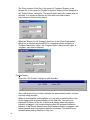
Select Stream
Opens the "Select Stream" or the “Program Select” dialog box.
When the "Search For All Streams" check box in the "Open Preferences"
dialog box is checked and the MPEG file contains multiple video or audio
streams, the specific audio and video stream to be played may be selected.
The Pids contained in the file (in the case of a Transport Stream) or the
Stream IDs (in the case of a Program or System Stream) will be displayed in
the "Select Stream" dialog box. The specific audio and video stream may be
selected. If no stream is selected, the first audio and video stream
encountered in the file will be played.
When the "Search For All Streams" check box in the "Open Preferences"
dialog box is checked and the MPEG is a transport stream containing a
“Program Association Table,” the “Program Select” dialog box will open. A
“program” may then be selected.
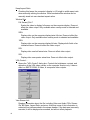
Position Dialog
Opens the "File Position" dialog box with Seek Bar.
Size is file size in bytes. Position indicates the approximate location, in bytes,
currently being decoded.
When an individual file is being played, you can seek to specific place in the
file by dragging the progress indicator on the Seek bar. You can move
backward or forward in the file. If the file was playing when the progress
indicator is dragged, it will continue playing when the progress indicator is
released. If the file was paused when the progress indicator is dragged, it will
remain paused when the progress indicator is released. This feature is not
available when playing files from a Play List.
14
Next File
When using a Play List, stop playing the current file and immediately skip to
the next file on the Play List. Only active when there is a "next file" available.
Play [Ctrl-P]
Same as the Play button. Begin playing the open MPEG file or the Play List.
Loop
Same as the Loop button. Repeatedly play the open MPEG file or the Play
List.
Slow Motion
Play the opened file in slow motion. Video may be played at 1/2, 1/3, 1/4, 1/5,
1/6, 1/7 or 1/8 actual speed.
Fast Forward
Same as the Fast Forward button. Play the video in fast motion. Since the
decoder card does this by playing I-frames only, the fast play speed will be
determined by the file’s IBP structure and bit-rate. In general, lower bit-rate
files will play faster than higher bit-rate files.
Still/Step [Ctrl-S]
Same as the Pause button. Pause the current MPEG file. Pressing or
selecting Pause again will step the file to the next frame of video. Press or
select Play to continue playing the file from the point where it was paused.
Stop & Rewind
Same as the Stop button. Stops playing the current file and “rewinds” it to the
beginning. However, if the current file is a File List, skip to the next item on
the list.
Reset
Reset the MPEG audio and video decoders. Only active when the decoder is
stopped. Primarily used for testing, this command is not normally needed.
Exit [Alt-F4]
Close all files and closes the application.
View
VGA On
Turn on or off the display of the decoder output on the VGA monitor.
Use Overlay Mode
Places the VGA card in overlay mode. If the VGA does not support overlay
mode, the warning box, “VGA card does not support overlay mode!” is
displayed.
15
Keep Aspect Ratio
Checking this keeps the computer’s display in 4:3 height to width aspect ratio
when manually resizing the window. When unchecked the window can be
manually sized into non-standard aspect ratios.
Window Size
Full Screen [Ctrl-F
Scales the video to display full screen on the computer display. Does not
affect the video output. Only available when overlay mode is selected and
available.
200%
Display video on the computer display twice full-size. Does not affect the
video output. Only available when overlay mode is selected and available.
100%
Display video on the computer display full-size. Displays both fields of an
interlaced frame. Does not affect the video output.
50%
Display video one-half actual size. Does not affect video output.
25%
Display video one-quarter actual size. Does not affect video output.
VGA Control…
Opens the "VGA Control" dialog box. Controls the brightness, contrast, and
saturation of the VGA video overlay on the computer monitor only. It has no
affect on SMPTE 259M, S-Video, or composite video outputs.
View Stream Info
Displays information about the file, including Video and Audio PIDs, Stream
IDs, Bit Rates, Aspect Ratio and more. Note that some of this information is
extracted from data encoded in the stream header. If the data was incorrectly
encoded, it will be displayed as encoded, but will not affect playback.
16
View SMPTE Code
Displays SMPTE Time Code. A time-code is encoded in each I-frame,
typically at the beginning of each GOP. During playback, the time code is
extracted from each I-frame. The time code is interpolated between I-frames.
View STC
Displays the System Time Clock.
Options
Video Standard (Active only when no file is open.)
Auto
The decoder will automatically select NTSC or PAL (B, D, G, H, I) based
on the detected frame-rate.
NTSC
Only NTSC files will play. Attempting to play files in any other standard will
generating a message box with "Warning: Selected Video Standard
Incompatible with File."
PAL (B, D, G, H, I)
Only PAL (B, D, G, H, I) files will play. Attempting to play files in any other
standard will generating a message box with "Warning: Selected Video
Standard Incompatible with File."
PAL (M)
Only PAL (M) or NTSC files will play. Attempting to play files in any other
standard will generating a message box with "Warning: Selected Video
Standard Incompatible with File."
PAL (N)
Only PAL (N) files will play. Attempting to play files in any other standard
will generating a message box with "Warning: Selected Video Standard
Incompatible with File."
PAL (Combination N)
Only PAL (Combination N) files will play. Attempting to play files in any
other standard will generating a message box with "Warning: Selected
Video Standard Incompatible with File."
Monitor Type (Active only when no file is open.)
4:3
When 4:3 is selected and a stream coded as 4:3 is displayed, no action is
taken.
When 4:3 is selected and a stream coded as 16:9 is displayed, a 4:3
image in the proper aspect ratio is displayed using pan and scan
information, if available. If no pan and scan information is in the stream,
the left-most portion of the 16:9 image is displayed.
17
16:9
When 16:9 is selected, no action is taken regardless of the stream type.
Volume Control…
Opens the "Volume Control" dialog box. Controls the decoded audio output
only. Does not affect CD-ROM "pass-through" audio. The volume and
balance settings are written into the Windows registry and are remembered
from session to session.
"Output Level Presets" select standard values of 0dBm, 4dBm or 8 dBm
output levels, based on a -20 dBFS signal.
Digital Audio (Active only when no file is open.)
Consumer PCM
Places the uncompressed digital audio output stream in “Consumer
Format.”
Professional PCM
Places the uncompressed digital audio output stream in “Professional
Format.”
IEC 61937 Compressed
Mutes analog output and places the compressed digital audio output
stream in “Consumer Format.” Used for outputting compressed AC-3
audio to an external consumer AC-3 decoder.
SMPTE 337M Compressed
Mutes analog output and places the compressed digital audio output
stream in “Professional Format.” Used for outputting compressed AC-3
audio to an external professional AC-3 decoder.
18
Offset Time Code
Displays the System Time Clock.
GenLock
Checking this locks the output video sync to the incoming video sync.
Sync Mode (Active only when no file is open.)
System Clock
Uses the Presentation Time Stamps to synchronize video and audio. The
audio decoder compares the audio PTS, when encountered, with the STC,
and corrects the audio if the difference between the two is more than five
milliseconds. The correction duplicates or skips samples periodically until
the audio PTS is within the five-millisecond window.
Software
Audio and video are started within a half frame. No further synchronization
is performed. However the audio and video clocks are locked together.
Single Field In Pause
When toggled on, the Pause command displays only a single field. Using this
option will eliminate interlace artifacts when paused or in Slow Motion.
Closed Caption
Enable Pass Through
Closed Captions are decoded assuming that they were placed in the
stream sequentially without regard to the actual frame with which they
were originally associated. In this mode, the decoder simply passes the
Closed Caption data as it is received and does not re-ordering them.
Enable Re-order
Closed Captions are decoded assuming that they were placed in the
stream attached to the frame from which they were originally decoded.
This causes the Closed Caption bytes to arrive at the decoder out of
sequence (same as video frames). In this mode, the decoder must reorder
the bytes to get them back into time sequence.
VITC Enabled
Places the SMPTE Time Code in the vertical interval in accordance with
SMPTE 12M-1999. As outlined in SMPTE RP 164, VITC is placed on lines 14
and 16 when in NTSC and lines 19 and 21 when in PAL.
19
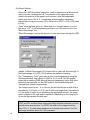
On-Screen Display…
Opens the "OSD Properties" dialog box, used to superimpose a Windows bitmap over video. Entering the X & Y coordinates of the upper left corner
controls the position of the graphic on the screen. Note that undesirable
results may occur if the X & Y coordinates entered position the graphic
beyond the normal picture area (720 x 480 pixels in NTSC or 720 x 576 pixels
in PAL).
“Fade” turns the fade option on. When fade is on, images fades in or out at
the rate of 1/16th of full transparency per frame, up to the amount set in the
"Blend Percentage" box.
"Blend Percentage" controls the amount of video that shows through the OSD
graphic. A Blend Percentage of 0% means that no video will show through. A
blend percentage of 93.75% (15/16) allows the maximum blending.
The "Transparency Color" group sets a color to be transparent by using the
Windows standard .bmp values of 0-255 for R, G, and B. All OSD graphic
pixels with a matching RGB value will become transparent, that is that video
behind will be displayed, not the OSD graphic. Note that Blending and
Transparency operate independently.
The .bmp file must be a 2-, 4- or 16-color file and should have a width that is
devisable by 8 (16-color) or 16 (2- and 4-color) and height that is devisable by
2. If the width or height is not divisible by the appropriate amount, the image
will be cropped on the right and/or top/bottom (depending on the .bmp file) to
fit into the appropriately divisible size.
Note: When creating .bmp files for OSD usage it is important to realize that
NTSC and PAL monitors have rectangular pixels whereas computer monitors
typically have square pixels. For NTSC, the width of the image should be
about 10% (1.1x) wider when displayed on a square pixel monitor. For PAL,
the image should be about 8% (.92x) narrower.
20
Test Pattern (Active only when no file is open.)
100% SMPTE Color Bars
Displays NTSC 100% Color Bars or 100% amplitude, 100% saturation
PAL color bars depending on video standard selected by the Options Video Standard command. If Auto is selected, the last video standard
usedused.
75% SMPTE Color Bars
Displays NTSC 75% Color Bars or 100% amplitude, 75% saturation PAL
color bars depending on video standard selected by the Options -Video
Standard command. If Auto is selected, the last format played is used.
Luminance Ramp
Displays an NTSC or PAL linear luminance ramp depending on video
standard selected by the Options -Video Standard command. If Auto is
selected, the last format played is used.
Display from File …
Display a stored image file.
The stored image can be either a standard Windows® BMP 24 bit RGB
color image or a Stradis proprietary YUV format that is 720 x 480 pixels
(when NTSC is selected) or 720 x 576 pixels (when PAL is selected).
Images that are up to 1024 pixels wide can be used, but will be cropped to
720 pixels. Stradis provides a utility program (MakeYUV.exe) for
converting BMP file into YUV files as part of the software distribution. The
advantage to the YUV format is that it loads much faster than the BMP
format.
Note: When creating .bmp files it is important to realize that NTSC or PAL
video monitors have rectangular pixels whereas computer monitors
typically have square pixels. For NTSC, the width of the image should be
about 10% (1.1x) wider when displayed on a square pixel monitor. For
PAL, the image should be about 8% (.92x) narrower when displayed on a
square pixel monitor.
21
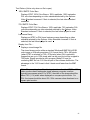
Video Timing Dialog
Opens the "Horizontal Sync & Chroma Timing" dialog box, used to control the
horizontal sync offset and chroma phase when the board is in GenLock
mode. The sync offset can be varied increments of 37ns and the chroma
phase in increments of 360/256 (1.40625) degrees.
Note that the Video Timing Dialog is disabled when Video Standard = Auto.
To use the Video Timing Dialog, a specific video standard must be selected.
Help
About the Stradis Professional Decoder
Display the software revision number and copyright information.
Multiple Decoders in a Single Computer
To use multiple Stradis MPEG-2 Decoders simultaneously in one computer, multiple
instances of the decoder application (Smpegdec.exe) must be run. This can be done by
adding the program argument -X where X is the decoder board number (1 through N).
Example: From the DOS command line enter the following commands to get two
decoder applications running simultaneously,
Smpegdec -1
Smpegdec -2
You can also set up a Windows shortcut that has the -X as the program parameter
where X is the board number (1 through N).
22
Play List
A Play List is a list of files to be played in a preprogrammed sequence. The list may be
played once or it may be played continuously using the Loop button or command. A
Play List must have the file extension .lst. All files in a Play List must be the same video
format (PAL or NTSC).
Format:
[d:][path]filename
.
.
.
Example:
transport\riox.mpeg
MPEG2-8Mbit\susi_080.m2v
transport\french.m2t
MPEG2-8Mbit\flwr_080.m2v
transport\vta10.mpg
MPEG2-8Mbit\mobl_080.m2v
mpeg1\weezer.mpg
bike.m2v
mpeg1\broadcas.mpg
mb15.m2v
mpeg1\goodtime.mpg
Sample MPEG Files
Sample MPEG bitstreams may have been provided on the Stradis MPEG-2 Decoder
Installation CD-ROM in the subdirectory “MPEG Files”. Such files were gathered from
different sources and were encoded on a variety of encoders with varying quality. If
present, these files are provided for research and demonstration purposes only. No
warranty is given or should be implied that the bitstreams are free from defects, are fit
for any purpose, or are free from infringement of any intellectual property right of a third
party.
23
Software License Agreement
STRADIS, INC.
PLEASE READ THIS SOFTWARE LICENSE AGREEMENT CAREFULLY. BY CLICKING THE “ACCEPT” BUTTON OR
DOWNLOADING, INSTALLING, OR USING THE SOFTWARE YOU INDICATE ACCEPTANCE OF AND AGREEMENT TO
THE TERMS AND CONDITIONS OF THIS AGREEMENT. IF YOU DO NOT AGREE TO THESE TERMS AND CONDITIONS,
CLICK THE DO NOT ACCEPT BUTTON AND DO NOT DOWNLOAD, INSTALL, OR USE THE SOFTWARE.
IF THE SOFTWARE WAS PRE-INSTALLED ON YOUR ELECTRONIC DEVICE OR CAME ON MEDIA PACKAGED WITH
YOUR ELECTRONIC DEVICE AT NO EXTRA CHARGE, AND IF YOU DO NOT AGREE WITH THIS AGREEMENT, DO NOT
USE THE SOFTWARE.
This agreement (the “Agreement”) is made between Stradis, Inc., (“Stradis”) and the owner and each end user (“Licensee”)
of the computer, processor, chip, or similar device (the “Electronic Device”) into which the Software is downloaded, installed,
and/or accessed online or through a network. This Agreement applies to Stradis drivers, DLL files, application programs, and
utility programs, including without limitation, the computer programs known as SmpegDec.EXE, StradisDecoder.DLL,
Stradnt.sys, Stradwd.sys, StradWD.inf, SVidmon.exe, Stradis.ax, StradisDecoderU.DLL, any updates and maintenance releases
thereto, and replacements therefore, and the supporting documentation and materials (collectively, the “Software”) obtained
from Stradis on Media or by download from the Stradis web site www.Stradis.com. This Agreement shall be effective on the date
of the first to occur of the date (a) of delivery of the Electronic Device with the Software pre-loaded, (b) that Media containing the
Software is delivered to Licensee, (c) the Software is downloaded to Media or the Electronic Device or (d) the date the Software
is first accessed by an Electronic Device in the possession of Licensee (the “Effective Date”). As used in this Agreement,
“Media” means a compact disc and any other object which can record information in a form that can be transferred into an
Electronic Device.
LICENSE
Subject to the terms and conditions of this Agreement, the Software is licensed, not sold, to Licensee by Stradis. Stradis grants
Licensee the limited non-exclusive right to Use a single copy of the Software on a single Electronic Device. Licensee may make
one copy (in machine-readable form only) of the Software licensed hereunder solely for backup or disaster recovery purposes.
“Use” shall mean Licensee may use, access, run, or otherwise interact with the Software on a single Electronic Device, for
Licensee’s own business use and not as a service for other third parties, in accordance with the applicable documentation.
OWNERSHIP RIGHTS
Stradis reserves any rights not expressly granted to Licensee and retains title and full ownership rights under the copyright laws
of the United States or any other jurisdiction or under any federal, state, or foreign laws. Stradis is not obligated to provide and
Licensee acquires no right of any kind with respect to any source code for the Software.
RESTRICTIONS
Licensee agrees that it has no right whatsoever to modify the Software or any portion thereof in any manner. Licensee shall not,
nor permit any third party to, reverse engineer, decompile, disassemble, or otherwise reduce the Software to any humanly
perceivable form. Licensee may not modify, adapt, translate, rent, or sublicense (including offering the Software to third parties
on an applications service provider or time-sharing basis), assign, give away, loan, resell for profit, or distribute the Software, the
Media, or related materials or create derivative works based upon the Software or any part thereof. Licensee may not access
the Software loaded on one Electronic Device from another Electronic Device through a network or other means. Except for one
copy to be used solely for solely for backup or disaster recovery purposes, Licensee may not copy the Software in whole or in
part, or use trade secret information contained in the Software, to develop computer programs that interface or interact with the
Software.
CONFIDENTIALITY
“Confidential Information” shall be defined to include Software, source code, object code, and any proprietary tools,
proprietary knowledge or proprietary methodologies disclosed by Stradis to Licensee under or relating to this Agreement.
Licensee shall observe complete confidentiality with respect to the Confidential Information, and shall use its best efforts and
take all reasonable steps to protect the Confidential Information from any use, reproduction, publication, disclosure, or
distribution except as specifically authorized by this Agreement. Licensee shall promptly notify Stradis of any known
unauthorized use or disclosure of the Confidential Information and will cooperate with Stradis in any litigation brought by Stradis
against third parties to protect its proprietary rights.
WARRANTIES
24
THE SOFTWARE IS PROVIDED TO LICENSEE IN “AS-IS” CONDITION WITH NO WARRANTY. STRADIS DISCLAIMS ALL
REPRESENTATIONS AND WARRANTIES, EXPRESS OR IMPLIED, REGARDING THE SOFTWARE, MEDIA, RELATED
MATERIALS, SERVICES, AND CONTENT, INCLUDING ANY REPRESENTATION AND WARRANTY OF QUALITY OR
SECURITY, AND THE IMPLIED WARRANTIES OF FITNESS FOR A PARTICULAR PURPOSE, MERCHANTABILITY, AND
NONINFRINGEMENT. STRADIS DOES NOT WARRANT THAT THE SOFTWARE OR ANY RELATED SERVICES OR
CONTENT IS FREE FROM BUGS, VIRUSES, ERRORS, OR OTHER PROGRAM LIMITATIONS. IF LICENSEE IS A
RESIDENT OF A STATE THAT DOES NOT ALLOW THE EXCLUSION OF IMPLIED WARRANTIES, THE ABOVE
EXCLUSIONS DO NOT APPLY, AND THE IMPLIED WARRANTIES ARE LIMITED IN DURATION TO SIXTY (60) DAYS FROM
THE EFFECTIVE DATE. IF LICENSEE IS A RESIDENT OF A STATE THAT DOES NOT ALLOW LIMITATIONS ON HOW
LONG AN IMPLIED WARRANTY LASTS, THE ABOVE LIMITATION DOES NOT APPLY. THIS WARRANTY MAY GIVE
LICENSEE SPECIFIC LEGAL RIGHTS WHICH VARY FROM JURISDICTION TO JURISDICTION.
STRADIS DOES NOT WARRANT ACCESS TO THE INTERNET OR TO ANY SERVICE OR CONTENT THROUGH THE
SOFTWARE OR CONTINUED ACCESS TO THE TRIAL VERSION OF THE SOFTWARE OR TO THE DATA ENTERED INTO
THE TRIAL VERSION OF THE SOFTWARE AFTER THE SPECIFIED NUMBER OF ALLOWED USES.
LIMITATION OF LIABILITY
IN NO EVENT WILL STRADIS, ITS SUBSIDIARIES, OR LICENSORS, OR ANY OF THE DIRECTORS, OFFICERS,
EMPLOYEES, OR AFFILIATES OF ANY OF THE FOREGOING BE LIABLE TO LICENSEE UNDER ANY CONTRACT,
NEGLIGENCE, STRICT LIABILITY, PRODUCT LIABILITY, OR OTHER LEGAL OR EQUITABLE THEORY FOR ANY
CONSEQUENTIAL, INCIDENTAL, INDIRECT, OR SPECIAL DAMAGES WHATSOEVER (INCLUDING, BUT NOT LIMITED TO,
DAMAGES FOR LOSS OF BUSINESS PROFITS, BUSINESS INTERRUPTION, LOSS OF BUSINESS INFORMATION, AND
THE LIKE), WHETHER FORESEEABLE OR UNFORESEEABLE, OR FOR COST OF PROCUREMENT OF SUBSTITUTE
GOODS, TECHNOLOGY, OR SERVICES, REGARDLESS OF THE BASIS OF THE CLAIM AND EVEN IF STRADIS OR A
REPRESENTATIVE OF STRADIS HAS BEEN ADVISED OF THE POSSIBILITY OF SUCH DAMAGE AND EVEN IF A
REMEDY SET FORTH HEREIN IS FOUND TO HAVE FAILED OF ITS ESSENTIAL PURPOSE. STRADIS’S CUMULATIVE
LIABILITY FOR DAMAGES FOR ANY CAUSE WHATSOEVER, AND REGARDLESS OF THE FORM OF THE ACTION, WILL
BE LIMITED TO THE AMOUNT OF MONEY PAID TO STRADIS FOR THE PURCHASE OF THE LICENSE OF THE
SOFTWARE THAT CAUSED THE DAMAGES. SOME JURISDICTIONS PROHIBIT THE EXCLUSION OR LIMITATION OF
LIABILITY FOR CONSEQUENTIAL OF INCIDENTAL DAMAGES. ACCORDINGLY, THE LIMITATIONS AND EXCLUSIONS
SET FORTH ABOVE MAY NOT APPLY TO LICENSEE. THE LIMITATIONS OF DAMAGES SET FORTH ABOVE ARE
FUNDAMENTAL ELEMENTS OF THE BASIS OF THE BARGAIN BETWEEN STRADIS AND LICENSEE. STRADIS WOULD
NOT HAVE PROVIDED THE SOFTWARE WITHOUT SUCH LIMITATIONS.
TERMINATION
Licensee may terminate this Agreement and the License granted hereunder by giving Stradis thirty (30) days prior written notice.
Stradis may terminate this Agreement and the License granted hereunder immediately without notice if: (a) Licensee fails to
comply with any term or condition of this Agreement or (b) Licensee shall become insolvent or shall make an assignment for the
benefit of its creditors or there shall be filed by or against Licensee any bankruptcy, receivership, reorganization, or other like
proceeding under any present or future debtor relief law. No portion of the fees paid to Stradis for Software shall be returnable or
refundable upon termination of this Agreement, whether such termination is by Licensee or by Stradis. Upon any termination of
this Agreement, Licensee must immediately cease all use of the Software and immediately destroy all complete and partial
copies of the Software, including all backup copies. Licensee shall certify to Stradis in writing that it has complied with the
preceding sentence.
EXPORT RESTRICTIONS
Licensee acknowledges and agrees that the Software is subject to restrictions and controls imposed by the Export Administration
Act and the Export Administration Regulations (the "Acts"). Licensee agrees and certifies that neither the Software nor any
direct product thereof is being or will be used for any purpose prohibited by the Acts. Licensee agrees and certifies that Licensee
is not a citizen or permanent resident of Cuba, Iran, Iraq, North Korea, Libya, Sudan or Syria.
U.S. GOVERNMENT
The Software is a "commercial item," as that term is defined at 48 C.F.R. 2.101 (OCT 1995), consisting of "commercial computer
software" and "commercial computer software documentation," as such terms are used in 48 C.F.R. 12.212 (SEPT 1995) and
the Department of Defense Federal Acquisition Regulations Sections 252.227-7014 (a) (1), (5). Consistent with 48 C.F.R.
12.212 and 48 C.F.R. 227-7202-1 through 227-7202-4 (JUNE 1995), all U.S. Government End Users acquire the Software (or
Licensed Product) with only those rights set forth herein. Stradis Inc., Stradis, Inc., 1800 Century Blvd NE Suite 1225, Atlanta,
GA 30345-3218 U.S.A..
GENERAL PROVISIONS
25
Assignment. Licensee may not assign or transfer its rights and obligations under this Agreement without registration with
Stradis and, unless the transfer is registered with Stradis, any purported assignment or transfer shall be null and void.
No Waiver. Any failure by either party to detect, protest, or remedy any breach of this Agreement shall not constitute a waiver or
impairment of any such term or condition, or the right of such party at any time to avail itself of such remedies as it may have for
any breach or breaches of such term or condition. A waiver may only occur pursuant to the prior written express permission of
an authorized officer of the other party.
Severability. If any provision hereof is declared invalid by a court of competent jurisdiction, such provision shall be ineffective
only to the extent of such invalidity, so that the remainder of that provision and all remaining provisions of this Agreement will
continue in full force and effect.
Headings. Headings used in this Agreement are for convenience only and shall not be considered in construing or interpreting
this Agreement.
Governing Law. The validity and performance of this Agreement shall be governed by Georgia law (without reference to choice
of law principles), except as to copyright and trademark matters, which are covered by federal laws. This Agreement is deemed
entered into at Atlanta, Georgia, and shall be construed as to its fair meaning and not strictly for or against either party. This
Agreement does not limit any rights that Stradis may have under trade secret, copyright, patent, or other laws. The parties
expressly exclude all application of the United Nations Convention on the International Sale of Goods to this Agreement. In any
suit, arbitration, mediation, or other proceeding to enforce any right or remedy under this Agreement or to interpret any provision
of this Agreement, the prevailing party will be entitled to recover its costs, including reasonable attorneys’ fees, and all costs and
fees incurred on appeal or in a bankruptcy or similar action.
Entire Agreement. This Agreement constitutes the final, complete, and exclusive statement of the agreement between the
parties in respect of the subject matter hereof. This Agreement shall govern any services related to the Software, unless such
services or content are subject to a separate written agreement between Licensee and Stradis. However, the limitations of
liability and disclaimer of warranties in this Agreement shall apply to Stradis with respect to such services except to the extent
provided otherwise in a separate written agreement approved by Stradis between Licensee and Stradis.
26