1
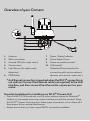
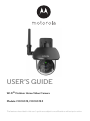
Overview of your Camera
1
2
6
7
5
4
3
9
8
1.
2.
3.
4.
5.
6.
Antenna
Wall mount base
Infrared LEDs (for night vision)
Camera Lens
Light Sensor (for night mode
detection)
PAIR Button
10
Power / Status Indicator
Dome Shape Cover
9. Power connection socket
10. LAN socket*
(Adaptive Ethernet socket for
connecting with various network
devices, such as hub, router, etc.)
7.
8.
* An Ethernet connection is required when the Wi-Fi® connection is
not optimal. Connect the Ethernet cable (not supplied) to the LAN
interface, and then connect the other end to a spare port on your
router.
Important guidelines for installing your Wi-Fi® Camera Unit
• Use of other 2.4 GHz products, such as other wireless networks, Bluetooth®
systems or microwave ovens may cause interference with this product. Keep
the Wi-Fi® Camera Unit away from these types of products, or turn them off if
they appear to be causing interference.
• Always ensure that you have a good Wi-Fi® connection available.