1
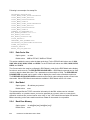
Following is an example of a startup file:
PROCESSOR_VERSION=440
LOCAL_MEM0_START_ADDR=0x00000000
LOCAL_MEM0_START_EXT=0x0
LOCAL_MEM0_LEN=0x00080000
LOCAL_MEM0_SPEED=0
LOCAL_MEM1_START_ADDR=0xFFF80000
LOCAL_MEM1_START_EXT=0x1
LOCAL_MEM1_LEN=0x00080000
LOCAL_MEM1_SPEED=0
CONNECT_TO_DEBUGGER=yes
BUS_MODEL_ADDRESS=127.0.0.1
BUS_MODEL_PORT=10000
BUS_MODEL_PROTOCOL=udp
CLOCK_PERIOD=5
DEBUGGER_PORT_NUMBER=6470
PROCESSOR_PVR_REGISTER=0x40120000
TIMER_CLK_PERIOD=5
STARTUP_DELAY=0
RESET_440_TLB_ERA=0x1
2.2.2
Data Cache Size
Option syntax
–a value
Default value
8KB for PPC405, 32KB for PPC440
This option enables the user to alter the data cache size. For the PPC405 valid values are: 0, 1024,
2048, 4096, 8192, 16384, 32768, and 65536. For the PPC440 valid values are: 8192, 16384, 32768,
65536, and 131072.
The Correct cache size must be configured in RISCWatch in order for the RISCWatch cache display
functions to work correctly. The PRD ALTER DCACHE SIZE = n RISCWatch command can be used
in order to alter the data cache size. The n parameter must be multiple of 1024. The PRD DISPLAY
DCACHE SIZE command can be used in order to display the current value of the data cache size.
The PRD DISPLAY DCACHE LINES command can be used in order to display number of lines in the
data cache. Above RISCWatch commands are available in RISCWatch version 4.6 or later.
2.2.3
Bus Model
Option syntax
–B address,port,protocol
Default value
none
This options specifies the TCP/IP connection information for the BM. address can be in dotted
decimal notation, or a machine name. port can be specified as a numeric value or a name that is
defined in a services file. protocol can be set to “udp” or “tcp”. UDP should be used when ISS and the
BM are executing on the same machine and loss of data on the network is not possible.
2.2.4
2-6
Back Door Memory
Option syntax
–b addr@len[:era][,addr@len[:era]]
Default value
none
Instruction Set SImulator User’s Guide