1
Resistive Configuration and Capacitive Configuration Tabs
device does not match the GUI’s baud rate, a baud rate auto detection mechanism starts. The GUI asks you to enter the
CRTouch device into a baud rate auto detection mode. See the data sheet titled CR Touch Data Sheet Capacitive and
Resistive Touch Sensing Application Specific IC (document number CRTOUCHDS) for more information about the baud rate
auto detection mechanism. Click the interrogation icon on the top right corner of the GUI to open the CRTouch datasheet.
3 Resistive Configuration and Capacitive Configuration Tabs
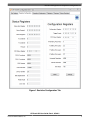
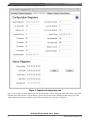
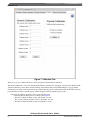
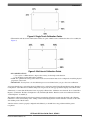
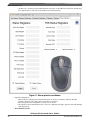
These tabs allow you to customize the CRTouch for different applications and different hardware. Figure 1 and Figure 2
show tabs which allow readings to know the current CRTouch device configuration, and writings to customize the
performance of the device.
CRTouch GUI User Guide, Rev 3, 07/2013
2
Freescale Semiconductor, Inc.