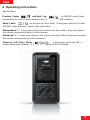
1
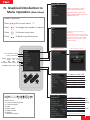
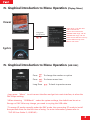
Ⅳ. Graphical Introduction to Menu Operation: [Playing Menu]
Cover
Artist, album, code and other
Add to Favorites list
Remove from Favorites list
Available treble range: -10~10
Available bass range: -10~10
Delete Current File from memory
Choose different loop mode
Back to main menu
Long press
menu button
Lyrics
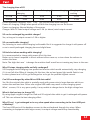
Ⅳ. Graphical Introduction to Menu Operation: [USB DAC]
Press
To change the number or option
Press
To choose menu item
Long Press
To back to previous menu
* Long
press “Menu” to exit current interface and get into main interface, at when the
DAC stops working.
* When choosing “USB Mode” under the system settings, the default can be set as
Storage or DAC. After any change, you need to re-plug the USB cable.
* To ensure X3 works normally under the DAC mode, the connecting PC needs to install
the specified driver for the first time of using. For more information, please refer to
“FiiO X3 User Guide-2(USB DAC)”
8