1
■ Operation Details
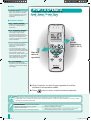
SLEEP TIMER
• Enables you to select the pre-set
timer. It automatically stops after the
selected scheduled time.
• When selection is 5 or 7 hours, the
setting temperature changes after 3
hours :
Cooling • Dry
↑ 1°C
Heating
↓ 1°C
HOW TO OPERATE
Sleep Timer
SLEEP
TIMER
Enables sleep
timer.
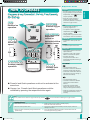
TIMER
• Use the ON timer to turn on the air
conditioner at the desired time. This
will give you a cooling or warming
environment, e.g. when you return
from work or wake up.
• When the ON timer is set, operation
will start maximum 50 minutes earlier
before the actual set time.
• Use the OFF timer to stop the air
conditioner operation at the desired
time. This can save electricity while
you are going out or sleeping.
• The set timer will repeat daily once it
is set.
• If there is a power failure, press the
SET button to restore the previous
setting once the power is resumed.
• If the timer is cancelled, you can
restore the previous setting by
pressing the SET button.
• When used together with the Sleep
Timer, the Sleep Timer is given priority.
��������
Timer
3
1
Confirm the
setting.
Select ON or
OFF timer.
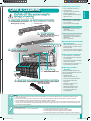
CHECK
• Where there is error, the unit stops
its operation and timer indicator
blinks.
1. Press for 5 seconds.
2. Browse for respective error code,
where “beep” sounds are heard.
3. Turn off the power supply and call
authorized distributor.
4. Press “CHECK” button for 5 seconds/
wait 30 seconds to quit checking.
ERROR RESET
Press the “ERROR RESET” button to
stop the Timer indicator from blinking.
Unit might be operated with limited
function depending on error found.
(Operation starts, 4 “beep” sounds are
heard.)
2
Set the
desired time.
CANCEL
Cancel the
selected timer.
● Ensure the clock on the remote control has been set
correctly.
● You could use the ON and OFF timers at the same time.
● To cancel either the ON or OFF timer, press
press
.
or
, then
Hint
●
For your convenience, you could set the air conditioner to operate automatically by using both ON and OFF timer.
Troubleshooting
●
●
TIMER indicator always on.
POWER indicator is blinking 70 minutes before ON
timer is activated.
➤ Timer is activated and the setting will repeat itself daily.
➤ The unit is determining the operation mode by sensing the indoor/
outdoor temperature. This happens when it has been set to AUTO
operation mode.
6
B1_X_1EN(1-7).indd 6
5/31/2005 9:37:26 AM