1
Chapter 3
Setting your changes as a
new default
3
You can save the settings for the fax options
you use most often by setting them as the
default settings, such as Fax Resolution,
Contrast, Glass ScanSize and
Real Time TX. These settings will remain
until you change them again.
a
Press
b
Press a or b to choose the menu option
that you want to change and press OK.
Then press a or b to choose the new
option.
Press OK.
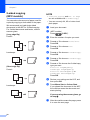
Sending a fax manually
d
e
3
NOTE
(FAX).
To send a multi-page fax, use the ADF.
After changing the last setting, press
a or b to choose Set New Default.
Press OK.
a
Load your document.
b
Press
c
To listen for a dial tone, pick up the
handset of the external telephone.
d
Dial the fax number using the external
telephone.
e
When you hear the fax tones, press
Mono Start or Colour Start.
If you are using the scanner glass, press
1 to send the fax.
f
Replace the handset of the external
phone.
Press 1 to choose Yes.
Press Stop/Exit.
Restoring fax options to the
factory default
You can restore all the fax options you have
changed back to the factory default. These
settings will remain until you change them
again.
a
Press
b
Press a or b to choose
Factory Reset.
Press OK.
c
d
Press 1 to choose Yes.
8
3
Manual transmission lets you hear the
dialling, ringing and fax-receiving tones while
sending a fax.
Repeat this step for each setting you
want to change.
c
Additional sending
operations
(FAX).
Press Stop/Exit.
(FAX).
3
Sending a fax at the end of a
conversation
At the end of a conversation, you can send a
fax to the other party before you both hang
up.
a
Ask the other party to wait for fax tones
(beeps) and then to press the Start or
Send key before hanging up.
b
Load your document.
c
Press
(FAX).
3