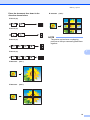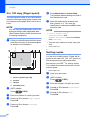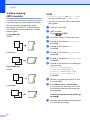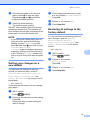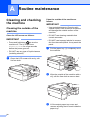
1
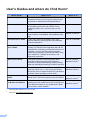
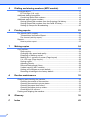
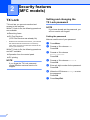
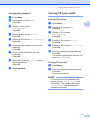
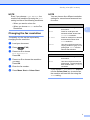
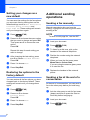
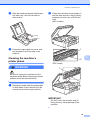
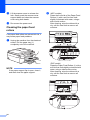
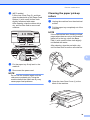
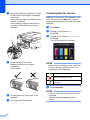
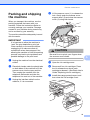
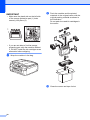
Advanced User’s Guide MFC-J470DW DCP-J152W Version 0 UK/IRE/GEN User's Guides and where do I find them? Which Guide? What's in it? Product Safety Guide Read this Guide first. Please read the Safety Instructions before you set up your machine. See this Guide for trademarks and legal limitations. Printed / In the box Quick Setup Guide Follow the instructions for setting up your machine and installing the drivers and software for the operating system and connection type you are using. Printed / In the box Basic User’s Guide Learn the basic Fax, Copy and Scan operations and how to replace consumables. See troubleshooting tips. Printed / In the box 1 Advanced User’s Guide Learn more advanced operations: Fax, Copy, security features, printing reports and performing routine maintenance. PDF file / CD-ROM Software and Network User’s Guide This Guide provides instructions for Scanning, Printing, PC-Fax and other operations that can be performed by connecting your Brother machine to a computer. You can also find useful information about using the Brother ControlCenter utility, using your machine in a network environment, and frequently used terms. HTML file/CD-ROM Web Connect Guide This Guide provides useful information about accessing Internet services from the Brother machine, as well as downloading images, printing data and uploading files directly to Internet services. PDF file / Brother Solutions Center 2 AirPrint Guide This Guide provides information for using AirPrint to print from OS X v10.7.x, 10.8.x and your iPhone, iPod touch, iPad, or other iOS device to your Brother machine without installing a printer driver. PDF file / Brother Google Cloud Print Guide This Guide provides details on how to use Google Cloud Print™ services for printing over the Internet. PDF file / Brother Mobile Print/Scan Guide for Brother iPrint&Scan This Guide provides useful information about printing from your mobile device and scanning from your Brother machine to your mobile device when connected to a Wi-Fi network. PDF file / Brother 1 This may differ depending on your country. 2 Visit us at http://solutions.brother.com/. i Where is it? Solutions Center 2 Solutions Center 2 Solutions Center 2 Table of Contents 1 General setup 1 IMPORTANT NOTE...............................................................................................1 Memory Storage ....................................................................................................1 Automatic Daylight Saving Time (MFC models) ....................................................1 Sleep Mode ...........................................................................................................2 Auto Power Off (DCP model).................................................................................2 LCD .......................................................................................................................3 Changing the LCD language (depending on your model) ...............................3 Setting the Dim Timer for the backlight ...........................................................3 Mode Timer (MFC models)....................................................................................3 2 Security features (MFC models) 4 TX Lock .................................................................................................................4 Setting and changing the TX Lock password ..................................................4 Turning TX Lock on/off ....................................................................................5 3 Sending a fax (MFC models) 6 Additional sending options.....................................................................................6 Sending faxes using multiple settings .............................................................6 Stop faxing.......................................................................................................6 Contrast ...........................................................................................................6 Changing the fax resolution.............................................................................7 Setting your changes as a new default............................................................8 Restoring fax options to the factory default .....................................................8 Additional sending operations................................................................................8 Sending a fax manually ...................................................................................8 Sending a fax at the end of a conversation .....................................................8 Dual Access (Monochrome only).....................................................................9 Broadcasting (Monochrome only)....................................................................9 Real Time Transmission................................................................................ 11 Overseas Mode .............................................................................................11 Checking and cancelling waiting jobs ............................................................12 4 Receiving a fax (MFC models) 13 Memory Receive (Monochrome only).................................................................. 13 Printing a fax from the memory ..................................................................... 13 PC-Fax Receive (Windows®) ........................................................................13 Turning off Memory Receive operations........................................................ 14 Changing Memory Receive operations ......................................................... 15 Additional receiving operations............................................................................15 Out of Paper Reception .................................................................................15 Printing a reduced incoming fax .................................................................... 15 Receiving a fax at the end of a conversation................................................. 16 ii 5 Dialling and storing numbers (MFC models) 17 Voice operations ..................................................................................................17 BT Call Sign (U.K. only).................................................................................17 Additional dialling operations ...............................................................................18 Combining Speed Dial numbers ....................................................................18 Additional ways to store numbers ........................................................................19 Storing Speed Dial numbers from the Outgoing Call history .........................19 Storing Speed Dial numbers from the Caller ID history .................................19 Setting up Groups for Broadcasting ..............................................................20 6 Printing reports 22 Fax reports (MFC models)...................................................................................22 Transmission Verification Report...................................................................22 Fax Journal (activity report) ...........................................................................22 Reports ................................................................................................................23 How to print a report ......................................................................................23 7 Making copies 24 Copy options........................................................................................................24 Stop copying..................................................................................................24 Changing copy speed and quality .................................................................24 Enlarging or reducing copies .........................................................................25 Making N in 1 copies or a poster (Page Layout) ...........................................26 2 in 1 ID copy (Page Layout) .........................................................................28 Sorting copies ................................................................................................28 Adjusting Density ...........................................................................................29 Remove Background Colour .........................................................................29 2-sided copying (MFC models)......................................................................30 Setting your changes as a new default..........................................................31 Restoring all settings to the factory default....................................................31 A Routine maintenance 32 Cleaning and checking the machine ....................................................................32 Cleaning the outside of the machine .............................................................32 Cleaning the machine’s printer platen ...........................................................33 Cleaning the paper feed rollers .....................................................................34 Cleaning the paper pick-up rollers .................................................................35 Checking the ink volume ...............................................................................36 Packing and shipping the machine ......................................................................37 iii B Glossary 39 C Index 42 1 General setup 1 1 IMPORTANT NOTE 1 Most of the illustrations in this User's Guide show the MFC-J470DW. Memory Storage Your menu settings are stored permanently, and, in the event of a power failure, will not be lost. Temporary settings (for example, Overseas Mode) will be lost. If you have chosen Set New Default for your preferred FAX 1 and COPY settings, those settings will not be lost. However, you may have to reset the date and time. 1 MFC models only 1 Automatic Daylight Saving Time (MFC models) 1 You can set the machine to change automatically for daylight saving time. It will set itself forward one hour in the Spring and backward one hour in the Autumn. Make sure you have set the correct date and time in the Date & Time setting. a b Press Menu. c Press a or b to choose Date & Time. Press OK. d Press a or b to choose Auto Daylight. Press OK. e Press a or b to choose Off (or On). Press OK. f Press Stop/Exit. Press a or b to choose Initial Setup. Press OK. 1 Chapter 1 Sleep Mode You can choose how long the machine will remain idle before it goes into Sleep Mode (up to 60 minutes). The timer will restart if any operation is carried out on the machine. a b Press Menu. Press a or b to choose General Setup. Press OK. c Press a or b to choose Sleep Mode. Press OK. d Press a or b to choose 1Min, 2Mins, 3Mins, 5Mins, 10Mins, 30Mins or 60Mins which is the length of time the machine is idle before entering Sleep Mode. Press OK. e 2 1 Auto Power Off (DCP model) The Auto Power Off feature will turn off the machine after it has been in Sleep Mode for the number of hours you set. When this feature is Off, the machine will remain in Sleep Mode and not turn itself off. The default setting is 1h. NOTE The machine will not power off automatically when: • the machine is connected to a wireless network • WLAN Enable is set to On. a b Press Menu. c Press a or b to choose Auto Power Off. Press OK. d Press a or b to choose 1h, 2h, 4h, 8h or Off. Press OK. e Press Stop/Exit. Press Stop/Exit. Press a or b to choose General Setup. Press OK. 1 General setup LCD Changing the LCD language (depending on your model) 1 1 You can change the LCD language. a b Press Menu. c Press a or b to choose Local Language. Press OK. d Press a or b to choose your language. Press OK. e Press Stop/Exit. Press a or b to choose Initial Setup. Press OK. Setting the Dim Timer for the backlight 1 You can set how long the LCD backlight stays on after the last key press. a b c Press Menu. Press a or b to choose General Setup. Press OK. Press a or b to choose LCD Settings. Press OK. d Press a or b to choose Dim Timer. Press OK. e Press a or b to choose 10Secs, 20Secs, 30Secs or Off. Press OK. f Press Stop/Exit. Mode Timer (MFC models) 1 The machine’s control panel has four temporary mode keys: FAX, SCAN, COPY and WEB. You can change the amount of time the machine takes after the last Fax, Scan, Copy or Web operation before it returns to Ready mode. If you choose Off, the machine stays in the mode you used last. a b Press Menu. c Press a or b to choose Mode Timer. Press OK. d Press a or b to choose 0Sec, 30Secs, 1Min, 2Mins, 5Mins or Off. Press OK. e Press Stop/Exit. Press a or b to choose General Setup. Press OK. 3 1 2 Security features (MFC models) TX Lock TX Lock lets you prevent unauthorized access to the machine. While TX Lock is On, the following operations are available: 2 Setting and changing the TX Lock password 2 2 NOTE If you have already set the password, you will not need to set it again. Receiving faxes PC-Fax Receive 1 (If PC-Fax Receive was already On) 1 While the TX Lock feature is turned on, your machine will receive faxes and store them in its memory. Then, when TX Lock is turned off, the faxes will be sent to your chosen PC. While TX Lock is On, the following operations are NOT available: Operation from the control panel Setting the password Make a careful note of your password. a b Press Menu. c Press a or b to choose Miscellaneous. Press OK. d Press a or b to choose TX Lock. Press OK. e Enter a 4-digit number for the password. Press OK. f When the LCD shows Verify: re-enter the password. Press OK. g Press Stop/Exit. PC printing NOTE If you forget the TX Lock password, contact Brother customer service for support. 4 2 Press a or b to choose Fax. Press OK. Security features (MFC models) Changing the password a b 2 Turning TX Lock on/off 2 Press Menu. Press a or b to choose Fax. Press OK. Turning TX Lock on a b Press Menu. c Press a or b to choose Miscellaneous. Press OK. 2 2 c Press a or b to choose Miscellaneous. Press OK. d Press a or b to choose TX Lock. Press OK. e Press a or b to choose Set Password. Press OK. d Press a or b to choose TX Lock. Press OK. f Enter the 4-digit number of the current password. Press OK. e Press a or b to choose Set TX Lock. Press OK. g Enter a 4-digit number for the new password. Press OK. f Enter the registered 4-digit password. Press OK. The machine goes offline and the LCD shows TX Lock Mode. h When the LCD shows Verify: re-enter the new password. Press OK. i Press Stop/Exit. Press a or b to choose Fax. Press OK. Turning TX Lock off a b 2 Press Menu. Enter the registered 4-digit password. Press OK. TX Lock is turned off. NOTE If you enter the wrong password, the screen shows Wrong Password and stays offline. The machine will stay in TX Lock Mode until the registered password is entered. 5 3 Sending a fax (MFC models) Additional sending options Sending faxes using multiple settings When you send a fax, you can choose a combination of settings, such as Fax Resolution, Contrast, Glass ScanSize, and Real Time TX. You can also choose: Outgoing Call, Caller ID hist., Address Book, Broadcasting, Overseas Mode, Set New Default, and Factory Reset. Some settings are only available when sending mono faxes. a Load your document. b Press (FAX). The LCD shows: c d Press a or b to choose the setting you want to change. Press OK. Press a or b to choose an option. Press OK. e Go back to c to change additional settings. f g Enter the fax number. 6 Press Mono Start or Colour Start. 3 NOTE 3 3 • Most settings are temporary and the machine returns to its default settings after you send a fax. • You can save some of the settings you use most often by making them the default settings. These settings will remain until you change them again. (See Setting your changes as a new default on page 8.) Stop faxing 3 To stop faxing, press Stop/Exit. Contrast 3 If your document is very light or very dark, you may want to change the contrast. For most documents, the factory setting Auto can be used. Auto chooses the suitable contrast for your document. Choose Light when sending a light document. Choose Dark when sending a dark document. a Load your document. b Press c Press a or b to choose Contrast. Press OK. d Press a or b to choose Auto, Light or Dark. Press OK. e f Enter the fax number. (FAX). Press Mono Start or Colour Start. Sending a fax (MFC models) NOTE NOTE Even if you choose Light or Dark, the machine will send the fax using the Auto setting in either of the following conditions: You can choose four different resolution settings for monochrome faxes and two for colour. • When you send a colour fax. Monochrome • When you choose Photo as the Fax Resolution. Changing the fax resolution The quality of a fax can be improved by changing the fax resolution. a Load your document. b Press c Press a or b to choose Fax Resolution. Press OK. d e f Standard Suitable for most typed documents. Fine Good for small print and transmits a little slower than Standard resolution. S.Fine Good for small print or artwork and transmits slower than Fine resolution. Photo Use when the document has varying shades of grey or is a photograph. Photo has the slowest transmission. 3 (FAX). Press a or b to choose the resolution you want. Press OK. Enter the fax number. Press Mono Start or Colour Start. 3 Colour Standard Suitable for most typed documents. Fine Use when the document is a photograph. The transmission time is slower than Standard resolution. If you choose S.Fine or Photo and then use the Colour Start key to send a fax, the machine will send the fax using the Fine setting. 7 Chapter 3 Setting your changes as a new default 3 You can save the settings for the fax options you use most often by setting them as the default settings, such as Fax Resolution, Contrast, Glass ScanSize and Real Time TX. These settings will remain until you change them again. a Press b Press a or b to choose the menu option that you want to change and press OK. Then press a or b to choose the new option. Press OK. Sending a fax manually d e 3 NOTE (FAX). To send a multi-page fax, use the ADF. After changing the last setting, press a or b to choose Set New Default. Press OK. a Load your document. b Press c To listen for a dial tone, pick up the handset of the external telephone. d Dial the fax number using the external telephone. e When you hear the fax tones, press Mono Start or Colour Start. If you are using the scanner glass, press 1 to send the fax. f Replace the handset of the external phone. Press 1 to choose Yes. Press Stop/Exit. Restoring fax options to the factory default You can restore all the fax options you have changed back to the factory default. These settings will remain until you change them again. a Press b Press a or b to choose Factory Reset. Press OK. c d Press 1 to choose Yes. 8 3 Manual transmission lets you hear the dialling, ringing and fax-receiving tones while sending a fax. Repeat this step for each setting you want to change. c Additional sending operations (FAX). Press Stop/Exit. (FAX). 3 Sending a fax at the end of a conversation At the end of a conversation, you can send a fax to the other party before you both hang up. a Ask the other party to wait for fax tones (beeps) and then to press the Start or Send key before hanging up. b Load your document. c Press (FAX). 3 Sending a fax (MFC models) d Before you begin the broadcast Press Mono Start or Colour Start. If you are using the scanner glass, press 1 to send a fax. e Speed Dial numbers must be stored in the machine's memory before they can be used in a broadcast. (See Basic User’s Guide: Storing Speed Dial numbers.) Replace the handset of the external phone. Dual Access (Monochrome only) 3 You can dial a number and start scanning the fax into memory—even when the machine is sending from memory, receiving faxes or printing PC data. The LCD shows the new job number. Group numbers must also be stored in the machine's memory before they can be used in a broadcast. Group numbers include many stored Speed Dial numbers for easier dialling. (See Setting up Groups for Broadcasting on page 20.) How to broadcast a fax The number of pages you can scan into the memory will vary depending on the data that is printed on them. NOTE If the Out of Memory message appears, press Stop/Exit to cancel or Mono Start to send the pages scanned so far. Broadcasting (Monochrome only) 3 3 3 a Load your document. b Press c Press a or b to choose Advanced Settings. Press OK. d Press a or b to choose Broadcasting. Press OK. e You can add numbers to the broadcast in the following ways: (FAX). Press a or b to choose Add Number and press OK. Enter a number using the dial pad. 3 Broadcasting is automatically sending the same fax message to more than one fax number. You can include Groups, Speed Dial numbers, and up to 50 manually dialled numbers in the same broadcast. Press OK. Press a or b to choose Address Book and press OK. Press a or b to choose Alphabetical Order or Numerical Order and press OK. Press a or b to select a number and press OK. After the broadcast is finished, a Broadcast Report will be printed. f After you have entered all the fax numbers by repeating step e, press a or b to choose Complete. Press OK. 9 Chapter 3 g Press Mono Start. Cancelling a Broadcast in progress Faxing from the ADF a b Press Menu. c Press a or b to choose Remaining Jobs. Press OK. The LCD will show the fax number being dialled and the Broadcasting job number. d Press OK. The LCD will ask you the following question: Cancel Job? Yes i Press 1 No i Press 2 e Press 1 to cancel the fax number being dialled. The LCD will then show the Broadcasting job number. f Press OK. The LCD will ask you the following question: Cancel Job? Yes i Press 1 No i Press 2 g h To cancel the broadcast, press 1. The machine starts scanning the document. Faxing from the scanner glass When the LCD asks you Next Page?, do one of the following: To send a single page, press 2 (or press Mono Start again). The machine starts sending the document. To send more than one page, press 1 and place the next page on the scanner glass. Press OK. The machine starts scanning the page. (Repeat this step for each page.) After all the pages have been scanned, press 2 or Mono Start to start sending the document. NOTE • If you did not use up any of the numbers for Groups, you can “broadcast” faxes to as many as 90 different numbers. • The machine’s available memory will vary depending on the types of jobs in the memory and the numbers used for broadcasting. If you broadcast to the maximum amount of numbers available, you will not be able to use Dual Access. • If the Out of Memory message appears, press Stop/Exit to cancel or Mono Start to send the pages scanned so far. 10 Press a or b to choose Fax. Press OK. Press Stop/Exit. 3 Sending a fax (MFC models) Real Time Transmission 3 When you are sending a fax, the machine will scan the documents into the memory before sending. Then, as soon as the telephone line is free, the machine will start dialling and sending. Sometimes, you may want to send an important document immediately, without waiting for the machine to scan it into memory. You can do this by turning on Real Time TX. a Load your document. b Press c Press a or b to choose Advanced Settings. Press OK. d Press a or b to choose Real Time TX. Press OK. e Press a or b to choose On (or Off). Press OK. f Press Clear so you can continue sending your fax. g h Overseas Mode 3 If you are having difficulty sending a fax overseas due to possible interference on the telephone line, we recommend that you turn on Overseas Mode. After you send a fax using this feature, the feature will automatically turn itself off. a Load your document. b Press c Press a or b to choose Advanced Settings. Press OK. d Press a or b to choose Overseas Mode. Press OK. e Press a or b to choose On (or Off). Press OK. f Press Clear so you can continue sending your fax. g h Enter the fax number. (FAX). (FAX). Press Mono Start or Colour Start. Enter the fax number. Press Mono Start or Colour Start. NOTE • If you are sending a colour fax or if the memory is full and you are sending a monochrome fax from the ADF, the machine will send the document in real time (even if Real Time TX is set to Off). • In Real Time Transmission, the automatic redial feature does not work when you are using the scanner glass. 11 3 Chapter 3 Checking and cancelling waiting jobs You can check which jobs are still waiting in the memory to be sent, or cancel a job. (If there are no jobs, the LCD shows No Jobs Waiting.) a b Press Menu. c Press a or b to choose Remaining Jobs. Press OK. Any waiting jobs appear on the LCD. d Press a or b to scroll through the jobs and choose the job you want to cancel. Press OK. e Do one of the following: Press a or b to choose Fax. Press OK. To cancel, press 1 to choose Yes. If you want to cancel another job go to step d. To exit without cancelling, press 2 to choose No. f 12 When you have finished, press Stop/Exit. 3 4 Receiving a fax (MFC models) Memory Receive (Monochrome only) PC-Fax Receive (Windows®) If you turn on the PC-Fax Receive feature, your machine will store received faxes in the memory and send them to your PC. You can then use your PC to view and store these faxes. You can select either of the following Memory Receive options: Even if you have turned off your PC (for example, at night or at the weekend), your machine will receive and store your faxes in its memory. PC-Fax Receive Off You can change your selection at any time. If received faxes are still in the machine’s memory when you change the Memory Receive operation, a message will appear on the LCD. (See Changing Memory Receive operations on page 15.) When you start your PC and the PC-FAX Receiving software runs, your machine transfers the faxes to your PC. To transfer the received faxes to your PC you must have the PC-FAX Receiving software running on your PC. (See Software and Network User’s Guide.) 4 If you have chosen PC-Fax Receive, your machine will receive and store your faxes in its memory when your PC is turned off. To print faxes from the memory, follow the instructions. a b Press Menu. c Press a or b to choose Print Document. Press OK. d e Press Mono Start. 4 4 Memory Receive lets you receive faxes while you are away from the machine. Printing a fax from the memory 4 If you choose Backup Print:On, the machine will also print the fax. a b Press Menu. c Press a or b to choose Setup Receive. Press OK. d Press a or b to choose Memory Receive. Press OK. e Press a or b to choose PC Fax Receive. Press OK. f The LCD shows the message Run PC-Fax on your computer. Press OK. Press a or b to choose Fax. Press OK. Press Stop/Exit. NOTE When you print a fax from the memory, the fax data will be erased from your machine. Press a or b to choose Fax. Press OK. 13 4 Chapter 4 g h i Press a or b to choose <USB> or the name of the PC you want to receive faxes if you are on a network. Press OK. Press a or b to choose Backup Print:On or Backup Print:Off. Press OK. a b Press Menu. c Press a or b to choose Setup Receive. Press OK. d Press a or b to choose Memory Receive. Press OK. e Press a or b to choose Off. Press OK. f Press Stop/Exit. Press Stop/Exit. NOTE • PC-Fax Receive is not supported by Mac OS. • Before you can set up PC-Fax Receive, you must install the MFL-Pro Suite software on your PC. Make sure your PC is connected and turned on. (See Software and Network User’s Guide.) • If you get an error message and the machine cannot print the faxes in the memory, you can use this setting to transfer your faxes to your PC. (See Basic User’s Guide: Transferring your faxes or Fax Journal report.) • When you receive a colour fax, your machine prints the colour fax at your machine but does not send the fax to your PC. • To change the destination PC, repeat steps a to i. 14 Turning off Memory Receive operations Press a or b to choose Fax. Press OK. NOTE The LCD will show you more options if there are still received faxes in the machine’s memory. (See Changing Memory Receive operations on page 15.) 4 Receiving a fax (MFC models) Changing Memory Receive operations 4 If there are received faxes in your machine’s memory when you change the Memory Receive operations, the LCD will ask you one of the following questions: If all the received faxes have already been printed 4 • If you press 2 (No), faxes in the memory will not be erased and the setting will be remain unchanged. • If you press 1 (Yes), faxes in the memory will be printed before the setting changes. If a backup copy has already been printed, it will not be printed again. • If you press 2 (No), faxes in the memory will not be printed and the setting will be unchanged. The LCD will ask you the following question: Send Fax to PC? • If you press 1 (Yes), faxes in the memory will be sent to your PC before the setting changes. You will be asked if you want to turn on Backup Print. (For more information, see PC-Fax Receive (Windows®) on page 13.) • If you press 2 (No), faxes in the memory will not be erased or transferred to your PC and the setting will be unchanged. 4 As soon as the paper tray becomes empty during fax reception, the LCD shows No Paper Fed. Put some paper in the paper tray. (See Basic User’s Guide: Loading paper and other print media.) 4 If you don't put paper in the paper tray, the machine will continue receiving the fax. The remaining pages will be stored in the memory, if enough memory is available. • If you press 1 (Yes), faxes in the memory will be erased before the setting changes. Print All Fax? 4 Out of Paper Reception Erase All Doc? If unprinted faxes remain in the memory Additional receiving operations Further incoming faxes will also be stored in memory until the memory is full. To print the faxes, put fresh paper in the tray. When the memory is full, the machine will stop answering calls. 4 Printing a reduced incoming fax 4 If you choose On, the machine reduces each page of an incoming fax to fit on one sheet of A4 or Letter size paper. The machine calculates the reduction ratio by using the page size of the fax and your Paper Size setting. (See Basic User’s Guide: Paper Size.) a b Press Menu. c Press a or b to choose Setup Receive. Press OK. d Press a or b to choose Auto Reduction. Press OK. e Press a or b to choose On (or Off). Press OK. Press a or b to choose Fax. Press OK. 15 Chapter 4 f Press Stop/Exit. Receiving a fax at the end of a conversation At the end of a conversation, you can ask the other party to fax you information before you both hang up. Make sure the ADF is empty. a Ask the other party to place the document in their machine and to press the Start or Send key. b When you hear the other machine's CNG tones, press Mono Start or Colour Start. c Press 2 to choose Receive to receive the fax. d Replace the handset of the external telephone. 16 4 5 Dialling and storing numbers (MFC models) Voice operations 5 You can use your extension or external telephone to dial voice calls. BT Call Sign (U.K. only) 5 This feature of the machine lets you use the BT Call Sign subscriber service which allows you to have at least two separate telephone numbers on one telephone line. Each telephone number has its own distinctive ringing pattern, so you know which telephone number is ringing. This is one way you can have a separate telephone number for your machine. Your machine has a BT Call Sign compatible distinctive ringing function, allowing you to dedicate a second telephone number (on the same telephone line) just for receiving faxes. NOTE • You can switch BT Call Sign off temporarily, then turn it back on. When you get a new fax number, make sure you reset this function. This machine will automatically answer incoming calls that use your new fax number. 5 To enable the machine to work with BT Call Sign (with your external telephone only) a b Press Menu. c Press a or b to choose Miscellaneous. Press OK. 5 Press a or b to choose Fax. Press OK. 5 d Press a or b to choose BT Call Sign. Press OK. e Press a or b to choose On (or Off). Press OK. f Press Stop/Exit. NOTE If you turn off BT Call Sign, the receive mode stays in Manual. You will need to set receive mode again. (See Basic User’s Guide: Choose the Receive Mode.) • When you set the BT Call Sign feature to On, the receive mode is set to Manual automatically. Manual mode will not respond to incoming telephone calls, since the number you use for telephone calls will use the normal ring pattern. 17 Chapter 5 Additional dialling operations Combining Speed Dial numbers 5 5 Sometimes, you may want to choose from several long-distance carriers when you send a fax. Rates may vary depending on the time and destination. To take advantage of low rates, you can store the access codes of longdistance carriers and credit card numbers as Speed Dial numbers. (See Basic User’s Guide: Storing Speed Dial numbers.) You can store these long dialling sequences by dividing them and setting them up as separate Speed Dial numbers in any combination. You can even include manual dialling using the dial pad. For example, you might have stored ‘01632’ on Address Book: 01 and ‘960555’ on Address Book: 02. You can use them both to dial ‘01632-960555’ as shown in the following example: a Press b Press a or b to choose Search. Press OK. c d Enter 01. e Press a or b to choose Search. Press OK. f g Enter 02. 18 (Address Book). Press a or b to choose Address Book. Press OK. Press Mono Start or Colour Start. You will dial ‘01632-960555’. To temporarily change a number, you can substitute part of the number with manual dialling using the dial pad. For example, to change the number to 01632-960556, you could enter the number (01: 01632) using (Address Book), choose Search, press 01, and then press 960556 using the dial pad. NOTE If you must wait for another dial tone or signal at any point in the dialling sequence, create a pause in the number by pressing Redial/Pause. Each key press adds a 3.5 second delay. You can press Redial/Pause as many times as needed to increase the length of the pause. Dialling and storing numbers (MFC models) Additional ways to store numbers Storing Speed Dial numbers from the Outgoing Call history You can also store Speed Dial numbers from the Outgoing Call history. a Press Redial/Pause. You can also choose Outgoing Call by pressing Storing Speed Dial numbers from the Caller ID history 5 5 5 If you have the Caller ID subscriber service from your telephone company, you can also store Speed Dial numbers from incoming calls in the Caller ID history. (See Basic User’s Guide: Caller ID (U.K. and Ireland only).) a (FAX). Press Redial/Pause and press l. You can also choose Caller ID hist. by pressing 5 (FAX). b Press a or b to choose the number you want to store. Press OK. b Press a or b to choose the name or number you want to store. Press OK. c Press a or b to choose Add to AddressBook. Press OK. c Press a or b to choose Add to AddressBook. Press OK. d Press a or b to choose the 2-digit Speed Dial location where you want to store the number. Press OK. d Press a or b to choose the 2-digit Speed Dial location where you want to store the number. Press OK. e Do one of the following: e Do one of the following: Enter the name (up to 16 characters) using the dial pad. If you want to store the displayed name, press OK. Press OK. Enter the name (up to 16 characters) using the dial pad. (For help entering letters, see Basic User’s Guide: Entering Text.) Press OK. To store the number without a name, press OK. (For help entering letters, see Basic User’s Guide: Entering Text.) f Press OK to confirm the fax or telephone number. g Press a or b to choose Complete. Press OK. f Press OK to confirm the fax or telephone number. h Press Stop/Exit. g Press a or b to choose Complete. Press OK. h Press Stop/Exit. To store the number without a name, press OK. 19 Chapter 5 Setting up Groups for Broadcasting g Do one of the following: To add another number to the Group, repeat steps e to f. 5 A Group, which is stored in a Speed Dial location, allows you to send the same fax message to many fax numbers by pressing If you are finished adding numbers to the Group, press a or b to choose Complete. (Address Book), Search, OK, the two-digit location and Mono Start. (See Broadcasting (Monochrome only) on page 9.) First, you'll need to store each fax number in a Speed Dial location. (See Basic User’s Guide: Storing Speed Dial numbers.) Then you can include them as numbers in the Group. Each Group uses a Speed Dial location. You can have up to six Groups, or you can assign up to 39 numbers to a large Group. a Press b Press a or b to choose Setup Groups. Press OK. c Press a or b to choose GROUP1, GROUP2, GROUP3, GROUP4, GROUP5 or GROUP6 for the Group name where you will store the fax numbers. Press OK. d (Address Book). Press a or b to choose the two-digit Speed Dial location you want to add to the Group. Press OK. e Press a or b to choose Add Number. Press OK. f To add numbers to the Group, press a or b to choose Alphabetical Order or Numerical Order and press OK. Press a or b to select a number and press OK. 20 Press OK. h Do one of the following: To store another Group for broadcasting, repeat steps c to g. To finish storing Groups for broadcasting, press Stop/Exit. NOTE You can print a list of all the Speed Dial numbers. (See Reports on page 23.) Changing a Group name 5 a Press b Press a or b to choose Setup Groups. Press OK. c Press a or b to choose the Group name you want to change. Press OK. d Press a or b to choose Change Group Name. Press OK. (Address Book). NOTE How to change the stored name or number: If you want to change a character, press d or c to position the cursor under the character you want to change, and then press Clear. Re-enter the character. Dialling and storing numbers (MFC models) e f g Enter the new name (up to 16 characters) using the dial pad. (For help entering letters, see Basic User’s Guide: Entering Text.) Press OK. (For example, type NEW CLIENTS.) Press a or b to choose Complete. Press OK. f Press a or b to choose the number you want to add. Press OK. g Repeat steps d to f to add another number in a group, and then press a or b to choose Complete. Press OK. h Press Stop/Exit. Press Stop/Exit. Deleting a Group Deleting a number from a Group 5 a Press b Press a or b to choose Setup Groups. Press OK. c Press a or b to choose the Group you want to delete. Press OK. d Press a or b to choose Delete. Press OK. Press 1 to confirm. e Press Stop/Exit. (Address Book). Adding a number to a Group 5 5 a Press b Press a or b to choose Setup Groups. Press OK. c Press a or b to choose the Group you want to change. Press OK. d Press a or b to choose the Add Number. Press OK. e Press a or b to choose Alphabetical Order or Numerical Order. Press OK. a Press b Press a or b to choose Setup Groups. Press OK. c Press a or b to choose the Group you want to change. Press OK. d Press a or b to choose the number you want to delete. Press OK. Press 1 to confirm. e Press a or b to choose Complete. Press OK. f Press Stop/Exit. (Address Book). 5 (Address Book). 21 6 Printing reports Fax reports (MFC models) e 6 You can use the Menu keys to set up the Transmission Verification Report and the Journal Period. Transmission Verification Report You can set the machine to print a journal at specific intervals (every 50 faxes, 6, 12 or 24 hours, 2 or 7 days). If you set the interval to Off, you can still print the report by following the steps in How to print a report on page 23. The factory default is Every 50 Faxes. a b Press Menu. c Press a or b to choose Report Setting. Press OK. d 22 Press a or b to choose Fax. Press OK. Press a or b to choose Journal Period. Press OK. Press a or b to choose an interval. Press OK. If you choose Every 50 Faxes, go to step h. 6, 12, 24 hours, 2 or 7 days The machine will print the report at the chosen time and then erase all jobs from its memory. If the machine's memory is filled with the maximum 200 jobs before the time you chose has passed, the machine will print the Fax Journal report early and then erase all jobs from the memory. If you want an extra report before it is due to print, you can print it without erasing the jobs from the memory. 6 You can use the Transmission Verification Report as proof that you sent a fax. (See Basic User’s Guide: Transmission Verification Report.) Fax Journal (activity report) 6 6 Every 50 Faxes The machine will print the Fax Journal report when the machine has stored 50 jobs. f Enter the time to start printing (in 24-hour format) using the dial pad. Press OK. (For example: enter 19:45 for 7:45 PM.) g If you chose Every 7 Days in step e, press a or b to display the days of the week. Then choose the day you want to be the first day of the 7-day countdown. Press OK. h Press Stop/Exit. Printing reports Reports The following reports are available: XMIT Verify (MFC models) Prints a Transmission Verification Report for your last transmission. Address Book (MFC models) Prints a list of names and numbers stored in the Address Book memory, in alphabetical or numerical order. 6 How to print a report a b Press Menu. c Press a or b to choose the report you want to print. Press OK. d (Address Book Only) Press a or b to choose Alphabetical Order or Numerical Order. Press OK. e f Press Mono Start. Fax Journal (MFC models) Prints a list of information about the last incoming and outgoing faxes. (TX: Transmit) (RX: Receive) 6 Press a or b to choose Print Reports. Press OK. 6 Press Stop/Exit. User Settings Prints a list of your settings. Network Config Prints a list of your Network settings. WLAN Report Prints a WLAN connection report. Caller ID hist. (MFC models) Prints a list of the available Caller ID information about the last 30 received faxes and telephone calls. 23 7 Making copies Copy options 7 You can change the copy settings temporarily for the next copy. Changing copy speed and quality You can choose different settings to change the speed and quality of your copies. The factory default is Normal. The machine returns to its default settings after being idle for 1 minute. NOTE Press COPY 1 and then press a or b to scroll through the copy settings. When the setting you want is highlighted, press OK. If you choose Fast 1 or Normal, you can only choose Plain Paper in Paper Type. When you have finished choosing settings, press Mono Start or Colour Start. 1 7 1 MFC models only MFC models only Fast (MFC models) NOTE Fast copy speed and lowest amount of ink used. Use to save time printing documents to be proof-read, large documents or many copies. You can save some of the settings you use most often by setting them as the default settings. These settings will remain until you change them again. (See Setting your changes as a new default on page 31.) Stop copying To stop copying, press Stop/Exit. Normal Normal is the recommended mode for ordinary print outs. This produces good copy quality with good copy speed. 7 Best Use Best mode to copy precise images, such as photographs. This provides the highest resolution and slowest speed. a b Load your document. (MFC models) Press c d Enter the number of copies you want. e Press a or b to choose Fast 1, Normal or Best. Press OK. Press a or b to choose Quality. Press OK. 1 24 (COPY). MFC models only 7 Making copies f If you do not want to change additional settings, press Mono Start or Colour Start. Enlarging or reducing copies 198% 10x15cmiA4 186% 10x15cmiLTR 141% A5iA4 100% 7 97% LTRiA4 You can choose an enlargement or reduction ratio. If you choose Fit to Page, your machine will adjust to the size you set in Paper Size. a b 83% (DCP model) 83% LGLiA4 (MFC models) 69% A4iA5 Load your document. 47% A4i10x15cm (MFC models) Press c d 93% A4iLTR Fit to Page (COPY). Enter the number of copies you want. Press a or b to choose Enlarge/Reduce. Press OK. Custom(25-400%) g If you do not want to change additional settings, press Mono Start or Colour Start. NOTE e Press a or b to choose the available options. • Page Layout is not available with Enlarge/Reduce. f Do one of the following: • Page Layout, 2-sided Copy 1, Sort and Remove Background are not available with Fit to Page. If you chose Enlarge or Reduce, press OK and press a or b to choose the enlargement or reduction ratio you want. Press OK. • Fit to Page does not work correctly when the document on the scanner glass is skewed more than 3 degrees. Using the document guidelines on the left and top, place your document in the upper-left corner, with the document face down on the scanner glass. If you chose Custom(25-400%), press OK and then enter an enlargement or reduction ratio from 25% to 400%. Press OK. • Fit to Page is not available when using the ADF 1. If you chose 100% or Fit to Page, press OK. • Fit to Page is not available for Legal sized documents. 1 MFC models only 25 7 Chapter 7 Making N in 1 copies or a poster (Page Layout) f 7 The N in 1 copy feature can help you save paper by letting you copy two or four pages onto one printed page. You can also produce a poster. When you use the poster feature, your machine divides your document into sections, then enlarges the sections so you can assemble them into a poster. If you want to print a poster, use the scanner glass. NOTE • Sort, Enlarge/Reduce and Remove Background are not available with Page Layout. • 2-sided Copy 1 is not available with Poster copy. 1 MFC models only a b (MFC models) MFC models only If you are using the scanner glass, go to step g. g After the machine has scanned the page, press 1 or + to scan the next page. h Place the next page on the scanner glass. Press OK to scan the page. Repeat steps g and h for each page of the layout. i After all the pages have been scanned, press 2 or - to finish. • Make sure the paper size is set to A4 or Letter. (COPY). • You can only make one colour copy at a time. Enter the number of copies you want. 1 • You can only make one Poster copy at a time. 1 You can only make one copy at a time when you are using Poster layout. d Press a or b to choose Page Layout. Press OK. e Press a or b to choose Off(1in1), 2in1(P), 2in1(L), 4in1(P), 4in1(L), Poster (2x1), Poster (2x2), Poster (3x3) or 2in1(ID) 1. Press OK. 1 26 1 NOTE Load your document. Press c If you do not want to change additional settings, press Mono Start or Colour Start to scan the page. If you placed the document in the ADF 1 or are making a poster, the machine scans the document and starts printing. For information about 2 in 1 (ID), see 2 in 1 ID copy (Page Layout) on page 28. • Poster copy is not available when using transparencies. • (P) means Portrait and (L) means Landscape. Making copies Place the document face down in the direction shown below: Poster (3x3) 2in1(P) 2in1(L) NOTE 4in1(P) The poster copies have overlapping portions so that you can easily paste them together. 7 4in1(L) Poster (2x1) Poster (2x2) 27 Chapter 7 2 in 1 ID copy (Page Layout) You can copy both sides of your identification card onto one page, keeping the original card size. Make sure the paper size is set to A4 or Letter. 7 f Press Mono Start or Colour Start. The machine starts scanning one side of the identification card. g After the machine has scanned one side, press 1 or +. Turn over the identification card and press OK to scan the other side. NOTE You can copy an identification card to the extent permitted under applicable laws. (See Product Safety Guide: Unlawful use of copying equipment.) a NOTE • Sort, 2-sided Copy 1, Enlarge/Reduce and Remove Background are not available with 2in1(ID). Place your identification card face down near the left corner of the scanner glass as shown in the illustration. • You can only make one colour copy at a time. 1 1 MFC models only Sorting copies 1 3 4 1 1 2 b 3 mm or greater (top, left) 2 210 mm 3 148 mm 4 scannable area MFC models only a b Load your document. (MFC models) Press (MFC models) (COPY). c d Enter the number of copies you want. e Press a or b to choose 2in1(ID). Press OK. 28 We recommend you load single-sided documents in the ADF 1 for sorting copies. For 2-sided documents and books, use the scanner glass. 1 1 Press You can sort multiple copies. Pages will be sorted in the order 123, 123, 123, and so on. Press a or b to choose Page Layout. Press OK. (COPY). c d Enter the number of copies you want. e Press a or b to choose Sort. Press OK. Press a or b to choose Stack/Sort. Press OK. 7 Making copies f Remove Background Colour If you do not want to change additional settings, press Mono Start or Colour Start. If you placed the document in the ADF 1, the machine scans the document and starts printing. 1 Removes the background colour of the document when copying. This can save ink and help you read the document clearly. NOTE MFC models only This function is for use only when making colour copies. The background colour is automatically removed for all monochrome copies. If you are using the scanner glass, go to step g. g h i After the machine scans the page, press 1 or + to scan the next page. a b Place the next page on the scanner glass. Press OK to scan the page. Repeat steps g and h until all the pages have been scanned. c d NOTE Fit to Page and Page Layout are not available with Sort. You can adjust the copy density to make copies darker or lighter. a b Load your document. (MFC models) Press (COPY). c d Enter the number of copies you want. e Press d or c to make a lighter or darker copy. Press OK. f If you do not want to change additional settings, press Mono Start or Colour Start. Load your document. (MFC models) Press Press 2 or - to finish scanning. The machine starts printing. Adjusting Density 7 7 (COPY). Enter the number of copies you want. 7 Press a or b to choose Advanced Settings. Press OK. e Press a or b to choose Remove Background. Press OK. f Press a or b to choose Low, Medium or High. Press OK. g Press Colour Start. NOTE Fit to Page and Page Layout are not available with Remove Background. Press a or b to choose Density. Press OK. 29 Chapter 7 2-sided copying (MFC models) NOTE 7 You can reduce the amount of paper used for copies by copying on both sides of the paper. We recommend you load single-sided documents in the ADF for 2-sided copying. For 2-sided documents and books, use the scanner glass. • 2in1(ID), Poster and Fit to Page are not available with 2-sided Copy. • You can use only A4, A5 or Letter sized plain paper. a b (MFC models) Press (Long edge flip) Portrait 1 1 2 2 Landscape 11 1 2 2 Enter the number of copies you want. e Press a or b to choose Sort. Press OK. f Press a or b to choose 2-sided Copy. Press OK. g Press a or b to choose 2-sided Copy. Press OK. h Press a or b to choose the 2-sided copy type you want Portrait LongEdgeFlip, Landscape LongEdgeFlip, Portrait ShortEdgeFlip or Landscape ShortEdgeFlip. Press OK. i Review your settings on the LCD, and then press OK. j Press Mono Start or Colour Start. If you placed the document in the ADF, the machine scans the document and starts printing. Portrait 1 1 2 2 Landscape 11 1 2 (COPY). c d (Short edge flip) Press a or b to choose Stack/Sort. Press OK. If you are using the scanner glass, go to step k. 2 k 30 Load your document. After the machine scans the page, press 1 to scan the next page. Making copies l m Place the next page on the scanner glass. Press OK to scan the page. Repeat steps k and l until all the pages have been scanned. Press 2 to finish scanning. The machine starts printing. DO NOT touch printed pages until they are ejected the second time. The machine will print and eject the first side, and then pull the paper back in to print the second side. d e Press 1 or + to choose Yes. Press Stop/Exit. 7 You can restore the copy settings that you have changed—such as Quality, Enlarge/Reduce, Density, Page Layout, 2-sided Copy 1 and Remove Background—to the factory default. If your document causes paper jams, try using one of the special 2-sided copy settings. Choose Advanced and then press OK after step i, and then choose 2-sided1 or 2-sided2. 2-sided1 helps avoid paper jams when copying by allowing more time for the ink to dry. Choosing 2-sided2 allows more time for the ink to dry while also using less ink. 1 MFC models only a 7 7 (MFC models) Press You can save the settings for the copy options you use most often—such as Quality, Enlarge/Reduce, Density, Page Layout, 2-sided Copy 1 and Remove Background—by setting them as the defaults. 1 After changing the last setting, press a or b to choose Set New Default. Press OK. Restoring all settings to the factory default NOTE Setting your changes as a new default c (COPY). b Press a or b to choose Factory Reset. Press OK. c d Press 1 or + to choose Yes. Press Stop/Exit. MFC models only These settings will remain until you change them again. a (MFC models) Press b (COPY). Press a or b to choose your new setting. Press OK. Repeat this step for each setting you want to change. 31 A Routine maintenance Cleaning and checking the machine Cleaning the outside of the machine Clean the LCD screen as follows: IMPORTANT • Press and hold down to turn the machine off. The LCD will show Shutting Down for a few seconds before the power goes off. Clean the outside of the machine as follows: A A IMPORTANT • Use neutral detergents. Cleaning with volatile liquids, such as thinner or benzine will damage the outside surface of the machine. • DO NOT use cleaning materials that contain ammonia. • DO NOT use isopropyl alcohol to remove dirt from the control panel. It may crack the panel. a • DO NOT use any type of liquid cleaners (including ethanol). a 32 A Clean the LCD screen with a dry, soft lint-free cloth. Pull the paper tray (1) completely out of the machine. 1 b Wipe the outside of the machine with a dry, soft lint-free cloth to remove dust. c Lift the output paper tray cover and remove anything that is stuck inside the paper tray. Routine maintenance d Wipe the inside and outside of the paper tray with a dry, soft lint-free cloth to remove dust. e Close the output paper tray cover and put the paper tray firmly back in the machine. Cleaning the machine’s printer platen b Clean the machine’s printer platen (1) and the area around it, wiping off any scattered ink with a dry, soft lint-free cloth. (MFC models) 1 A 2 A (DCP model) WARNING 1 Be sure to unplug the machine from the electrical socket before cleaning the printer platen to avoid an electrical shock. 2 a Place both hands under the plastic tabs on both sides of the machine to lift the scanner cover into the open position. IMPORTANT DO NOT touch the encoder strip (2). Doing this may cause damage to the machine. 33 c Lift the scanner cover to release the lock. Gently push the scanner cover support down and close the scanner cover using both hands. d Re-connect the power cord. Cleaning the paper feed rollers b (MFC models) Clean the front side of the Paper Feed Rollers (1) with a soft lint-free cloth slightly moistened with water, using a side-to-side motion. After cleaning, wipe the rollers with a dry, soft lint-free cloth to remove all moisture. A If the paper feed rollers are stained with ink, it may cause paper feed problems. a Unplug the machine from the electrical socket. Pull the paper tray (1) completely out of the machine. 1 1 NOTE If the paper support flap is open, close it, and then close the paper support. (DCP model) Clean the Paper Feed Rollers (1) with a soft lint-free cloth slightly moistened with water, using a side-to-side motion. After cleaning, wipe the rollers with a dry, soft lint-free cloth to remove all moisture. 1 34 Routine maintenance c (MFC models) Lift the Jam Clear Flap (2), and then clean the back side of the Paper Feed Rollers (1) with a soft lint-free cloth slightly moistened with water. After cleaning, wipe the rollers with a dry, soft lint-free cloth to remove all moisture. Cleaning the paper pick-up rollers A a Unplug the machine from the electrical socket. b Pull the paper tray completely out of the machine. NOTE 1 2 If the machine has been feeding multiple pages when there are only a few sheets of paper left in the tray, clean the Base Pad (1) with a soft lint-free cloth slightly moistened with water. After cleaning, wipe the pad with a dry, soft lint-free cloth to remove all moisture. A d Put the paper tray firmly back in the machine. e Re-connect the power cord. 1 NOTE Do not use the machine again until the rollers are completely dry. Using the machine before the rollers are dry may cause paper feed problems. c Open the Jam Clear Cover (1) at the back of the machine. 1 35 d Clean the Paper Pick-up Rollers (1) with a soft lint-free cloth slightly moistened with water. Slowly turn the rollers so that the whole surface is cleaned. After cleaning, wipe the rollers with a dry, soft lint-free cloth to remove all moisture. Checking the ink volume Although an ink volume icon appears on the LCD, you can use the Menu key to see a large graph showing the ink that is left in each cartridge. a b Press Menu. c Press a or b to choose Ink Volume. Press OK. The LCD shows the ink volume. 1 e Close the Jam Clear Cover. Make sure the cover is closed completely. (DCP model) Press a or b to choose Ink. Press OK. NOTE When the ink cartridge is near the end of its life or having a problem, one of the following icons is displayed. The ink level is low. The ink cartridge is empty. There is a problem with the ink cartridge. d Press Stop/Exit. NOTE f Put the paper tray firmly back in the machine. g Re-connect the power cord. 36 You can check the ink volume from your computer. (See Software and Network User’s Guide.) A Routine maintenance Packing and shipping the machine d A Lift the scanner cover (1) to release the lock. Gently push the scanner cover support down (2) and close the scanner cover (3) using both hands. When you transport the machine, use the packing materials that came with your machine. Follow the instructions below to correctly package your machine. Damage caused to your machine during transit may not be covered by your warranty. 1 3 The machine should be adequately insured with the carrier. 2 IMPORTANT It is important to allow the machine to “park” the print head after a print job. Listen carefully to the machine before unplugging it to make sure that all mechanical noises have stopped. Not allowing the machine to finish this parking process may lead to print problems and possible damage to the print head. a b c Unplug the machine from the electrical socket. Place both hands under the plastic tabs on both sides of the machine to lift the scanner cover into the open position. Then unplug the machine from the telephone wall socket and take the telephone line cord out of the machine. CAUTION Be careful not to pinch your fingers when the scanner cover closes. e f Open the ink cartridge cover. g Install the orange protective part, and then close the ink cartridge cover. Remove all four ink cartridges. Press the ink release lever above each cartridge to release it. (See Basic User’s Guide: Replacing the ink cartridges.) Unplug the interface cable from the machine, if it is connected. 37 A IMPORTANT i Pack the machine and the printed materials in the original carton with the original packing material as shown in the illustration. Do not pack the used ink cartridges in the carton. j Close the carton and tape it shut. • Make sure the plastic tab on the left side of the orange protective part (1) locks securely into place (2). 1 2 • If you are not able to find the orange protective part, ship the machine without it. DO NOT install the ink cartridges as an alternative before shipping. h 38 Wrap the machine in the bag. B Glossary B This is a comprehensive list of features and terms that appear in Brother manuals. Availability of these features depends on the model you purchased. Address Book Your list of Speed Dial names and numbers that you have stored for easy dialling. ADF (automatic document feeder) The document can be placed in the ADF and scanned one page at a time automatically. Auto Reduction Reduces the size of incoming faxes. Automatic fax transmission Sending a fax without picking up the handset of an external telephone. Automatic Redial A feature that enables your machine to redial the last fax number after five minutes if the fax did not go through because the line was busy. Beeper Volume Volume setting for the beep when you press a key or make an error. Brightness Changing the Brightness makes the whole image lighter or darker. Broadcasting The ability to send the same fax message to more than one location. Caller ID A service purchased from the telephone company that lets you see the number (or name) of the party calling you. CNG tones The special tones (beeps) sent by fax machines during automatic transmission to tell the receiving machine that a fax machine is calling. Coding method Method of coding the information contained in the document. All fax machines must use a minimum standard of Modified Huffman (MH). Your machine is capable of greater compression methods, Modified Read (MR), Modified Modified Read (MMR) and JPEG, if the receiving machine has the same capability. Colour Enhancement Adjusts the colour in the image for better print quality by improving sharpness, white balance and colour density. Communication error (Comm. Error) An error during fax sending or receiving, usually caused by line noise or static. Compatibility group The ability of one fax unit to communicate with another. Compatibility is assured between ITU-T Groups. Contrast Setting to compensate for dark or light documents, by making faxes or copies of dark documents lighter and light documents darker. Density Changing the Density makes the whole image lighter or darker. Dual Access Your machine can scan outgoing faxes or scheduled jobs into the memory at the same time it is sending a fax from memory, receiving or printing an incoming fax. ECM (Error Correction Mode) Detects errors during fax transmission and resends the pages of the fax that had an error. 39 B Extension telephone A telephone using the same line as your fax but plugged into a separate wall socket. External telephone A TAD (telephone answering device) or telephone that is connected to your machine. F/T Ring Time The length of time that the Brother machine rings (when the Receive Mode setting is Fax/Tel) to notify you to pick up a voice call that it answered. Fax Detect Enables your machine to respond to CNG tones if you interrupt a fax call by answering it. Fax Journal Lists information about the last 200 incoming and outgoing faxes. TX means Transmit. RX means Receive. Fax tones The signals sent by sending and receiving fax machines while communicating information. Fax/Tel You can receive faxes and telephone calls. Do not use this mode if you are using a telephone answering device (TAD). Fine resolution Resolution is 203 196 dpi. It is used for small print and graphs. Greyscale The shades of grey available for copying, scanning and faxing photographs. Group number A combination of Speed Dial numbers that are stored in a Speed Dial location for Broadcasting. 40 Innobella™ Innobella™ is a range of genuine consumables offered by Brother. For best quality results, Brother recommends Innobella™ ink and paper. Journal Period The pre-programmed time period between automatically printed Fax Journal reports. You can print the Fax Journal report on demand without interrupting the cycle. LCD (Liquid Crystal Display) The display screen on the machine that shows interactive messages during OnScreen Programming and shows the date and time when the machine is idle. Manual fax When you lift the handset of your external telephone you can hear the receiving fax machine answer before you press Mono Start or Colour Start to begin sending the fax. Memory Receive Receives faxes into the machine's memory when the machine is out of paper. Menu mode Programming mode for changing your machine's settings. OCR (optical character recognition) Nuance™ PaperPort™ 12SE or Presto! PageManager software application converts an image of text to text you can edit. Overseas Mode Makes temporary changes to the fax tones to accommodate noise and static on overseas telephone lines. Pause Allows you to place a 3.5 second delay in the dialling sequence while you are dialling using the dial pad or while you are storing Speed Dial numbers. Press Redial/Pause key on the control panel as many times as needed for longer pauses. Glossary Photo resolution (Mono only) A resolution setting that uses varying shades of grey for the best representation of photographs. Settings Tables At-a-glance instructions that show all the settings and options that are available for setting up your machine. Pulse A form of rotary dialling on a telephone line. Speed Dial You can set up names and numbers for easy dialling. Real Time Transmission When the memory is full, you can send faxes in real time. Standard resolution 203 98 dpi (monochrome). 203 196 dpi (colour). It is used for regular sized text and the quickest transmission. Remaining jobs You can check which jobs are waiting in memory and cancel jobs individually. Remote Activation Code Press this code (l 5 1) when you answer a fax call on an extension or external telephone. Remote Deactivation Code (For Fax/Tel mode only) When the machine answers a voice call, it pseudo/double-rings. You can pick up at an extension telephone by pressing this code (# 5 1). Resolution The number of vertical and horizontal lines per inch. (See Standard resolution, Fine resolution, Super Fine resolution and Photo resolution.) Ring Delay The number of rings before the machine answers in Fax Only and Fax/Tel modes. Ring Volume Volume setting for the machine's ring. Scanning The process of sending an electronic image of a paper document to your computer. Search A numerical or alphabetical electronic listing of stored Speed Dial and Group numbers. Station ID The stored information that appears on the top of faxed pages. It includes the sender's name and fax number. Super Fine resolution (Mono only) 203 392 dpi. Best for very small print and line art. TAD (telephone answering device) You can connect an external TAD to your machine. Temporary settings You can choose certain options for each fax transmission and copy without changing the default settings. Tone A form of dialling on the telephone line used for touch-tone telephones. Transmission The process of sending faxes over the phone lines from your machine to the receiving fax machine. User Settings A printed report that shows the current settings of the machine. WLAN Report A printed report that shows the result of the WLAN Connection. XMIT Report (Transmission Verification Report) A listing for each fax sent, that shows its date, time and number. 41 B C Index Numerics 2 in 1 ID Copy ..........................................28 2-sided copy ......................................................30 A Access codes, storing and dialling ...........18 Address Book Broadcasting (Group dial) .......................9 Cancelling a Broadcast ......................10 changing Groups ......................... 20, 21 deleting Groups ..................................21 setting up Groups for Broadcasting ...20 using Groups ........................................9 Speed Dial setting up from Caller ID history .........19 setting up from outgoing calls ............19 Apple Macintosh See Software and Network User’s Guide. B Broadcasting ..............................................9 setting up Groups for ............................20 C Caller ID Caller ID History report .........................23 Cancelling jobs awaiting redial ...............................12 Cleaning paper feed rollers ..................................34 printer platen .........................................33 ControlCenter See Software and Network User’s Guide. Copy 2 in 1 ID .................................................28 2-sided ..................................................30 density ...................................................29 enlarge/reduce ......................................25 page layout (N in 1) ...............................26 poster ....................................................26 quality ....................................................24 remove background colour ...................29 42 set new default ..................................... 31 sort ....................................................... 28 using ADF ............................................. 28 D Dialling access codes and credit card numbers ............................................... 18 Groups (Broadcasting) ........................... 9 Dual Access .............................................. 9 F Fax Storage printing from memory ........................... 13 turning off ............................................. 14 Fax, from PC See Software and Network User’s Guide. Fax, stand-alone receiving at end of conversation ....................... 16 into PC .............................................. 13 into the memory ................................ 15 out of paper reception ....................... 15 printing from memory ........................ 13 reducing to fit on paper ..................... 15 sending ................................................... 6 at end of conversation ......................... 8 Broadcasting ....................................... 9 cancelling from memory .................... 12 contrast ............................................... 6 from memory (Dual Access) ................ 9 manual ................................................ 8 overseas ............................................ 11 Real Time Transmission .................... 11 Resolution ........................................... 7 return to factory default ....................... 8 set new default .................................... 8 G Groups for Broadcasting ......................... 20 I R ID Copy ....................................................28 Ink cartridges checking ink volume .............................36 Reducing copies ................................................... 25 incoming faxes ..................................... 15 Remote Setup See Software and Network User’s Guide. Reports .................................................... 22 Address Book ....................................... 23 Caller ID history .................................... 23 Fax Journal .......................................... 23 Journal Period ................................... 22 how to print ........................................... 23 Network Configuration .......................... 23 Transmission Verification ............... 22, 23 User Settings ........................................ 23 WLAN Report ....................................... 23 Resolution setting for next fax .................................. 7 L LCD (Liquid Crystal Display) Dim Timer ...............................................3 Language ................................................3 M Macintosh See Software and Network User’s Guide. Manual transmission ............................................8 Memory Storage ........................................1 Mode, entering Timer .......................................................3 N S Scanning See Software and Network User’s Guide. Shipping the machine .............................. 37 Sleep Mode ............................................... 2 Network Printing See Software and Network User’s Guide. Scanning See Software and Network User’s Guide. Nuance™ PaperPort™ 12SE See Software and Network User’s Guide. Also see Help in the PaperPort™ 12SE application. Troubleshooting checking ink volume ............................. 36 TX Lock turning on/off .......................................... 5 P W Packing and shipping the machine ..........37 Power failure ..............................................1 Presto! PageManager See Software and Network User’s Guide. Also see Help in the Presto! PageManager application. Print fax from memory ...................................13 report ....................................................23 Printing See Software and Network User’s Guide. Windows® See Software and Network User’s Guide. Wireless Network See Quick Setup Guide and Software and Network User’s Guide. T C 43 Visit us on the World Wide Web http://www.brother.com/ These machines are approved for use in the country of purchase only. Local Brother companies or their dealers will only support machines purchased in their own countries. www.brotherearth.com