1
PROFORECASTER
WELCOME
Welcome to proForecaster, the forecasting software which adds advanced time
series forecasting functions to Microsoft Excel. proForecaster is an Add In for
Microsoft Excel and can be easily used inside the Excel environment to produce
time series forecasts for all kind of time series data.
proForecaster helps you to create time series predictions fast and without
statistical know-how. This user guide will introduce you to time series
forecasting and how to use proForecaster Professional to generate accurate and
reliable predictions.
Further information about proForecaster can be found on the proForecaster
website www.proforecaster.net
INSTALLING PROFORECASTER
You can download proForecaster from www.proforecaster.net.
proForecaster is available in two editions.
1) proForecaster Free Edition – free for personal and commercial use
2) proForecaster Professional Edition – full features and technical support
When you download the proForecaster Free Edition you automatically receive a
30 days trial license to test the Professional Edition. At the end of the trial
period, proForecaster will be downgraded to the Free Edition, if no Professional
license is purchased and activated.
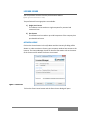
1) Download proForecaster from www.pro-bs.net
2) Open the setup and proForecaster will guide you through the
installation process
3) After successful installation, proForecaster is available at each Microsoft
Excel start-up in the Add In tab.
SOFTWARE REQUIREMENTS
proForecaster requires Microsoft Excel version 2007 or 2010 and the Microsoft
.NET Framework version 3.5 to be installed.
1