1
Reset MIDI Mapping
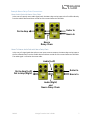
To clear MIDI mapping, first press the Control Input button and turn off Control Input mode. The
Control LED should be dark. Then, press and hold the Control Input button until the Control LED
blinks. This clears all Expression, Hot Hand, and MIDI mapping.
MIDI Channel
By default, the Vertigo responds to MIDI Channel 1 (in technical terms, this means that the lower 4
bits in the command byte of MIDI messages should be 0b0000). The Vertigo ignores all MIDI
messages sent to it that are not on its channel, with the exception of MIDI clock messages. To change
the Vertigo’s MIDI channel, edit the Vertigo’s global settings using the USB editor software or the
Neuro App.
MIDI Clock
The Vertigo syncs to MIDI clock (also known as MIDI timing clock or MIDI beat clock). MIDI clock is
tempo-dependent and is used to ensure that multiple MIDI-enabled devices stay in synchronization.
A common use of MIDI clock with the Vertigo is when recording along to a click track in a DAW
(Digital Audio Workstation) running on a computer. MIDI clock can be sent to the Vertigo directly
over USB-MIDI or via the Control Port from the Neuro Hub.
The Vertigo begins to sync its LFO to the MIDI Clock as soon as the first MIDI Clock message is
received. If the tempo changes, the rate of MIDI Clock messages will change as well, and the Vertigo
will adjust to resynchronize itself accordingly. The Vertigo doesn’t require any special configuration
to use MIDI Clock; just start sending it MIDI Clock messages and it will synchronize itself
automatically.
By default, the LFO starts synchronized with the first MIDI Clock message received. If you wish to
offset the LFO start time, for example by an eighth note, simply start playback in your DAW an eighth
note earlier or later than the beginning of the measure.
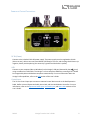
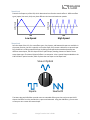
After the Vertigo receives its first MIDI clock message, the function of the Speed Knob changes.
Instead of controlling the speed of the LFO directly, it controls the number of subdivisions are in the
LFO, using the MIDI clock as a basis for the tempo. One, two, three, or four subdivisions can be
created. Musically speaking, this means that the LFO can run at the rate of quarter notes, eighth
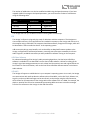
notes, triplets, or sixteenth notes. The following diagram shows the knob positions corresponding to
each subdivision, with the knob currently set to quarter notes:
Eighth Notes
Triplets
3
Quarter Notes
SA243
Sixteenth Notes
Vertigo Tremolo User’s Guide
23