1
Advanced Topics for Series B Commands
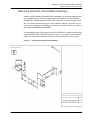
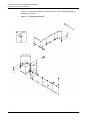
Revising the Isometric
Revising the Isometric
After you have created an isometric drawing, you may find that changes to the
plant model, from which the pipeline(s) originated, render the isometric
inaccurate. One solution is to remake the isometric. This ensures that the
information in the model and the information in the isometric agree completely.
Changes to the model are not automatically reflected in your isometric. For many
changes, such as those described next, you can use the TRANSLATE ISOMETRIC
command to make the appropriate correction on the isometric.
TRANSLATE ISOMETRIC lets you revise the dimensions and locations of items on
the isometric without altering the drawing graphics, except for the dimension text,
which is automatically updated. The values of the XYZ properties, which save the
original geometry of the model, change. For example, increasing the length of a
pipe is done by changing the coordinate values stored in the XYZ property on the
end point Cnode. In a sense, the Cnode is translated, although it does not
physically move on the drawing.
The command also lets you associate the true model coordinates with items that
you insert onto a generated isometric drawing. For example, you could add a valve
to a pipe run. You do not have to be exact about where you insert the valve. Just
place it along the pipe so it looks about right and scale it so it looks consistent, in
terms of size, with other components. The newly inserted item does not have any
XYZ properties associated with it. TRANSLATE ISOMETRIC takes such items and
translates them from wherever they are (in terms of the coordinates of the distorted
isometric) to where you want them to be (in terms of the true model coordinates).
It does this by inserting XYZ properties (saving the desired model coordinates)
onto the items.
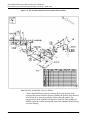
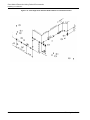
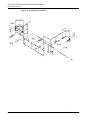
For more information about how to translate isometrics, see “Break and Translate
the Pipeline” on page 7-4 and Figure 7-2 on page 7-6.
Isometric Drawing User Guide
7-15