1
English - GN 9120 user guide
About the GN 9120
This user guide provides you with information and instructions on assembling, using
and maintaining your GN 9120. This guide contains the following sections:
The GN 9120 is a cordless headset solution, made up of a cordless headset and a base
unit that is connected to your telephone. The GN 9120 gives you full mobility, handsfree convenience and superior sound quality for your telephone conversations.
• About the GN 9120
• Assembling
• Battery charging and assembly
verification
• Low Power Mode
• HookSwitch set-up
• Features and customisation
• Answering and making telephone
calls
• Frequently asked questions
• Operational and safety information
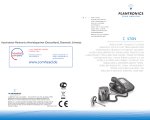
Box contents:
1. Base unit
1a) On-line indicator
1b) Link-up indicator
1c) Mute indicator
1d) Battery re-charge indicator
1e) Telephone Termination
Switch (back)
2. Headset
2a) On-line indicator
2b) Volume – button
2c) Volume + button
2d) Multifunction button
3.
4.
5.
6.
7.
8.
9.
Headband
Earhook
Earplate
Earcushion
Base foot
Connection cord
Power adaptor
Assembling
To integrate the unit to your telephone:
1. Disconnect the handset cord from the telephone’s handset
socket and connect it to the socket marked 0 on the base unit
(1).
2. Connect the connection cord (8) to the telephone’s handset
socket.
3. Connect the power adapter (9) to the socket marked 2 at the
bottom of the base unit and then connect to a power socket.
4. Insert the base unit into the foot (7) and turn until secure.
5. If your telephone has volume control, set the volume to the
middle setting.
6. Place the headset into the base unit for battery charging.
Battery charging and assembly verification
Initial battery charging
The battery in the headset is not initially charged and will require a
minimum of 20 minutes of charging before use. It takes 1.5 hours
before the battery is fully charged, providing up to 8 hours of talk
time.
The battery charging indicator (1d) on the base unit will flash continuously during charging and will light when the battery is fully
charged.
Note: The headset may become warm during battery charging.
This is normal and will not affect the safety or performance of the
headset.
2
GN9120_contents_RC_new2_EU.indd 2-3
3
09-10-2003, 15:29:29