1
USFM 100 Installation Guide, cont'd
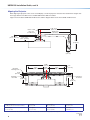
Depending on the power supply used, either:
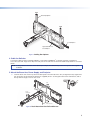
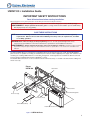
• Secure the power supply within the support end of the boom arm. To do this, pass the tie wraps through the
holes on one side of the arm and then around the power supply (see figure 7, left image). Tighten the tie wraps.
The cables should then be easily and safely routed to the electrical outlet and to the switcher.
OR
• Using the two 4-40 x ¼ inch pan head screws, secure the power supply to the second device mounting bracket.
Secure the mounting plate (and power supply) to the base plate by aligning the two small tabs on the back of
the mounting plate over the corresponding tabs on the base plate above the installed switcher (see figure 7, right
image). Slide the mounting plate up into place. Secure it to the base plate with a 6-32x¼ inch screw through the
securing tab. Tighten down the screw.
Power Supply
Mounting
Brackets
RGB
PoleVault
Switcher
C/IR
2 ML
IR
R
O
DI
AU 5
X T
AU PU
T
DIO
OU
DO
OR GRO NOT AMPLI
SPE SHO UND
OUT AKE
FIE
PUT R RT
D AU
2 WIR S
SS
CLA
R
NE
OU
T
L
LI
FT
LI R
CE VE
OI EI
12V
L
RO
NT
CO
L
A
Tx
Rx
50m
ING
10V
R
/8 s
2/4 m
Oh
-23
RS
E
UT
L/M
PAG
SEN ING
SOR
VO
L
US
17TT
AUD
APP IO/V
ARA IDEO
TUS
Figure 7. Secure
b.
the Power Supply in the Boom Arm or the Mounting Bracket
Extend the boom arm to the appropriate projector throw distance and secure in the applicable slots with the four
supplied (¼-20 x ½ inch) screws and washers.
NOTE: Do not overtighten the screws.
c.
Loosen the set screw (located in the lower hole on the boom arm end), and screw the threaded pipe up into
the end of the arm. A minimum of three turns is needed to safely secure the pipe in place. Lock it in place by
tightening down the set screw.
NOTE: The upper hole on the boom arm end is for attaching an optional seismic/support wire.
d.
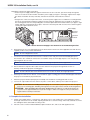
Run the VGA and composite video cables from the switcher to the projector through the boom arm so
that they exit down the projector mounting pipe.
NOTE: Provide sufficient cable slack within the boom arm to allow for future arm length adjustment.
e.
Referring to the UPB 25 User Manual, screw the UPB 25 upper mounting plate onto the threaded pipe and attach
the projector to the UPB 25 projector bracket.
f.
Attach the projector bracket (with projector installed) onto the UPB 25 mounting plate and secure it.
g.
Connect the output cables from the switcher, any MLC control cables, and the power cable to the projector.
CAUTION: Electrical Shock That May Result in Injury. Do not thread the projector power cable through the
boom arm or mounting pipe. Threading it through the arm or the pipe violates national electrical regulations.
ATTENTION : Choc électrique qui peut causer des blessures. N'enfilez pas le câble d'alimentation du
projecteur sur le support flexible ou le tuyau de montage. L'enfiler sur le support ou le tuyau enfreint les
réglementations électriques nationales.
6. Complete the Installation
6
a.
Switch on the display device, control device, and signal sources, and configure the system. Adjust the position
and length of the boom arm as needed, adjusting the UPB 25 to center the image. When fully satisfied, secure the
arm and tighten down all the UPB 25 locking screws.
b.
Place the covers over the installed USFM base plate and boom arm, and secure with supplied screws.