1
Welcome
Thank you!
Transporting
At Loewe, we combine the highest standards of technology, design and user
friendliness. This applies equally for TV, video and accessories.
Your new TV set is ideally equipped for the TV standard of the future - ”HDTV”
(High Definition Television). With its high-resolution screen and the future-proof
digital interfaces HDMI, you have the option to view HD content with excellent
picture quality. It therefore carries the European quality mark ”HD ready”.
Digital TV is steadily spreading via terrestrial reception, in the cable network and
via satellite. Loewe supplies sets equipped with DVB-T and DVB-C (DVB-C not
for GB). A digital satellite tuner (DVB-S) can be retrofitted. The DVB integrated
within the TV set is operated via the TV set menus using the remote control.
We have designed this TV set so that it is easy to operate by using menus.
Information about settings in menus is shown automatically; this enables you to
understand the context quickly.
You will find the answers to many of your technical queries in the index of your
TV. If you want to operate the TV, you can access functions directly from the index. This saves you from having to read through detailed operating instructions
and is the reason why this operating manual only explains the most important
operating steps.
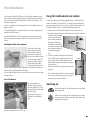
Only transport the unit in an upright position. Hold the set by the top and bottom edges of the housing. The LCD screen is made of glass and/or plastic and
may break if not handled carefully. Should the LCD screen become damaged
or should the liquid crystal begin to leak, then it is imperative you wear rubber
gloves when removing the set. Should the liquid come in contact with your skin,
thoroughly rinse with water immediately.
Integrated features
Installation options
As a manually rotatable desktop unit
Positioning as a manually rotatable desktop unit with the mounted table leg
included in the delivery.
As a motorized rotating desktop unit
• ARS Motor Unit Screen Table Stand, Loewe order no. 66481B00.
• ARS Motor Unit Screen Table Stand Chrom, Loewe order no. 66481Q00.
As a wall-mounted unit
• Wall Holder WM55 for Individual 26, Loewe order no. 65497A00.
The maximum equipment is described in these operating instructions. Functions
indicated by 3 are not available in all TV sets. Menu contents may differ from
the ones shown, depending on how your TV is equipped.
You can display how your set is equipped in the “Integrated features“ index
(press the INFO button in the TV mode if no menu is displayed; the “Integrated
features“ menu item is also displayed in the index before the initial letter A).
There are separate operating instructions for Digital Recorder+.
• Wall Holder WM54 for Individual 32 / 40, Loewe order no. 65498A00.
Scope of delivery
• Screen Floor Stand for Individual 26 / 32, Loewe order no. 65496B00.
•
•
•
•
•
•
•
LCD-TFT TV set
Mains Cable
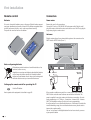
Assist remote control with 2 batteries
Table stand mounted
Marketing and service card
3 binders
These operating instructions
• Screen Wall Mount 1 for Individual 26 / 32, Loewe order no. 66484B00
(Only in connection with VESA adapters, see accessories on page 44).
• Screen Wall Mount 2 for Individual 40, Loewe order no. 65493B00
(Only in connection with VESA adapters, see accessories on page 44).
As a manually rotatable stand-alone unit
• Screen Paravent for Individual 26 / 32 / 40, Loewe order no. 65494B00.
As a motorized rotating stand-alone unit
• Screen Floor Stand MU for Individual 26 / 32 / 40, Loewe order no. 66494Q00.
As an individual mounting solution
• Screen Lift Plus for Individual 26 / 32 / 40, Loewe order no. 65486B10
(Only in connection with VESA adapters, see accessories on page 44).
7-