1
Installation and Operating Instructions
Remote Transmission Device
RAMOC® VD4-ST2
Innotas Produktions GmbH
Friedrich-Engels-Str. 46
D-15745 Wildau
+ 49 (3375) 529649 0
+ 49 (3375) 529649 24
Email: [email protected]
www.innotas-service.de
Last update - 28.07.2014
Page 6/8
Maintenance:
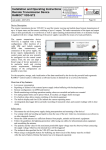
The remote transmission unit itself is maintenance-free. If
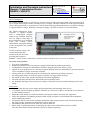
necessary, the contrast of the display can be adjusted by means of a
Phillips screwdriver in size PH0.
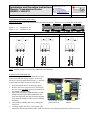
Hole for contrast
adjustment
Repair:
Repairs may only be carried out by the manufacturer. The device
must be replaced, if the remote transmission device is defective.
The replacement of the fuse (which triggers on surge voltage of the power supply) is permitted only by a fuse
with identical specification according to the supplied technical specification of the device!
Troubleshooting:
No response (no display outputs, no lighting of the LED L3)
- Check the fuse of the device
- Check the polarity of the power supply (plus / minus correct?)
- Power switch is ON?
No display outputs, lighting of the LED L3 every 4s:
Battery operation mode, the device is in power saving mode (the display is switched off in order to
secure a long running time of the device), short term display output can be activated by pressing button T1
Bad or fluctuating display contrast
- Ambient temperature at the boundaries of acceptable values?
- Voltage of the power supply < 4 V?
- Contrast adjustment refer to item Maintenance:
LED L1 lights permanently
- Supply voltage less than 5.0 V and battery voltage < 10,8V
- Failed to initialize the radio unit Observe display outputs at power on or press T1 button for renewed
display
o Missing SIM card
o Incorrect SIM-PIN revise configuration
o SIM card locked after having have entered 3 wrong PIN codes in a row. Unlock SIM card by
means of a mobile phone with correct PIN
Obsolete display or no display of the measured values of sensors
- Press button T1 in order to determine and display the current value
Device can not be reset by briefly interrupting the power supply or switching the device off and on
- The power supply must be interrupted until the display and LED L3 permanently remain turned off.
- Alternatively press button T1 for at least 6s