1
HAINKE Staubfilter GmbH
P.O. Box 12 48
27795 Hude
An der Imbäke 7
27798 Hude
phone
fax
e-mail
web
+49 4408 8077-0
+49 4408 8077-10
[email protected]
www.hainke.de
Operating instructions
electronic solenoid valve control type IFC 12
8.1
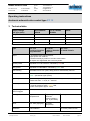
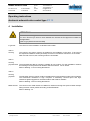
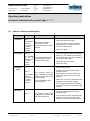
Causes of fault and elimination
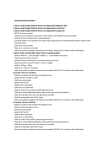
Messages
overload
Indication
LED red
Solenoid valve output
overloaded or shortcircuited during the control
impulse.
• Check the power of the conntected
solenoid vales. Pay attention to the
maximum output power.
• Check the valve
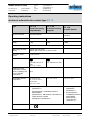
LED red
This indicator
will go off No output load during the
when the next control impulse or shortcircuited valve output.
non-faulty
impulse
is
received.
pneumatic
fault
Elimination
• Check the valve connection
This indicator
will go off
when the next
non-faulty
impulse is
received.
wire break
Causes of fault
• Check the settings of the multi-position
switch (7). The number of connected
valves must agree with the adjusting of
the multi-position switch
• Check the valve connection
• Check the valve
• Check valve function
• Watching to the manometer at the
pressure column.
The pressure switch at
The pressure must have sunk by at
This indicator input P indicates no signal
least 1 bar at the end of the control
change at the end of the
will go off
impulse.
when the next control impulse.
non-faulty
• Check the connection, adjustment and
The pneumatically valve
impulse is
hysteresis of the pressure switch
control is faulty
received.
• If no function test shall be carried out,
switch the DIP switch 1 (19) to the OFF
position.
LED red
lack of air
LED red
• Check the compressed air and the
pressure switch
The pressure switch input
P indicates no signal at the • If no monitoring of the compressed air
end of the delay time.
shall be carried out, switch the DIP
switches 1+2 (19) to the OFF position.
operating instructions
ifc12-ba_eng
version: 02/2015
date: 26.02.2015
page: 20