1
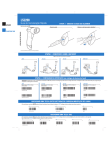
Use the small Delete Button to clear the scanner memory of all
stored items.
1. Aim the scanner away from any bar codes.
2. Press and hold the Delete Button for 6 seconds, until you
hear a long beep.
Clear All
Note: If you scan the sample bar code above 3 times there will be 3 listings of this bar code in the
CS 1504’s memory. To delete all 3 listings of the bar code from memory, scan the sample bar code
3 times using the small Delete button (-) on the scanner. Upon each minus scan you will receive a
single beep. When the last entry has been deleted, a long double beep will be emitted indicating all
listings of that bar code have been removed from memory.
1.
2.
For developers interested in writing software applications for a CS 1504, a Software Developer’s Kit
is available for downloading. Visit: http://www.symbol.com/consumer for more information.
To transfer bar code data from the scanner to the computer, use your third party application software
to upload stored data from the scanner to your computer. (Application software is not included with
the scanner.)
Note: The manner in which this transfer occurs depends on your specific application. Refer to your
application software manual for instructions. When communication starts, the indicator blinks green
and the scanner beeps.
Upload Bar Code Data to the Computer
Clean the CS 1504 with a soft, clean cloth. Do NOT use any solvent such as alcohol or any abrasive
substances.
Cleaning
To toggle the beeper tone on or off, press and hold the large button for 10 seconds until the LED
indicator turns solid amber (beeper tone off) or until the LED turns solid amber and a double tone is
heard (beeper tone on).
Audio Control
Aim the scanner at the bar code to be deleted from memory.
Press and hold the small Delete Button on the scanner until you hear a tone and the blinking
indicator turns solid amber.
Delete Bar Codes (Remove Items from Memory)
0123
The CS 1504 will indicate a low power state to the user by blinking the LED indicator red while trying
to scan a bar code.
Serial
Connection
USB
Connection
Low Battery Warning
Practice scanning this sample bar code.
3.
Remove the old batteries.
4.
Insert 4 new batteries noting the
polarity.
5.
Close battery cover and replace
screw.
Connecting the Scanner to Your Computer
Replacing the Batteries
Scan Bar Codes (Add Items to Memory)
Note: Before you begin, shut down your computer according to your computer manufacturer’s
directions.
1. Connect the included serial (9-pin) or USB (4-pin) connector to the corresponding communication port on the back of you computer according to the manufacturer’s directions. Ensure
that the connection is secure.
2. Holding the other end of the communication cable with the arrow facing up, slide the connector into the data communication jack on the side of the scanner.
When it is necessary to replace the
batteries:
1. Remove screw securing the battery cover.
2. Lift battery cover.
Welcome!
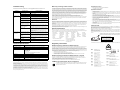
© 2001 SYMBOL TECHNOLOGIES, INC. All rights reserved.
Thank you for selecting this world class, bar code memory scanner. This scanner, when
combined with a third party application (software not included), allows you to capture bar
codes for a variety of uses. Whether you’re scanning bar codes to generate a shopping
list, purchasing products, or finding information on the Internet, this scanner is the
easiest data capture device to use. Simply point, and scan!
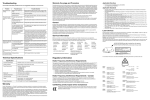
Delete Button
Scan Button
Battery Cover
(underneath)
LED
Indicator
Scanner Exit
Window
Data
Communication
Connector Jack
Unpacking Your Scanner
Depending upon the configuration you purchased, the scanner is packaged with either
a serial communication cable or a USB communication cable. If any items are missing,
contact your reseller.
Serial Communication Cable OR USB Communication Cable
Symbol reserves the right to make changes to any product to improve reliability, function, or design.
Symbol does not assume any product liability arising out of, or in connection with, the application or use of any
product, circuit, or application described herein.
No license is granted, either expressly or by implication, estoppel, or otherwise under any patent right or patent,
covering or relating to any combination, system, apparatus, machine, material, method, or process in which Symbol
products might be used. An implied license only exists for equipment, circuits, and subsystems contained in Symbol
products.
Symbol is a registered trademark of Symbol Technologies, Inc. Other product names mentioned in this manual may
be trademarks or registered trademarks of their respective companies and are hereby acknowledged.
Symbol Technologies, Inc.
One Symbol Plaza
Holtsville, N.Y. 11742-1300
http://www.symbol.com
Patents
This product is covered by one or more of the following U.S. and foreign Patents:
U.S. Patent No. 4,496,831; 4,593,186; 4,603,262; 4,607,156; 4,652,750; 4,673,805; 4,736,095; 4,758,717;
4,760,248; 4,806,742; 4,816,660; 4,845,350; 4,896,026; 4,897,532; 4,923,281; 4,933,538; 4,992,717; 5,015,833;
5,017,765; 5,021,641; 5,029,183; 5,047,617; 5,103,461; 5,113,445; 5,130,520; 5,140,144; 5,142,550; 5,149,950;
5,157,687; 5,168,148; 5,168,149; 5,180,904; 5,216,232; 5,229,591; 5,230,088; 5,235,167; 5,243,655; 5,247,162;
5,250,791; 5,250,792; 5,260,553; 5,262,627; 5,262,628; 5,266,787; 5,278,398; 5,280,162; 5,280,163; 5,280,164;
5,280,498; 5,304,786; 5,304,788; 5,306,900; 5,321,246; 5,324,924; 5,337,361; 5,367,151; 5,373,148; 5,378,882;
5,396,053; 5,396,055; 5,399,846; 5,408,081; 5,410,139; 5,410,140; 5,412,198; 5,418,812; 5,420,411; 5,436,440;
5,444,231; 5,449,891; 5,449,893; 5,468,949; 5,471,042; 5,478,998; 5,479,000; 5,479,002; 5,479,441; 5,504,322;
5,519,577; 5,528,621; 5,532,469; 5,543,610; 5,545,889; 5,552,592; 5,557,093; 5,578,810; 5,581,070; 5,589,679;
5,589,680; 5,608,202; 5,612,531; 5,619,028; 5,627,359; 5,637,852; 5,664,229; 5,668,803; 5,675,139; 5,693,929;
5,698,835; 5,705,800; 5,714,746; 5,723,851; 5,734,152; 5,734,153; 5,742,043; 5,745,794; 5,754,587; 5,762,516;
5,763,863; 5,767,500; 5,789,728; 5,789,731; 5,808,287; 5,811,785; 5,811,787; 5,815,811; 5,821,519; 5,821,520;
5,823,812; 5,828,050; 5,850,078; 5,861,615; 5,874,720; 5,875,415; 5,900,617; 5,902,989; 5,907,146; 5,912,450;
5,914,478; 5,917,173; 5,920,059; 5,923,025; 5,929,420; 5,945,658; 5,945,659; 5,946,194; 5,959,285; 6,002,918;
6,021,947; 6,036,098; 6,047,892; 6,050,491; 6,053,413; 6,056,200; 6,065,678; 6,067,297; 6,068,190; 6,082,621;
6,084,528; 6,088,482; 6,092,725; 6,101,483; 6,102,293; 6,104,620; 6,114,712; 6,115,678; 6,119,944; 6,123,265;
6,131,814; 6,138,180; 6,142,379; 6,172,478; 6,176,428; 6,178,426; 6,186,400; 6,188,681; 6,209,788; 6,216,951;
6,220,514; 6,243,447; 6,244,513; 6,247,647; 6,250,551; D305,885; D341,584; D344,501; D359,483; D362,453;
D363,700; D363,918; D370,478; D383,124; D391,250; D405,077; D406,581; D414,171; D414,172; D418,500;
D419,548; D423,468; D424,035; D430,158; D430,159; D431,562; D436,104.
Invention No. 55,358; 62,539; 69,060; 69,187 (Taiwan); No. 1,601,796; 1,907,875; 1,955,269 (Japan); European
Patent 367,299; 414,281; 367,300; 367,298; UK 2,072,832; France 81/03938; Italy 1,138,713.
rev. 07/01
•
Aim the scanner at the sample bar code shown below.
Press and hold the large button on the scanner until you
hear the tone and the blinking indicator turns solid green.
1.
2.
Scanner
•
Make sure the scanner beam covers the entire bar
code and extends as far out as indicated by the endpoints in the bar code below.
The scanner should be held approximately 2.5" from
the bar code and at a slight angle.
Getting Started
Owner’s Guide
CS 1504 Consumer Memory Scanner
http://www.symbol.com/consumer
72-50875-02
Revision A - October 2001