1
Troubleshooting
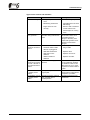
Typical error causes and remedies
Failure
Possible reason
Remedy
Generator is noisy
•
Foreign object inside fan
cover.
•
Remove foreign object
•
Ball bearing is defective.
•
Ask skilled person to check
ball bearing.
•
Engine does not work
correctly.
•
Renew V-belt or set belt to
correct tractive force.
•
Check engine for running
noise.
Mechanical damage
at the generator.
Damages detected at the
generator during maintenance
works.
Contact
KW-Generator GmbH & Co.
KG and take picture of
damage, if necessary. Until
clarified, take generator out of
operation to avoid further
damages.
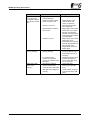
Display at the HMI
control unit is without
function.
•
Generator does not rotate.
•
Start engine.
•
Generator cable or HMI
cable is not plugged-in.
•
Plug in cable.
•
HMI cable is defective.
•
Replace cable.
•
HMI control unit is
defective.
•
Replace control unit.
•
GEMA controller is
defective.
•
Replace controller.
Display of the HMI
Connection cable or joystick is
control unit and green defective.
"ACTIVE" LED are on
but joystick is without
function.
Check whether the system
can be operated by pressing
the "ON/OFF" button on the
HMI control unit. If so, check
or replace connection cable to
joystick.
Red "ERROR" LED is Interruption in power cable or
on, display shows
magnet plate.
"OPEN".
Check connection cable and
magnet plate for interruptions
and repair it, if possible.
Red "ERROR" LED is Generator has been switched
on, display shows
off by controller due to
"TEMP".
overtemperature.
Wait until the generator has
cooled down.
45