1
1. Functional description
Note: A non-occupied interface is assessed
as a line interrupt. The TP/TX line to terminal equipment which is switched off is likewise assessed as a line interrupt as the deenergised bus coupler cannot transmit link
test pulses.
Auto polarity exchange
If the receive line pair is incorrectly connected (RD+ and RD- switched) polarity is automatically reversed.
Autonegotiation
Autonegotiation is a procedure in which the
switch automatically selects the operating
mode of its 10/100 RJ-45 ports. When a
connection is set up for the first time, the
switch detects the speed (10 or 100 Mbit/s)
and the transmission mode of the connected network (half duplex or full duplex).
Autocrossing
If the autonegotiation function is active, the
RS2-4R detects the transmit and receive
pairs (MDI, MDI-X). The RS2-4R automatically configures its port for the correct
transmit and receive pins. Consequently it
does not matter whether you connect devices using a cross-over or straight cable.
1.3 SPECIFIC FUNCTIONS OF THE
F/O INTERFACE
Link control
According to IEEE 802.3 standard 100BASEFX an RS2-4R monitors the attached F/O
lines for open circuit conditions.
1.4 REDUNDANCY FUNCTIONS
If a line section fails, the redundancy functions “HIPER-Ring” solves a network interruption within less than 0.5 seconds (see
chap. 2).
LS
LS
DA
DA
DA
2
2
FAULT
4
4
LS
LS
LS
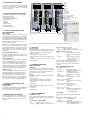
MAC address field
IP address field
2 HIPER-Ring ports (port 3 and 4)
LED
display
elements
Port 4
RS2-4R
1MM SC
1SM SC
1LH SC
2MM SC
2SM SC
2LH SC
Port 3
RS2-4R
1MM SC
1SM SC
1LH SC
2MM SC
2SM SC
2LH SC
LH
DA
4
x
x
x
x
x
x
x
x
x
x
x
x
x
x
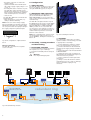
Fig. 1: Overview interfaces, display elements and controls of the RS2-4R
1.5 SECURITY
Port security
An RS2-4R protects every port from unauthorized access. The following functions are
available for the security monitoring of
every single port:
– Who has access to this port?
– Actions which result on an unauthorized
access
– How to proceed in case of an access of an
unknown user
1.6 FURTHER FUNCTIONS
AND FEATURES
Diagnosis
In case of a reset the RS2-4R runs a hardware self test. During operation an integrated watch dog (monitoring unit) monitors
the function of the software.
Reset
The RS2-4R will be reset by the following
actions:
– management
– input voltages fall below a threshold
– internal voltage supply falls below a
threshold
– watchdog
After a reset the following actions are carried through:
– self test
– initialization
1.7 DISPLAY ELEMENTS
Equipment status
These LEDs provide information about statuses which affect the function of the entire
RS2-4R.
P1 – Power 1 (green LED)
– lit:
– supply voltage 1 present
– not lit: – supply voltage 1 is less than 18 V
4
3
LS
SM
DA
4
DA
LH
3
LS
2
LS
Port 1 and 2 complying
with 10/100BASE-T(X)
autonegotiaton + autopolarity +
autocrossing
(RJ45 connectors)
MM
DA
V.24 interface
for external
management
SM
+24V (P2)
DA
4
LS
2pole
DIP switch
TP
3
LS
Aufkleber MAC-Adresse
1
LS
DA
FAULT
DA
1
LS
0V
0V
RM
RING
V.24
DA
3
Aufkleber MAC-Adresse
Aufkleber MAC-Adresse
1
LED
display
elements
FAULT
RM
0 1
6pin
terminal
block
MM
DA
2
+24V (P2)
IP-ADDRESS
IP-ADDRESS
RM
RING
V.24
1
0V
0V
0 1
RM
RING
V.24
P
FAULT
RM
+24V (P1)
2
IP-ADDRESS
1
FAULT
P
+24V (P2)
FAULT
RM
0V
0V
2
h
RS2-4R
TP
1.2 SPECIFIC FUNCTIONS OF THE
TP/TX INTERFACE
Link control
The RS2-4R monitors the connected TP/TX
line segments for short-circuit or interrupt
using regular link test pulses in accordance
with IEEE standard 802.3 10/100BASE-T/TX.
The RS2-4R does not transmit any data to a
TP/TX segment from which it does not
receive a link test pulse.
1
0 1
+24V (P1)
1.1 FRAME SWITCHING FUNCTIONS
The RS2-4R supports the following frame
switching functions:
– Store and Forward
– Multi address capability
– Learnt addresses
– Priority
– Tagging
– Flow control
– Port mirroring
– Broadcast Limiter
P
h
RS2-4R
+24V (P1)
h
The ports of an RS2-4R represent a terminal
connection for the connected LAN segment.
You can connect single devices or complete
network segments.
RS2-4R
P2 – Power 2 (green LED)
– lit:
– supply voltage 2 present
– not lit: – supply voltage 2 is less than 18 V
FAULT – Failure (red LED)
– lit:
– The indicator contact is
open, i.e. it indicates an
error.
– not lit:
– The indicator contact is
closed, i.e. it does not
indicate an error.
If the manual setting of the indicator contanct is active, the fault LED does not
depend on the position of the indicator
contact.
RM – Redundancy Manager
(green/yellow LED)
– lit green:
– RM function active,
redundant port not active
– lit yellow:
– RM function active,
redundant port active
– not lit:
– RM function not active
– flashes green 2 times
per second
– Configuration is loaded
from ACA
– flashes yellow 2 times
per second
– Configuration is saved to
ACA
– flashes green/yellow 2 times
per second
– Error in memory
operation
– flashes green 1 time
per second
– HIPER-Ring configuration
error, e.g. no RM or
several RMs active
Port Status
These LEDs display port-related information.
LS 1 to 4 – Link state (green LED)
– not lit:
– no valid link
– lit green:
– valid link
– blinking green (1 single blink per period)
– port is deactivated by RM
(port 3, if RM active)