1
DMP-BD30PP_Book1.book
4 ページ
2007年10月5日 金曜日 午前10時44分
Getting started 11 Disc and card information
Disc and card information
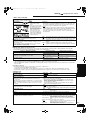
Packaged discs
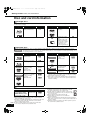
This chart shows the different type of retail/commercial discs you can use, and also includes the industry-standard logos that should appear on
the discs and/or packaging.
Type of media/
Logo
BD-Video
Features
High Definition (HD)
movie and music discs
Indicated as
Type of media/
Logo
[BD-V]
DVD-Video
CD
Features
High quality movie and
music discs
Compact Discs (CD’s)
that contain audio and
music
≥Operation and sound
quality of CDs that do
not conform to CD-DA
specifications (copy
control CDs, etc.)
cannot be guaranteed.
Indicated as
[DVD-V]
[CD]
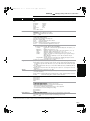
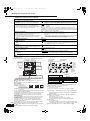
Recorded discs
This chart shows the different type of discs recorded with DVD recorders, DVD video cameras, personal computers, etc. that you can use.
Finalized
This mark means you must finalize the disc with the DVD recorder, etc. before playback. For details about finalizing, refer to
the operating instructions for your equipment.
Type of media/
Logo
Formats
Indicated as
Type of media/
Logo
Formats
Indicated as
BD-RE
≥Version 3 of the BD-RE
Recording Format
≥JPEG format
[BD-V]
DVD-R DL
Finalized
[DVD-V]
[DVD-VR]
[JPEG]
≥DVD-Video Format
≥Version 1.2 of the DVD
Video Recording
Format
≥AVCHD format
≥+VR (+R/+RW Video
Recording) Format
≥AVCHD format
[DVD-V]
BD-R
DVD-RAM
DVD-R/RW
Finalized
≥Version 2 of the BD-R
Recording Format
[BD-V]
≥Version 1.1 of the DVD
Video Recording
Format
≥JPEG format
≥AVCHD format
[DVD-VR]
≥DVD-Video Format
≥Version 1.1 of the DVD
Video Recording
Format
≥AVCHD format
[DVD-V]
[DVD-VR]
[JPEG]
[AVCHD]
[AVCHD]
rR/rRW/
rR DL
Finalized
[AVCHD]
[AVCHD]
≥CD-DA format
[CD]
≥MP3 format
[MP3]
≥JPEG format
[JPEG]
Finalized
≥It may not be possible to play the above discs in some cases due
to the type of discs, the condition of the recording, the recording
method and how the files were created.
≥When a disc recorded in the AVCHD format is being played, the
video may be paused for a few seconds at portions spliced, due
to deletion or editing.
CD-R/RW
SD cards
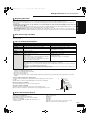
This chart shows the different type of cards recorded with Panasonic High Definition Video Camera or personal computers, etc. that you can use.
≥A miniSD Card and a microSD Card must be used with
Type of media
Formats
Indicated as
the attached adaptor that comes with the card.
≥JPEG format
[JPEG]
≥Useable memory is slightly less than the card capacity.
SD Memory Card§
≥AVCHD format
[AVCHD]
≥If the SD card is formatted on a PC, you may not be able
(from 8 MB to 2 GB)
to use it on this unit.
SDHC Memory Card
≥We recommend using a Panasonic SD card.
(from 4 GB to 16 GB)
≥Keep the Memory Card out of reach of children to
§ Including miniSD Card and microSD Card
prevent swallowing.
≥When a card recorded in the AVCHD format is being played, the
≥When using from 4 GB to 16 GB SD cards, only SD cards that
video may be paused for a few seconds at portions spliced, due to
display the SDHC logo can be used.
deletion or edition.
≥This unit is compatible with SD Memory Cards that meet SD Card
≥Switch the write-protect switch to the “LOCK” position to protect
Specifications FAT 12 and FAT 16 formats, as well as SDHC
the content from accidental erasure.
Memory Cards in FAT 32 format.
ADAPTER
RQT9037
(ENG)
4
≥In these operating instructions, the cards shown in the table
(D above) are comprehensively called SD cards.