1
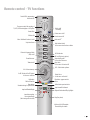
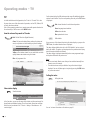
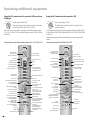
Remote control - TV functions
Control LED for programming
the remote LED
DVD
TV
STB
VCR
Change-over switch for operating of
TV, VCR, DVD recorder/player or Set Top Box
Switch on/off
- on standby
Sound off/on
-Set
Call timer list
Picture menu on/off
Sound menu on/off
-List
REC-MENU
Menu "Additional functions" on/off
Radio on/off (1
RADIO
Set picture format
Electronic Programme Guide
(EPG) on/off
abc
def
ghi
jkl
mno
pqrs
tuv
wxyz
AV
PIP
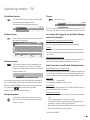
Select station directly
/in the menu: enter numbers or letters
Call AV selection
PIP on/off (picture in picture)
Status display on/off
/in the menu: hide menu
Open index
/in the menu: info texts on/off
DVD-AV
EPG
Show/hide menu
Teletext on/off
-M
SC
DI
P+
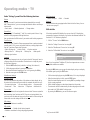
P+/P– Select station up/down
V–/V+ Volume down/up
OK
V–
for PIP: Position of the PIP picture
/ in the menu: select/set
Red button:
Call the DR archive
Green button:
Standard settings for picture/sound
V+
Station list on
/in the menu: confirm/call
P–
C-
Blue button: programme info
off/on
RD
SE
CA
T
SV
Yellow button: previous station
TITLE
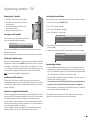
Jump forward/Fast forward
Playback/Set bookmark/Play highlights
Jump back/Rewind/Replay
Immediate recording
Freeze picture/Pause
(Start viewing with time shift)
Stop (live picture)
(1
Radio only for DVB reception
if broadcast by the station
3-