1
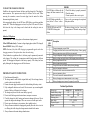
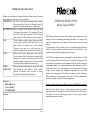
TO START THE CHARGING PROCESS Establish a safe connection between the battery and the charger first. Then plug the mains connector. This sequence must always be followed in this order. When removing the connection, remove the mains plug from the mains first before disconnecting the battery circuit. After connecting the battery, the red LED (error LED) flashes several times and then remains OFF. When the charging process starts, the yellow LED comes ON (also a click from the relay in the charger can be heard and the cooling fan starts to operate). Indication LED pattern: Yellow LED ON: Main charge phase with maximum charging current Yellow LED flashes slowly: Constant voltage charging phase (about 80% charged) Green LED ON: Battery 100% charged NOTE: Function of the yellow LED charging is programmable together with other charging parameters. Description above shows the usual setting. If local standards or regulations allow it, the battery may be permanently connected to the charger. The cooling fan is temperature controlled and operates at different speeds. The charging time depends on the battery capacity. If the battery has been partly discharged, the charging process will finish sooner. IMPORTANT SAFETY INSTRUCTIONS Read the manual thoroughly. The charger must be used with the original cables only. Do not change, shorten, extend or short circuit the cables. Remove the mains plug from the mains first before braking the battery circuit. Only rechargeable batteries can be used. Do not connect any non-rechargeable batteries (like dry-cell batteries) to the charger. The charger may be used for the correct battery type only. Do not install the charger inside motor-homes, campers or caravans. Check the charger for cable, housing and connector damages before use. Do not operate the charger when damaged. There are no user serviceable parts inside. Do not expose the charger to rain, moisture, direct sunlight or dust. Always disconnect mains after charging and generally when the device is not in use. During the trickle charge the charger remains attached to the mains. Always disconnect the mains during a thunderstorm. No LED lights or flashes after the charger has been connected to the mains Red LED flashes periodically : ntimes flashes/ 2 s Pause / n-times flashes POWER LED lights and LED CHARGING showing short flashes Number of LED flashes 1 2 3 4 5 6 7 8 9 10 11 12 13 14 ERRORS 1. Check if the battery is properly connected 2. Check the mains 3. Contact your after-sales service point Please see the error messages description of flash pattern bellow The battery voltage is too low – lower as the charger parameter "Minimal starting voltage" Description Charger temperature sensor failed Charging time limit has been exceeded (faulty battery / battery aging) Battery temperature sensor failed or not connected Charger temperature during the charging process is too high Battery voltage too high at start of the charging (incorrect battery) Battery temperature too low Battery temperature too high Charger disconnected from the battery during charging Incorrect parameter checksum Problems with the current measurement offset Incorrect parameter values The current can not be measured/detected Battery charging current measurement is out or range Battery charging current can not be properly controlled Technical Specification Charger type Nominal battery voltage Nominal output current Peak input power Input voltage IP protection grade Weight KOP302-12V KOP302-24V 12V 24V 20A 10A 350 W / 2 A 230V~ 50/60 Hz IP21 2,1 kg