1
Page
1e
Issue 11.06
LiPoRx Operating instructions
Dear customer,
Congratulations on your choice of this modern two-cell Lithium receiver battery, which incorporates a stabilisation circuit which can be set to any of three output voltages. It also features a push-button controlled FET On /
Off switch, a compensated battery state indicator, a cell balancer and a data logger.
The LiPoRx makes an important contribution to greater safety in modelling, and should be considered as a
basic necessity in all your larger models.
The On / Off switch is wear-free, permanently immune to contact problems, and offers low resistance.
The power supply cables are of generous dimensions.
The battery state indicator shows correct readings under load as well as under no-load conditions (idle state).
The integral data logger is an important and useful aid to the modeller, confirming that you have selected the
appropriate type of LiPoRx, and detecting overload conditions in terms of temperature, current and operating
times.
1
Set-up options
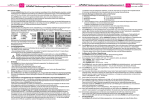
You can select any of three different stabilised output voltages using the two solder bridges on the circuit
board. If you set a higher receiver voltage, the servos offer more power and run faster.
If necessary cut a flap in the heat-shrink sleeve using a sharp blade - taking care not to damage the circuit
board or the battery.
Solder bridge 1 Solder bridge 2 Output
1 = open,
2 = bridged
5,0 Volt
1 = bridged,
2 = open
5,3 Volt
1 = open,
2 = open
5,7 Volt
Please read the instructions and data sheets
supplied with your receiver and servos before
setting the receiver voltage to a high value.
2
3
3,1 = open, 2 = bridged
LiPoRx Operating instructions
Issue 11.06, Page
Control module
The LiPoRx is equipped with a removable control module. The control module includes:
• Two operating buttons (On and Off buttons)
• One RGB LED capable of displaying all colours, including white
• Various front plates, fixings and sticker
4.2.3 Proud mounting of the control module on the outside of the fuselage.
(adopt the following sequence and use two M 2 x 18 screws)
a) Front plate,
b) 4.5 mm long spacers,
c) Control module circuit board,
d) 7.0 mm long spacers,
e) Front plate,
f) M2 self-locking nut.
g) - If necessary, drill holes into the fuselage to recess the two M2 self-locking nuts, otherwise fill out, e.g. with
scrap balsa.
- Glue the control module to the outside of the fuselage.
h) Connect the control module to the battery electronics via the 8-pin connector.
5
Using the system for the first time / displays / indicators
5.1
The LiPoRx is switched on using the ON button, which must be held pressed in for about 0.8 seconds. When
you first press the button, the battery state indicator glows green to confirm the button-press. If the indicator
glows red, you have accidentally pressed the OFF button.
After the 0.8 second period, the battery state indicator flashes; the LED will always glow green as long as the
button is held pressed in. The power supply to the receiver is now switched on.
5.2
Since the discharge curve of the LiPo battery is known to the LiPoRx, the battery state indicator now flashes in
accordance with the colour sequence depicted on the front plate, i.e. from white (full) via blue, green (about
50%), yellow to red (flat).
The display is not a “simple” display of the battery voltage. Since the LiPoRx is aware of the current drain of
the receiving system, the indicator is maintained at a constant colour even though the current load may fluctuate widely according to the servos in use. This is possible because the internal resistance of the LiPo battery
cells is known.
5.3
The LiPoRx is switched off using the OFF button. This must be held pressed in for about two seconds. When
you first press the button, the battery state indicator glows red to confirm the button press. If the indicator
glows green, you have accidentally pressed the ON button.
After the two-second period, the battery state indicator goes out, and the receiver power supply to the receiver
is interrupted.
6
Recharging the LiPo battery / indicators
The LiPoRx is charged via the two-pin “slow-fly” connector.
In charge mode the receiver voltage is switched off.
6.1
The charger must be set to two LiPo cells and a charge rate of “1C”. This means:
• For the LiPoRx-910.x
910 mA (800 … 1000 mA)
• For the LiPoRx-2000.x
2A
• For the LiPoRx-3200.x
3.2 A (3 A … 3.5 A)
The LiPoRx must deliberately be set to charge mode for charging.
4
Installing the battery (with electronics) and the control module
6.2
4.1
The LiPoRx should be mounted in the fuselage close to the receiver, e.g. using self-adhesive Velcro
(hook-and-loop) tape (use a type with strong adhesive). Cable ties can be used for additional security. Don’t
forget a foam rubber strip for distributing the load into the LiPoRx module.
6.2.0 The LiPoRx must first be switched off (OFF button), if it is not already off.
4.2.1 Flush-/recessed mounting of the front plate of the of the control module in a thick fuselage side.
a) Cut out a rectangular opening in the fuselage side, 36 * 13 mm in size (use template).
b) Screw a front plate to the LiPoRx control module via the 4.5 mm spacer, using the fixings supplied.
c) Install the control module from the outside and glue or screw the front plate to the fuselage side using the
supplementary outer holes.
d) Apply one of the stickers provided; ensure that the text is legible, and that it covers the front plate exactly.
e) Connect the control module to the battery electronics via the 8-pin connector.
4.2.2 Flush-/recessed mounting of the front plate of the control module in a thin fuselage side (without illustration).
a) Cut out a rectangular opening in the fuselage side 36 x 13 mm in size (use template).
b) Hold one front plate on the outside of the opening and another front plate on the inside, fit the screws
through the screw-holes, fit both 4.5 mm long spacers over the screws, and then fit the control module on
them inside the fuselage. Tighten the screws. If the front plate is not secure enough, it can be glued to the
fuselage as described in 4.2.1, or screwed in place using the supplementary mounting holes.
2e
c) Apply one of the stickers provided; ensure that the text is legible, and that it covers the front plate exactly.
d) Connect the control module to the battery electronics via the 8-pin connector.
3,2=open, 1=bridged
Connections
Flap of heat-shrink
The LiPoRx features several integral leads.
sleeve folded up
• One lead fitted with a charge socket.
• Two conventional parallel-wired “servo leads” of large conductor cross-section, fitted with 1 Amp continuous
current sockets suitable for the output voltage selected above.
• One high-current receiver power supply lead of large conductor cross-section, fitted with a high-current
socket (5 Amp continuous current) for the output voltage selected above (not fitted to the 910 mAh types).
Note: the cables are of large cross-sectional area and relatively short, so the LiPoRx must be installed close to the receiver for reasons of operational security. The cables should never be extended, but if there is absolutely no alternative: use cable of 0.34 mm², and solder the joints - do not use a
standard extension lead, because the connectors are unreliable.
Operating Instructions
6.2.1 Charge mode is selected by holding both buttons pressed in for minimum 0.8 seconds, after release of the
buttons the battery state indicator starts flashing. The flashing colour alternates between a) green (=charge
mode), b) dark, c) display of charge state (=appropriate colour), d) dark, a) green …
6.3
After a longer period the battery is fully charged.
6.3.1 The charger switches the charge current off, and displays “full” or a similar message.
At the end of the charge process the user should switch charge mode off using the OFF button.
This is accomplished by holding the OFF button pressed in for two seconds - until the charge state indicator
goes out.
If you neglect to do this, the LiPoRx switches charge mode off one hour after the charger displays the “full”
message, thereby disconnecting the battery from the charger.
The charger will then display the message “battery disconnected” or “ready” or “…” according to charger type.
6.3.2 If you disconnect the charge lead during the charge process, the LiPoRx detects the same situation as under
6.3.1 (“no charge current”), and also responds identically: after one hour it switches charge mode off.
Page
3e
Issue 11.06
LiPoRx Operating instructions
Issue 11.06, Page
Hold the OFF button pressed in for two seconds: until the charge state indicator goes out.
Protective circuits
The LiPoRx monitors the charge / discharge current during the discharge and charge processes.
7.1
If an excessive charge rate is set at the charger, the charge process is interrupted, and the LiPoRx sets itself
to OFF.
7.2
If the wrong charge mode is set on the battery charger (incorrect cell count or a Nickel battery charge program
instead of the LiPo charge program), then the charge process is halted at the moment when the battery exceeds the maximum permissible charge voltage for the battery. The LiPoRx sets itself to OFF.
7.3
The LiPo battery can also be discharged via the charge socket. The protective circuit prevents excessive
discharge currents. The LiPoRx sets itself to OFF.
8
Battery maintenance
The voltage of the two LiPo battery cells is constantly balanced - if necessary - regardless of their state of
charge. The principle employed is the “smart balancing” method, which has already proved excellent in our
LiPoCard and LiPoBalancer, as it minimises unnecessary cell balancing at different states of charge.
9
Data logger function: recording
Although the normal function of the LiPoRx is to supply power to the receiving system, it also includes a vitally
important feature which is not offered by conventional receiver batteries: the data logger, which records everything relevant to your receiving system’s power supply.
9.1
• All data is initially (when the data memory is cleared) determined at one-second intervals.
• The average value of the data within this time period is stored, as is the peak value (e.g. the maximum
current and the minimum voltage).
• If there is a risk of memory overflow during the recording period, the data is compressed, i.e. two adjacent
average voltage values are replaced by the average of these two values, or the larger of two adjacent peak
current values is retained.
• The internal data memory is not erased until you change the operating mode; this means that the data is
stored permanently until the operating mode is changed (switched from receiver power supply mode to charge
mode, or vice versa). Switching the receiver power supply off does not constitute a mode change; it simply
interrupts the data recording process. If an interruption occurs - e.g. a new flight without recharging the battery
- the seconds are zeroed, but the earlier data is not erased.
9.2
Data recording with the receiver power supply switched on.
When the LiPoRx is switched on, the following data is recorded:
a) Minimum receiver voltage,
b) Average receiver voltage,
c) Maximum receiver current,
d) Average receiver current,
e) Temperature, especially of the voltage stabilisation circuit.
9.3
Data recording during battery charge mode.
When charge mode is activated, the following data is recorded:
a) Average charge voltage,
b) Average charge current,
c) Voltage of cell 1,
d) Voltage of cell 2,
e) Temperature of the LiPoRx circuit board with the battery bonded to it.
10
Data logger function: data transfer
10.1 The recorded data can be transferred from the LiPoRx to the RS 232 port of a PC using the prog-adaptalpha adaptor and the prog-adapt-uni lead.
If you wish to use a laptop with only a USB port, then you will require the RS232-USB-adaptor.
At the PC / laptop end the data is received by the winsoft or AkkuSoft software, both of which can be downloaded from our website (Section C1).
10.2 Preparing for data transfer
• Run the analysis program on the PC or laptop (winsoft or AkkuSoft).
• We recommend that you select “File”, “Store original data in file” for storing the data from the LiPoRx.
• Open the “battery 1 Online” window with the following “Settings” under “Curve select battery 1”:
Voltage, Current, Capacity, Temperature, 7 cell voltage
• To check the data arriving you can open the “Info”, “Online info” window.
• Connect the adaptor (stated under 10.1. - RS232-USB-adapt, pro-adapt-uni, pro-adapt-alpha) to the PC
or laptop - but not yet to the LiPoRx.
4e
• Select the appropriate port in the analysis program, and activate the port (“Connect”).
• Pull out the 8-pin plug (the one with the 6-core ribbon cable) from the LiPoRx.
• Refer to the photo sheet and check that you know how to connect the 6-pin prog-adapt-alpha to the 8 pins
of the LiPoRx control module plug with correct polarity - but don’t connect it yet.
6.3.3 The user can also halt the charge process at any time using the OFF button.
7
Operating Instructions
LiPoRx Operating instructions
10.3 When you have carried out all the preparatory steps listed under 10.2, connect the prog-adapt-alpha to the
connector on the LiPoRx control module.
• Ensure that the plug is connected to the correct six pins.
• Data transfer commences automatically when you plug in the prog-adapt-alpha. If you interrupt the data
transfer by disconnecting the prog-adapt-alpha from the LiPoRx, the data transfer starts again from the
beginning when the connection is restored.
• The data is immediately displayed in the opened Battery 1 diagram in the analysis program.
10.4 Key to the curves in the receiver battery data output diagram
a) Average receiver voltage =
“Voltage” curve
b) Average receiver current =
“Current” curve
c) Minimum receiver voltage =
“V12 voltage cell 3”
d) Maximum receiver current =
“V12 voltage cell 4” (= current value)
e) Voltage stabilisation circuit temperature =
“Temperature”
10.5 Key to the curves in the charge data output diagram
a) (Average) charge voltage =
“Voltage” curve
b) (Average) charge current =
“Current” curve
c) Voltage of cell 1 =
“V12 voltage cell 1”
d) Voltage of cell 2 =
“V12 voltage cell 2”
e) Temperature of circuit board =
“Temperature”
10.6 Practical use of the diagram curves
You can make use of the curves to work out the appropriate capacity of the receiver power supply for a particular model, as well as to check the loads which occur in that model.
• For example, if you find that peak currents of 7 Amps occur constantly with a 4 A LiPoRx, then you should
consider switching to the 7 A type.
“Since the energy consumption display in mAh is relatively accurate, it is possible to calculate the safe operating time with a fully charged receiver battery after a test-flight (i.e. by multiplication).”
11
Special notes
As the LiPoRx is connected to the battery “all year round”, it could deep-discharge the pack even though its
“sleep” current is extremely low. If you have a discharged LiPoRx-910, the maximum period of storage before
recharging is three weeks; the corresponding figure with a full pack is around five months. With higher-capacity LiPoRx versions the safe storage periods are commensurately longer. If a battery should become deep-discharged, then the LiPoRx can be recharged at a very
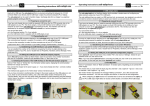
low current (1/10 C) by closing the solder bridge #3. When the pack reaches a
voltage at which the micro-processor is able to function again, the battery state
indicator will flash red at a fast rhythm (lilac flashing means: it is not full enough).
This is intended to alert you to the fact that the closed solder bridge is by-passing
all the protective circuits, and that the solder bridge must now be opened again.
3= soldered; 2,1= open
12 Specification
Type
Kapacity
Order designat. [mAh]
LiPoRx-910.4
LiPoRx-910.7
LiPoRx-2000.4
LiPoRx-2000.7
LiPoRx-3200.4
LiPoRx-3200.7
910
910
2000
2000
3200
3200
Nom./ Con./ Peak Weight
Current about [A]
[g]
4
7
4
7
4
7
3,5
3,5
3,5
3,5
4
4
6
10,5
6
10,5
6
10,5
Dimensions
[mm]
77 84 * 35 * 16
77 84 * 35 * 16
136 95 * 40 * 22
136 95 * 40 * 22
205 150 * 40 * 20
205 150 * 40 * 20
Colour sequence of the battery state indicator LED:
From white (full) via blue, green (approx. 50%), yellow,
violet to red (flat).
Size of circuit board (excl. battery) 75*35*4 mm
Size of On / Off module incl. LED
35*12*6 mm
Size of front plate, On / Off module 55*20*1 mm
Maximum voltage of safety power-off
60 V
“OFF” current drain about
350 µA
Connecting leads, length about 16 cm:
1 * charge lead
2 * power servo lead, 0.34 mm² (1 A continuous)
1 * high-current connector (5 A continuous)
(not fitted to LiPoRx-910.x)
Schulze Elektronik GmbH • Prenzlauer Weg 6 • 64331 Weiterstadt • Fon: +49-6150-1306-5, Fax: 1306-99
www.schulze-elektronik-gmbh.com
[email protected]
• Germany •
Page
5e
Issue 11.06
Important common hints to lithium
batteries
13 Common hints on using Lithium batteries
• Do not disassemble, modify, heat or short-circuit the battery.
• Do not burn the battery or store it in a hot area.
• Do not drop the battery and/or apply excessive mechanical stress to it.
• Do not allow the battery to get wet.
• Observe chapter 6.
• Use for charging with the LiPoCard the selections „LithiumPolymer“ and „2 cells“ and 1 C charging
current (suitably the capacity of the LiPoRx batteries) or a battery charger with a charge program
for Lithium batteries.
13.1 Charging instructions
• Lithium batteries must not be charged using any charger or charge program which was intended for
Nickel batteries (Ni-Cd or NiMH). These batteries must only be charged using a specialised unit such
as the Schulze LiPoCard, or a charger such as the Schulze isl 6 or isl 8 series; these devices include
programs for charging Lithium batteries.
FIRE HAZARD! - if you do not observe the battery manufacturer’s charging instructions, you risk damaging and even ruining the batteries (swelling, explosion); this can result in fire.
In particular please remember that the number of cells in the pack must be set correctly on the charger;
note: this applies only to the number of cells wired in series. Parallel-wired cells are “seen” by the
charger simply as one (1) cell “of large capacity”.
• Before charging the cells it is essential to check the cell count setting and the maximum charge voltage
on the charger.
• Before charging the cells it is essential to check the maximum charge current setting.
• Keep the battery well away from inflammable materials and volatile gases.
• During any charge / discharge process the charger / discharger and the the connected batteries (in the
LiPoRx) must be placed on a non-inflammable, heat-resistant and electrically non-conductive surface.
Such surfaces include ceramic dishes and flower pots, and special fireproof plastic or aluminium cases
(these must be insulated, e.g. using plaster sheets).
• Don’t charge batteries in the car - the seats burn very well …
• Supervise the charge/discharge process constantly - if the battery swells up, disconnect it from the
charger immediately.
• Burning batteries should be extinguished with dry sand or a powder fire extinguisher - never with water possibly explosion hazard!
• Never attempt to recharge dead or damaged cells - this can have particularly disastrous results if these
cells are part of a pack which also includes “healthy” cells.
• Protect the cells from mechanical loads!
13.2 Useful life
• Observe the charge current and discharge current limits stated by the battery manufacturer. Do not
exceed the maximum values, as this brings a risk of drastic reduction in the pack’s useful life.
• Contrary to much published information, the professional protective circuit for Kokam cells defines the
lower and upper limits as 1.0 and 4.5 Volts per cell (http://www.kokam.com/english/biz/care.html).
The protective circuits in the LiPoRx are not so close to the extremes as written above.
• The most common cause of unbalanced battery packs is not “deep-discharging” to below 3 V / cell, but
overloading through excessive discharge currents!
• Lithium cells lose a small amount of capacity every time they are charged, but the loss is much higher if
they are overloaded.
• Make sure your batteries are protected from short-circuit at all times! Whether the “short” is caused by a
screwdriver in your toolbox or by a house-key in your trouser pocket, the result is the same: overloaded
cells, and possibly a fire.
Important common hints to lithium
batteries
Instructions
Issue 11.06, page
6e
• If you deep-discharge a battery at a high current to a point below 1 V / cell, the result is invariably
irreparable damage. In any application where high motor currents are used, the discharge limit for
packs of identical cells must be in the range 2.4 … 3.0 V / cell. If the pack includes cells in different
conditions, the discharge limit should be set even higher, to avoid the danger that the weakest cell
might fall below the critical 1 V point when being discharged.
Our own experience shows that deep-discharges are not so critical if they are caused by the idle currents
of electronic circuits (speed controller not disconnected from the flight battery after the flight; balancers
powered by the battery and not removed after discharging the pack; in the present case with a LiPoRx,
whose capacity was not refreshed in time). However, if you discover a battery in this condition, charge it
initially using a very low current (1/20C or less) until it reaches a voltage within the “working window” of
the cells (for Li-Po cells that is 3.0 … 4.2 Volts).
• Since we are not in a position to ensure the proper use of the cells, the user is deemed to have accepted
the responsibility once he opens the sales package. Thereafter he has no claim against the manufacturer, the importer, the dealer or the employees of those companies if an accident occurs in which
personal injury or property damage result.
13.3 Cell handling
• The voltage of brand-new cells and discharged cells is not zero; it is generally more than 3 Volts. Shortcircuit hazard!
• Never place cells or batteries on a conductive surface. Note that carbon fibre fuselages and carbon fibre
spars are conductive!
• Do not place batteries in an oven or micro-wave oven!
• Schulze battery packs are protected at many points against accidental short-circuit, using cover plates,
silicone, fabric tape and heat-shrink sleeving. Take care to avoid short-circuits at any unprotected
points, and keep an eye open for abraded areas of the heat-shrink sleeving; if you discover a weak
point, insulate it thoroughly.
• Keep individual cells and battery packs well away from youngsters, and store them out of the reach of
children at all times. Many cells look rather like chewing gum or chocolate bars, and this is potentially
confusing and dangerous.
• Do not open cells. The internal chemicals react with oxygen in the air and / or water, and in some
circumstances the reaction can be violent. If a cell should catch fire and you have no suitable extinguishing agent to hand (sand, extinguisher powder), allow it to burn out, taking care not to breathe in
the vapours generated by the fire.
• If the chemicals make contact with your eyes, immediately wash it off using plenty of water, and seek the
assistance of a specialist doctor.
• The manufacturer’s stated maximum discharge rates may be greatly exceeded when the cells are in use
(typical of RC usage), which means that the cells are working under experimental conditions. As a result
the manufacturer, the importer and the dealer are not liable for any claim under guarantee in respect of
capacity, useful life, storage and discharge characteristics.
Due to the protective circuits of the LiPoRx the cells usually cannot be overloaded.
13.4 Disposal
• Discharge the cells of the LiPoRx by switching on the LiPoRx.
If you want to dispose single cells discharge them slowly, ideally using a 1 … 10 kOhm resistor, which
you can leave attached to the empty cells.
• Take the dead, discharged cells to your local battery collection point; packs purchased from us can also
be returned to us.
• If the electronics of the LiPoRx is in good working condition it is possible to change only the battery cells
of the LiPoRx in our service.
Schulze Elektronik GmbH • Prenzlauer Weg 6 • 64331 Weiterstadt • Fon: +49-6150-1306-5, Fax: 1306-99
www.schulze-elektronik-gmbh.com
[email protected]
• Germany •
Seite
7
Operating Instructions
Stand 11.06
Issue 11.06, Page
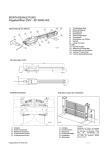
Bündige Montage des LiPoRxBedienteils im Rumpf
Flush-mounting of the LiPoRx
control module in the fuselage
a) “Bohrschablone” auf den Rumpf aufkleben und
b) farblich abgesetzten inneren Ausschnitt der
Schablone entfernen.
c) Ausbruch in die Rumpfwand schneiden.
(Im Bild ist ein Doppelwand-Rumpf abgebildet
der mit einem kleineren inneren Ausschnitt für
das Verbindungskabel zum Akku auskommt )
d) Vormontiertes Bedienteil auf den Rumpf kleben
oder
e) durch eventuell durch die äußeren beiden
Löcher festschrauben.
7
Steckverbinder zum Bedienteil
Connector of control module
Anschlußkabel (siehe unten)
Connecting cables (see below)
Front-Aufkleber / Front cover
Typ “EIN rechts” / Type “ON right”
Front-Aufkleber / front cover
Typ “EIN links” / Type “ON left”
e)
a)
c)
Lade-Anschluß
Charge connector
Konfigurations-Löt-Pads
Configuration solder pads
b)
Empfänger-Anschluß 1
Receiver connector 1
a) “Stick the “drilling template” to the fuselage
and
b) remove the inner area of the template (different
colour).
c) Cut the opening in the fuselage side.
(The picture shows a twin-wall fuselage, for
which a smaller inner cut-out for the cable to
the battery is sufficient)
d) Glue the prepared control module to the fuselage or
e) secure it using the two outer holes.
d)
Empfänger-Anschluß 2
Receiver connector 2
e)
Hochstrom-Anschluß*
High current connector*
* LiPoRx910.x
„Aufputz“- Montage des LiPoRxBedienteils
„Proud“- mounting of the LiPoRxcontrol module
Schulze
alpha 8.35w
Schulze
LiPoRx-2000.7
mit / with
Klettband über
gesamte Unterseite
Hook and loop tape
on the whole underside
Stückliste Bedienteil / parts list control module
1 Elektronik / electronics
2 Front-Klebefolien / Front covers (left & right)
1 Klebefolie Bohrschablone / Drilling template
1 GFK-Frontplatte / GRK front plate 0,5 mm
1 GFK Frontplatte / GRK front plate 1,0 mm
2 Schrauben / screws M2 * 18
2 Schrauben / screws M2 * 10
2 Stopp-Muttern / self-locking nuts M2
2 Abstandshülsen / spacers 4,5 mm
2 Abstandshülsen / spacers 7,0 mm
Sonstiges - nicht enthalten
Miscellaneous - not included
Bohrer / Drill 2,0 ... 2,2 mm oder für / or for extraLight-Version: M2 Gewindeschneider / tap
Standard Variante
Standard version
Ladeanschluß
charge connector
LiPoRx-2000.7
Plat
10s-1p-3200
Schulze LiPoPerfekt Akku
Schulze LiPoPerfekt battery
te sc
hwa
rz la
ckie
plate
rt black coloured
Front 1,0 mm
Anschluß von dem
Connecting of the
prog-adapt-alpha &
prog-adapt-uni
Lücke
Gap
Dieses Stiftpaar freilassen
Do not connect these pins
Extra-Light-Variante:
Schrauben abflexen.
Extra-Light-version:
Flex screws and remove.
M2 Gewinde in
Leiterplatte
schneiden
Cut M2 thread
in circuit
board
Frontplatte 0,5 mm / Front plate 0,5 mm